
Best Practices for LTI™ Assessment Tools
LTI 평가 도구를 위한 모범 사례
1EdTech Final Release
Spec Version 1.3
| Document Version | 1.0 |
|---|---|
| Date Issued | April 4, 2022 |
| Status | This document is made available for adoption by the public community at large. |
| This version | https://www.imsglobal.org/spec/lti/v1p3/impl-assess/ |
| Internal reference | 1ETK-LTI-ASSESS-13:2025 |
|---|---|
| Legacy internal reference | 1EdTech-LTI-2025-01 |
| Proposal date | 25 October 2025 |
| Adoption date | 25 December 2025 |
| Translation completed | December 2025 |
위 관리번호는 1EdTech Consortium의 공식 표준 식별자가 아니라 1EdTech Korea의 번역 출판 관리를 위한 내부 식별자입니다.
이 표준의 한국어 정보 및 공개는 2023년도 정부(과학기술정보통신부)의 재원으로 정보통신기획평가원의 지원을 받아 수행된 연구임(No.RS-2023-00229780, 맞춤형 교육을 위한 과정 중심 평가(학습진단) 인공지능 기술 개발)
요약
1. Introduction
1. 소개
1.1 Scope and Context
1.1 범위와 맥락
This document is an extension to the Learning Tools Interoperability (LTI) best practices and implementation guide [LTI-IMPL-13]. The focus of this work is the set of new best practice recommendations for the use of LTI Advantage features to support assessment tools. The assessment tools MAY or MAY NOT support the 1EdTech QTI specifications [QTI-OVIEW-30], [QTI-IMPL-22], etc. This work was completed by a combination of experts from the 1EdTech LTI and Question & Test Interoperability Working Groups.
이 문서는 Learning Tools Interoperability(LTI) 모범 사례 및 구현 가이드([LTI-IMPL-13])의 확장 문서이다. 본 문서의 초점은 LTI Advantage 기능을 활용하여 평가 도구를 지원하기 위한 새로운 모범 사례 권고안을 제시하는 데 있다. 평가 도구는 1EdTech QTI 표준([QTI-OVIEW-30], [QTI-IMPL-22] 등)을 지원할 수도 있고 지원하지 않을 수도 있다(MAY or MAY NOT). 이 작업은 1EdTech LTI 및 Question & Test Interoperability 작업 그룹의 전문가들이 협력하여 완료하였다.
1.2 Conformance Statements
1.2 준수 선언
This document is an informative resource in the Document Set of the LTI Advantage specification [LTI-13]. As such, it does not include any normative requirements. Occurrences in this document of terms such as MAY, MUST, MUST NOT, SHOULD or RECOMMENDED have no impact on the conformance criteria for implementors of this specification.
이 문서는 LTI Advantage 표준([LTI-13]) 문서 세트 내에서 정보를 제공하는 자료이다. 따라서 본 문서에는 어떠한 규범적(normative)인 요구사항도 포함되어 있지 않다. 본 문서에서 사용된 MAY, MUST, MUST NOT, SHOULD, RECOMMENDED와 같은 용어는 이 표준의 구현자들에게 요구되는 준수 기준에 영향을 미치지 않는다.
1.3 Structure of this Document
1.3 이 문서의 구조
The structure of the rest of this document is:
이하 이 문서의 구조는 다음과 같다.
| 2. User Identity, Account Binding and Permissions | Supporting the Single-Sign-On experience; 싱글 사인온(Single-Sign-On) 경험 지원 |
|---|---|
| 3. The ubiquity of the Resource Link launch | Best practice recommendations when using the resource link request message; 리소스 링크 요청 메시지 사용 시의 모범 사례 권장 사항 |
| 4. Assessment Activity Authoring | Best practice recommendations for the support of authoring assessment activities; 평가 활동 작성 지원에 대한 모범 사례 권장 사항 |
| 5. Lifecycle of Resources | Best practice recommendations for the synchronization of the lifecycle of resources between the platform and tool; 플랫폼과 도구 간 리소스 라이프사이클 동기화에 대한 모범 사례 권장 사항 |
| 6. Assessment Activity Delivery and Submission | Best practice recommendations for the delivery and submission of assessment activities; 평가 활동 제공 및 제출에 대한 모범 사례 권장 사항 |
| 7. Assessment Activity Review and Grading | Best practice recommendations for the review and grading of assessment activities; 평가 활동 검토 및 채점에 대한 모범 사례 권장 사항 |
| 8. Coming Soon? An Alternate Integration Mode - Activity Item | Awareness raising of a new approach that is under development using the new Activity Item extension; 새로운 Activity Item 확장을 사용하여 개발 중인 새로운 접근법에 대한 인식 제고 |
| 9. Integration with the Institution Ecosystem | Best practice considerations when using other, related, 1EdTech specifications; 다른 1EdTech 표준 사용 시의 모범 사례 고려 사항 |
| 10. Common Cartridge | The use of LTI links as provided through the use of the 1EdTech Common Cartridge specification; 1EdTech Common Cartridge 표준을 통한 LTI 링크 사용 |
| 11. Proprietary Extensions | Adding support for proprietary extensions; 사용자 확장을 지원하기 위한 추가 내용 |
| Appendix References | The formal references for the citations used throughout this doccument; 문서 전반에서 사용된 인용의 공식적인 참조 목록 |
| Appendix B List of Contributors | The list of people who were responsible for the creation of this document. |
1.4 Terminology and Acronyms
1.4 용어 및 약어
AfA DRD — Access for All Digital Resourcce Description
AfA PNP — Access for All Personal Needs & Preferences
AGS — Assignment & Grade Service (LTI)
API — Application Programming Interface
CCPA — California Consumer Privacy A
GDPR — General Data Protection Regulation
HTTP — HyperText Transfer Protocol
LIS — Learning Information Services
LMS — Learning Management Syustem
LOM — Learning Object Metadata
LRS — Learner Record Store
LTI — Learning Tools Interoperability
NRPS — Names & Role Provisioning Service (LTI)
PII — Personally Identifiable Information
QTI — Question & Test Interoperability
REST — Representational State Transfer
URI — Uniform Resource Identifier
URL — Uniform Resource Locator
WCAG — Web Content Accessibility Guidelines
2. User Identity, Account Binding and Permissions
2. 사용자 신원, 계정 연동 및 권한
2.1 Account Binding
2.1 계정 연동
One of the key elements (LTI Advantage is based on OpenID) of the LTI integration is to convey a Single Sign-On experience between the Learning Platform (the identity provider) and the Tool (the relying party).
LTI (표준을 활용한 플랫폼과 도구 간) 통합의 주요 요소 중 하나는 LTI Advantage가 OpenID를 기반으로 하여 학습 플랫폼(식별정보 제공자)과 도구(신뢰 당사자) 간에 싱글 사인온(Single Sign-On) 경험을 제공하는 것이다.
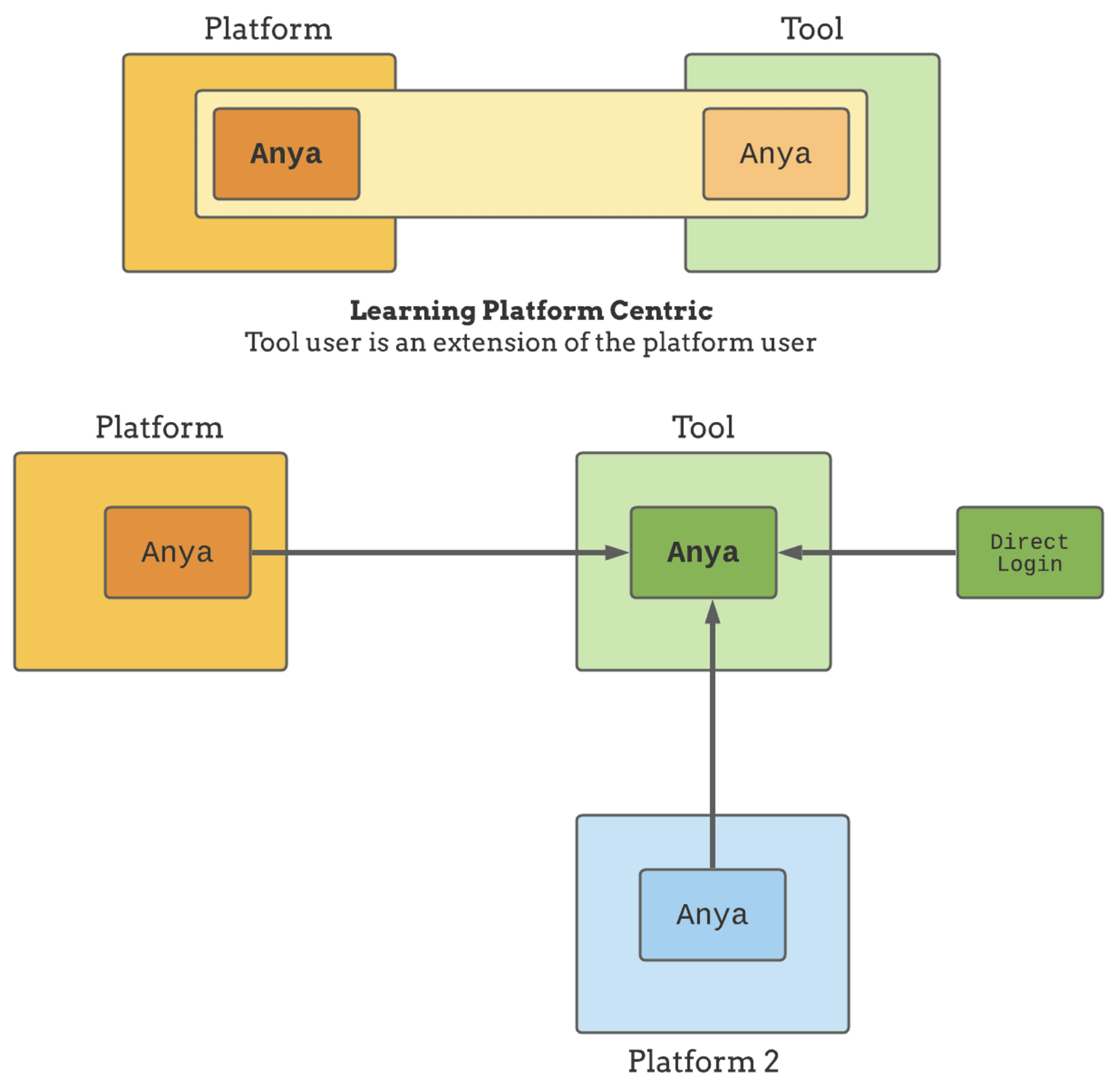
Tools usually fall in one of the two following camps:
도구는 일반적으로 다음 두 가지 유형 중 하나에 속한다.
- Learning Platform Centric user: a given user can only access the tool through a single Learning Platform학습 플랫폼 중심 사용자: 특정 사용자는 단일 학습 플랫폼을 통해서만 도구에 접근할 수 있다.
- Tool Centric user: a given user can access the tool through one or multiple Learning Platforms and also other means (like direct login)도구 중심 사용자: 특정 사용자는 하나 또는 여러 학습 플랫폼을 통해, 또는 직접 로그인과 같은 다른 방법으로 도구에 접근할 수 있다.
In the first case, a tool may just totally rely on the Learning Platform user account. If the user is removed from the Learning Platform, in practice, it also means that he will no longer be able to interact with the tool.
첫 번째 경우에서, 도구는 학습 플랫폼 사용자 계정에 전적으로 의존할 수 있다. 만약 사용자가 학습 플랫폼에서 삭제된다면, 실제로 사용자가 더 이상 도구와 상호작용할 수 없음을 의미한다.
In the 2nd case, the tool owns a user account whose lifespan is no longer tied to a given Learning Platform user. The tool also needs to map its user account with the various identity providers which may be other Learning Platforms or dedicated Identity Providers. For example, a tool user may have a direct login credential, and 2 Learning Platform users bound to it. The process to attach a Learning Platform identity to a tool's account is often referred to as account binding. It is usually a one-time operation that happens inside the tool on the first launch from the Learning Platform.
두 번째 경우에서는 도구가 자체 사용자 계정을 소유하며, 이 계정의 수명은 특정 학습 플랫폼 사용자와 연계되지 않는다. 도구는 또한 여러 식별정보 제공자와 자신의 사용자 계정을 매핑할 필요가 있다. 예를 들어, 도구 사용자는 직접 로그인할 수 있는 자격(credential)을 가지고 있을 수 있으며, 연결된 두 개의 학습 플랫폼 사용자 계정이 있을 수 있다. 학습 플랫폼 식별정보를 도구의 계정에 연결하는 과정을 일반적으로 계정 연동(account binding)이라고 한다. 이 과정은 보통 학습 플랫폼에서 도구를 처음 실행할 때 도구 내부에서 이루어지는 일회성 작업이다.
다른 학습 플랫폼이나 전용 아이덴티티 제공자일 수 있음
A tool may actually support a blend between the 2 models, applying one model or the other based on the customer, the user role… For example, a tool may require a standalone tool account for content creators, an account that will be associated with the Learning Platform user, while using the Learning Platform user-centric models for the content consumers (eg. Learners taking the assessment activity).
도구는 실제로 두 가지 모델을 혼합하여 사용자, 사용자 역할 등에 따라 각각의 모델을 적용할 수 있다. 예를 들어, 도구는 콘텐츠 제작자에게는 독립적인 도구 계정을 요구할 수 있으며, 이 계정은 학습 플랫폼 사용자와 연결될 것이다. 반면, 콘텐츠 소비자(예: 평가 활동을 수행하는 학습자)에게는 학습 플랫폼 사용자 중심 모델을 사용할 수 있다.
2.2 Privacy
2.2 개인정보 보호
Ideally, a tool should be able to function with only the user id given by the Learning Platform (the sub claim in the id_token). This id might actually be the only bit of identity a Tool may ever get, as a Learning Platform may actually prevent Personal Identifiable Information (PII) to be included in the LTI launch. Having the tool able to function with the user id only lowers the friction to get it working and also makes it easier to be accepted by Learning Platform administrators.
이상적으로 도구는 학습 플랫폼이 제공하는 사용자 ID(즉, id_token의 sub 클레임)만으로 작동할 수 있어야 한다. 학습 플랫폼이 LTI 실행에 개인 식별 정보(PII)를 포함하지 않도록 할 수 있으므로, 이 ID는 도구가 얻을 수 있는 유일한 사용자 식별 정보일 수 있다. 도구가 사용자 ID만으로 작동할 수 있게 하면 실행의 마찰을 줄이고, 학습 플랫폼 관리자가 이를 더 쉽게 수용할 수 있다.
The user id (sub claim) is scoped to the Learning Platform and is usually the one to rely on. However, if the Tool needs to interact with other institution software services, it may need a more generalized identifier. If available, this global user identifier will be included in the LTI Message payload under the LIS claim. See the section below: Integration with the Institution Ecosystem.
사용자 ID(sub 클레임)는 학습 플랫폼에 범위(scope)가 한정되며, 일반적으로 이를 기반으로 작동해야 한다. 그러나 도구가 다른 기관 소프트웨어 서비스와 상호작용해야 하는 경우에는 더 일반화된 식별자가 필요할 수 있다. 사용 가능한 경우, 이 전역 사용자 식별자는 LTI 메시지 페이로드의 LIS 클레임 아래 포함될 것이다. 이에 대한 자세한 내용은 아래의 기관 생태계와의 통합 섹션을 참조할 수 있다.
There is another user identifier that is usually best not to rely on, and that is the user's email. Email are poor identifiers: they are not stable (the user may change), they are themselves PII data and thus may actually not be made available to external tools, and, if present, the email communicated by the Learning Platform may also not be reliable anyway.
의존하지 않는 것이 바람직한 또 다른 사용자 식별자는 이메일 주소이다. 이메일은 다음과 같은 이유로 식별자로 적합하지 않다. (사용자가 변경할 수 있으므로) 이메일은 안정적이지 않다, 자체적으로 PII 데이터이며 외부 도구에 제공되지 않을 수 있다. 또한 학습 플랫폼이 제공한 이메일이 신뢰할 수 없는 경우도 있을 수 있다.
As with any web application, storing PII data comes with a growing set of responsibilities: a tool, as any other web application, must establish its PII governance and management rules as per various legal requirements (CCPA, GDPR, etc.). The responsibilities of the tool may vary based on the account binding policy (see Account Binding), especially in the case of GDPR which distinguishes between data processor and data controller.
모든 웹 애플리케이션과 마찬가지로, PII 데이터를 저장하게 되면 더 큰 책임이 따르게 된다. 도구는 다른 웹 애플리케이션과 마찬가지로 다양한 법적 요구사항(CCPA, GDPR 등)에 따라 PII 거버넌스 및 관리 규정을 수립해야 한다. 특히 GDPR의 경우 데이터 처리자와 데이터 관리자 간의 구분이 있기 때문에, 도구의 책임은 계정 연동 정책(계정 연동 참조)에 따라 달라질 수 있다.
Avoiding storing PII data altogether is simpler if at all possible. Since the user's information is available in the launch payload, and the Names and Role Provisioning Services allows tools to get the user details from the Learning Platform at launch time there is usually a way to build a user experience where all the displayed PII is actually transient and based solely on launch data (although temporary caching could be considered for performance reason).
가능하다면 PII 데이터를 전혀 저장하지 않는 것이 더 간단하다. 사용자의 정보는 실행 페이로드에서 제공되며, Names and Role Provisioning Services는 도구가 학습 플랫폼에서 실행 시 사용자 정보를 얻을 수 있도록 한다. 따라서 표시되는 모든 PII가 일시적이며 실행 데이터에만 기반을 둔 사용자 경험을 구축할 수 있다.
다만 성능상의 이유로 일시적인 캐싱이 고려될 수 있다
2.2.1 Coming Soon? 1EdTech Privacy Launch
2.2.1 1EdTech 개인정보 보호 지침 공개 예정
1EdTech Privacy Launch is a draft specification at the time of writing that would allow a platform administrator to launch into the tool to access and manage PII data related to a given platform's user, simplifying the management of personal information for platform administrators by centralizing and standardizing how the information may be accessed for each tool.
1EdTech 개인정보 실행(Privacy Launch)은 이 문서 작성 시점에 초안 상태인 표준이다. 이 표준은 플랫폼 관리자가 특정 플랫폼 사용자의 PII 데이터를 접근하고 관리하기 위해 도구에 실행할 수 있도록 하여, 각 도구에서 정보를 접근하는 방식을 중앙화하고 표준화함으로써 플랫폼 관리자가 개인정보를 더 간단하게 관리할 수 있도록 한다.
2.3 Role-based Permissions and Contextual Roles
2.3 역할 기반 권한 및 맥락적 역할
LTI uses a role-based permission model. There are different kinds of roles, namely Institution Roles, System Roles, and Context Roles. Usually, the context roles are the one that matters the most: they represent the roles of the user in the context where the launch happens; for example, it would say: in Course A1 the user launching is an Instructor. Deeply ingrained in LTI, this idea of context role implies that the same user may have different roles in different contexts. Here an instructor, there a student. It's an important piece to understand on the tool side when modeling the user entity.
LTI는 역할 기반 권한 모델을 사용한다. 역할에는 기관 역할(Institution Roles), 시스템 역할(System Roles), 맥락적 역할(Context Roles) 등이 있다. 일반적으로 맥락적 역할이 가장 중요한데, 도구가 실행되는 맥락에서 사용자의 역할을 나타낸다. 예를 들어, "A1 강좌에서 실행한 사용자는 교사(Instructor)이다"와 같은 방식으로 나타난다. LTI에 깊이 내재된 이 맥락적 역할의 개념은 동일한 사용자가 서로 다른 맥락에서 다른 역할을 가질 수 있음을 의미한다. 예를 들어, 한 맥락에서는 교사(Instructor)이고, 다른 맥락에서는 학생(Student)일 수 있다. 도구 측에서 사용자 엔티티를 모델링할 때 이를 이해하는 것이 중요하다.
The roles are a pre-defined vocabulary, a main role with sub-roles variant. Refer to the LTI 1.3 specification for the full listing [LTI-13].
역할은 미리 정의된 어휘로, 주요 역할과 하위 역할의 변형으로 구성된다. 전체 역할 목록은 LTI 1.3 표준([LTI-13])을 참조할 수 있다.
How roles and users map to actual permission is to be defined within the tool, either implicitly or if needed, through an explicit permission mapping page within the Tool (which maps permissions to roles and/or users). As this happens within the tool, this is not covered by the LTI specification.
역할과 사용자가 실제 권한으로 매핑되는 방식은 도구 내에서 정의된다. 이는 암묵적으로 설정되거나, 필요에 따라 도구 내에서 명시적으로 권한 매핑 (역할 및/또는 사용자에 권한을 매핑) 페이지를 통해 명시적으로 설정될 수 있다. 이 과정은 도구 내에서 이루어지므로 LTI 표준에서 다루지 않는다.
This may not be fine-grained enough for tools to manage which actions are allowed within the tool. For example, an assessment tool may allow editing of items or access to specific item banks to some instructors or teaching assistants. The mapping of the tool's permissions to LTI Roles and User memberships must be then done in the Tool itself. This may be already in place if the tool has its own account management (see Account Binding).
그러나 이 권한 매핑은 도구 내에서 허용되는 작업을 세부적으로 관리하기에는 충분하지 않을 수 있다. 예를 들어, 평가 도구는 일부 교사나 조교에게 항목을 편집하거나 특정 문제은행에 접근할 권한을 부여할 수 있다. 따라서 도구의 권한을 LTI 역할 및 사용자 소속에 매핑하는 작업은 도구 내에서 수행해야 한다. 도구가 자체 계정 관리 시스템을 갖추고 있다면, 이 작업이 이미 구현되어 있을 수 있다.
계정 연동 부분 참조
2.4 Lazy and Upfront Course Rostering
2.4 지연(Lazy) 및 사전(Upfront) 강좌 로스터링
The tool might adopt multiple strategies related to rostering, and especially for the assignment of assessment activities to specific Learners. The easiest (lazy) strategy is to fully rely on the Learning platform rostering functionalities and consider that the targeted resource should be delivered to any Learner issuing a valid resource link request to the tool. In that scenario, the Tool assumes that checking the eligibility of a user to see a given resource has been done in the Learning Platform, most likely using course enrollment and resource link visibility built-in features. In other words, the Tool is totally unaware of the user-to-resource assignment problem.
도구는 강좌 로스터링, 특히 특정 학습자에게 평가 활동을 할당하는 것과 관련된 여러 가지 전략을 채택할 수 있다. 가장 간단한 (지연형, lazy) 전략은 학습 플랫폼의 로스터링 기능에 온전히 의존하여, 유효한 리소스 링크 요청을 도구에 보낸 모든 학습자에게 대상 리소스를 제공하는 것이다. 이 시나리오에서 도구는 특정 리소스를 볼 수 있는 사용자의 적격성을 확인하는 작업이 학습 플랫폼에서 수행되었다고 가정한다. 이는 주로 학습 플랫폼의 강좌 등록 및 리소스 링크 표현을 위한 내장된 기능을 활용하여 이루어진다. 다시 말해, 도구는 사용자와 리소스 간 할당 문제를 전혀 인지하지 않는다.
If the tool needs to represent the course roster, there are multiple options:
도구가 강좌 로스터를 나타내야 하는 경우, 여러 가지 선택지가 있다:
- The usually preferred option is to use Names and Roles Provisioning Services (NRPS), which will give the current roster from the launching context.일반적으로 선호하는 방법은 Names and Roles Provisioning Services(NRPS)를 사용하는 것인데, 도구가 실행되는 맥락에서 현재 로스터를 제공한다.
- The service may not be available or the tool not be authorized to use the NRPS service. In which case, the tool must fall back on the lazy rostering, building an image of the context roster as new members launch in the toolNRPS 서비스가 제공되지 않거나 도구가 이 서비스를 사용할 권한이 없는 경우, 도구는 지연형 로스터링 전략을 채택하여 새로운 사용자가 도구에서 실행될 때 맥락 로스터의 이미지를 구축해야 한다.
- Finally, the tool may use other data feeds like OneRoster for K12 to get ahead of time the course roster information. See Integration with the institution ecosystem section on LIS data.마지막으로, 도구는 K-12 환경의 OneRoster와 같은 다른 데이터 피드를 사용하여 사전에 강좌 로스터 정보를 받을 수 있다. 자세한 내용은 기관 생태계와의 통합 섹션의 LIS 데이터를 참조할 수 있다.
3. The ubiquity of the Resource Link Launch
3. 리소스 링크 실행의 보편성
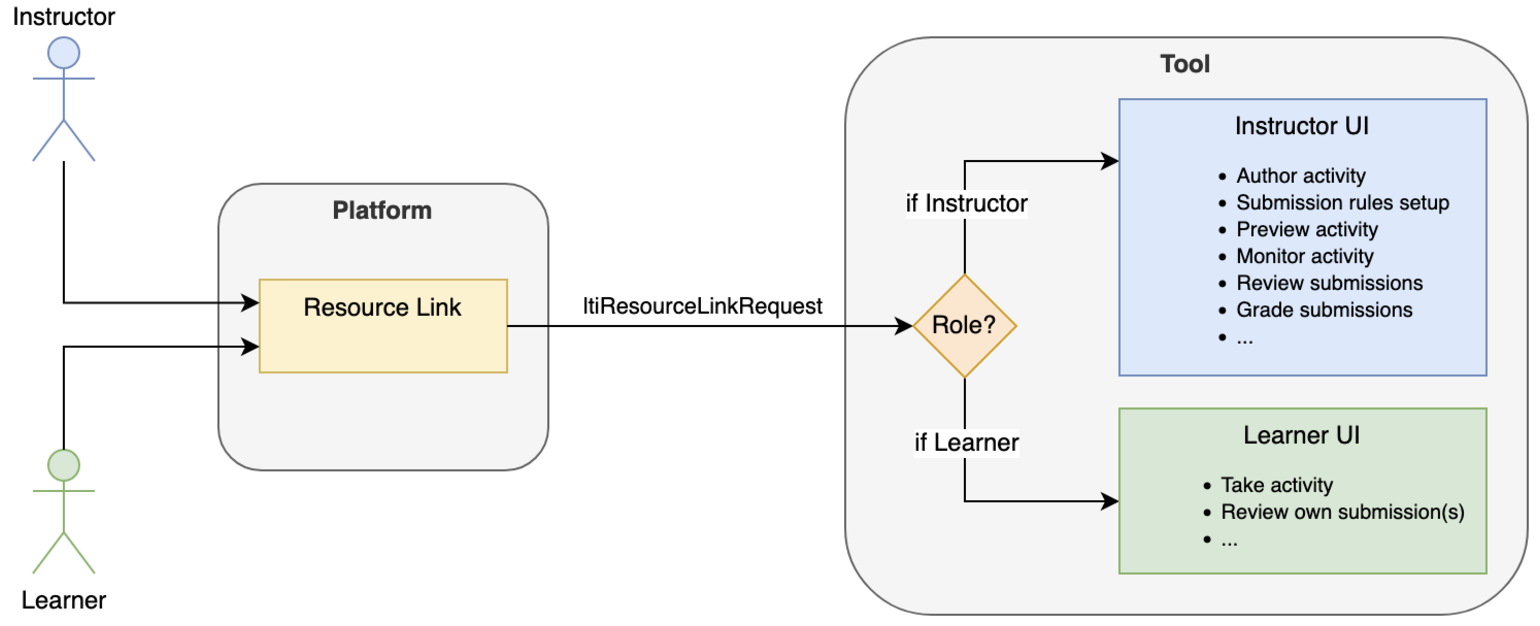
In the vast majority of cases, the user journey from the Learning Platform to the Tool's user interface will be based on the LTI 1.3 Resource Link Request Message. One notable exception is the Deep Linking flow (see Use Deep Linking), while the upcoming Submission Review might also propose an alternative in the near future for Grading/Review use cases (see Coming soon? Using Submission Review Message).
대부분의 경우, 학습 플랫폼에서 도구의 사용자 인터페이스로 이어지는 사용자 여정은 LTI 1.3 리소스 링크 요청 메시지(Resource Link Request Message)에 기반한다. 주목할 만한 예외는 딥 링크(Deep Linking) 흐름이며(Use Deep Linking 참조), 곧 공개될 제출 검토(Submission Review)는 평가 및 검토(Grading/Review) 유즈케이스를 위한 대안을 제안할 수도 있다(Coming soon? Using Submission Review Message 참조).
This means that the Tool needs to serve all assessment-related use cases behind a single link. It can adapt its user interface based on the launching user role, typically an Instructor or a Learner.
이것은 도구가 단일 링크를 통해 모든 평가 관련 유즈케이스를 지원해야 함을 의미한다. 도구는 실행하는 사용자의 역할(예: 교사(Instructor) 또는 학습자(Learner))에 따라 사용자 인터페이스를 적응시킬 수 있다.
3.1 (don't) Return to the Platform
3.1 (하지 않는다면) 플랫폼으로 돌아가기
The LTI Resource Link message may include a return URL:
LTI 리소스 링크 메시지에는 반환 URL(return URL)이 포함될 수 있다:
{
  "https://purl.imsglobal.org/spec/lti/claim/launch_presentation": {
    "return_url": "http://example.org/return"
  }
}
What to do with it? Some platforms may actually use it, for example as an unreliable approximation of the time spent on a task, or to orchestrate the delivery of activities (eg, on return, move to the next activity). However, the support for it is not well standardized, and is often redundant as the user is afforded with other - often more natural - means to navigate away (by clicking on another activity, by closing the tab, …). It may be impractical to even show a ‘return to Learning Platform' button within the tool. So, in practice, many tools just don't use it. However, if it makes sense in the tool experience, and the Learning Platform provided the return URL, then it is still a good practice on completion of the activity to return to the Learning Platform.
이 반환 URL을 어떻게 처리해야 할까? 일부 플랫폼은 이를 실제로 사용하여 작업에 소요된 시간의 신뢰할 수 없는 추정값으로 활용하거나, 활동의 전달을 조정(예: 반환 시 다음 활동으로 이동)하는 데 사용할 수 있다. 하지만 반환 URL에 대한 지원은 표준화가 잘 되어 있지 않으며, 종종 불필요하다. 사용자가 다른 활동을 클릭하거나 탭을 닫는 것과 같이 더 자연스러운 방법으로 이동할 수 있기 때문이다. 도구 내에서 "학습 플랫폼으로 돌아가기" 버튼을 표시하는 것도 실용적이지 않을 수 있다. 따라서 실질적으로 많은 도구는 반환 URL을 사용하지 않는다. 그러나 도구 경험에서 이를 사용하는 것이 적절하고 학습 플랫폼이 반환 URL을 제공한 경우, 활동 완료 시 학습 플랫폼으로 돌아가는 것은 여전히 좋은 관행이다.
Note: that this is quite different from the Deep Linking Request which exposes another return URL that must be used to complete the picker flow.
참고로, 이 방법은 딥 링크 요청(Deep Linking Request)과는 상당히 다르다. 딥 링크 요청에서는 피커 흐름을 완료하기 위해 반드시 사용해야 하는 또 다른 반환 URL을 제공한다.
4. Assessment Activity Authoring
4. 평가 활동 작성
Authoring of resources like assessment activities often requires the use of dedicated tools that allow creating rich assessment content for advanced learning experiences, such as QTI tests with Portable Custom Interactions. The purpose of this section is to describe how to best integrate those authoring tools and the content they produce into a Learning Platform using LTI Advantage.
평가 활동과 같은 리소스를 작성하려면 QTI 테스트에서 Portable Custom Interactions와 같은 고급 학습 경험을 위한 고급 평가 콘텐츠를 생성할 수 있는 전용 도구를 사용하는 경우가 많다. 이 섹션의 목적은 이러한 작성 도구와 그들이 생성한 콘텐츠를 LTI Advantage를 사용하여 학습 플랫폼에 통합하는 최적의 방법을 설명하는 것이다.
4.1 Use Deep Linking
4.1 딥 링크 사용
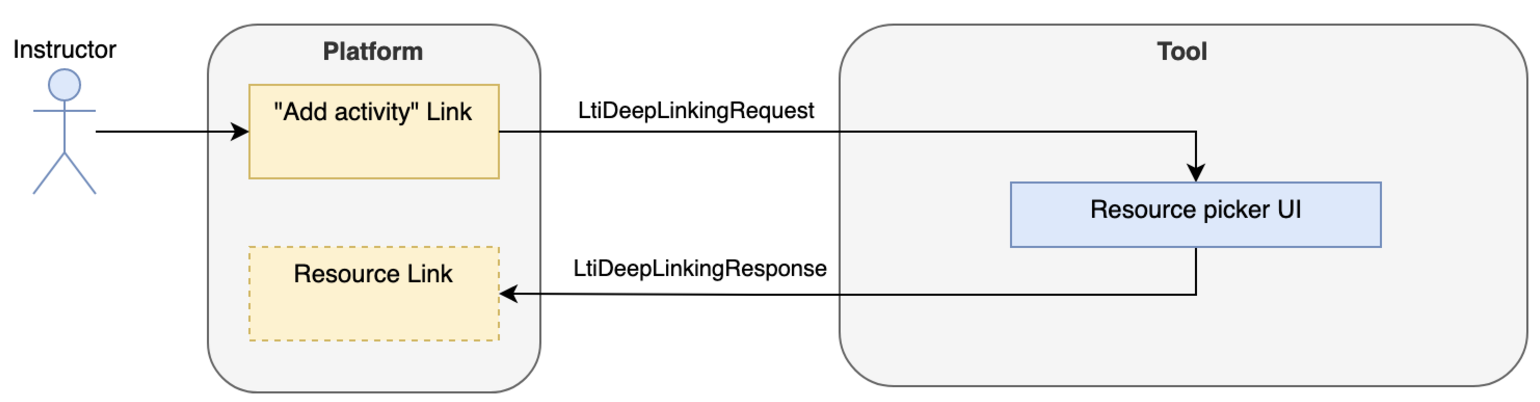
LTI Advantage best practice is to use the deep linking flow to import LTI links. A user should never have to manually insert or configure an LTI link in a course.
LTI Advantage의 모범 사례는 LTI 링크를 가져오기 위해 딥 링크(Deep Linking) 흐름을 사용하는 것이다. 사용자가 강좌에 LTI 링크를 수동으로 삽입하거나 구성해야 하는 상황은 절대로 발생하지 않아야 한다.
4.1.1 Include a Resource Identifier Identifying the Assessment Instance
4.1.1 평가 인스턴스를 식별하는 리소스 식별자 포함
LTI links imported through deep linking must contain an identifier of the targeted resource. That identifier can be passed either:
딥 링크를 통해 가져온 LTI 링크에는 대상 리소스를 식별하는 식별자가 반드시 포함되어야 한다. 이 식별자는 다음 두 가지 방식으로 전달될 수 있다.
- Custom parameter(s)사용자 정의 매개변수
- In the url of the link (query parameter or path)링크의 URL (쿼리 매개변수 또는 경로)
That identifier is preserved on course copy. It is not recommended to rely on the Learning Platform issued resource_link_id as this information is not preserved on the copy. The tool should also use the lineitem resource_id (and tag) to indicate the resource the line item is created for.
이 식별자는 강좌 복제 시에도 유지된다. 학습 플랫폼에서 제공한 resource_link_id에 의존하는 것은 권장되지 않는데, 복제 시 해당 정보가 유지되지 않기 때문이다. 또한, 도구는 lineitem의 resource_id(및 태그)를 사용하여 라인 아이템이 생성된 리소스를 나타내야 한다.
The resource identifier should identify the instance that is launched. For example, if the same assessment is linked twice, but is meant to be distinct experiences (each link has its own attempts and grades, but just use the same assessment definition) then a distinct identifier (in link url/custom parameters and in line item's resource_id/tag) should be used for each of the instances.
리소스 식별자는 실행되는 인스턴스를 식별해야 한다. 예를 들어, 동일한 평가가 두 번 링크되었지만 각각 독립된 경험을 나타낸다면, 각 인스턴스에 대해 (URL/사용자 정의 매개변수 및 라인 아이템의 resource_id/태그에 포함된) 고유한 식별자를 사용해야 한다.
각 링크가 고유한 시도와 점수를 가지며 동일한 평가 정의를 공유함
If multiple line items are bound to the same (resource_id, tag) tuple, then there is no way for the tool to associate the line items returned by AGS to a specific resource instance outside of relying on the platform generated resource_link_id. So to keep it simple, don't import multiple line items sharing the same (resourceid, tag).
여러 라인 아이템이 동일한 (resource_id, tag) 튜플에 연결된 경우, 도구는 AGS(Assignment and Grade Services)가 반환한 라인 아이템을 특정 리소스 인스턴스와 연관시키기 위해 학습 플랫폼에서 생성된 resource_link_id에 의존할 수밖에 없다. 따라서 이를 단순하게 유지하려면, 동일한 (resource_id, tag)를 공유하는 여러 라인 아이템을 가져오지 않는 것이 좋다.
4.1.2 Embed the Line Item in the Deep Linking Return
4.1.2 딥 링크 반환에 라인 아이템 포함
For the assessment activity to appear in the Gradebook, it is recommended to include the line item definition directly in the Deep Linking response, rather than using the Assignment and Grade Services API to create the line item independently:
평가 활동이 성적표(Gradebook)에 표현되기 위해, 라인 아이템을 Assignment and Grade Services API를 사용하여 독립적으로 생성하는 대신, 딥 링크 응답에 라인 아이템 정의를 직접 포함하는 것이 권장된다. 이 방식은 다음과 같은 이점이 있다.
- It ensures the platform will create the link and the line item as part of the same operation.플랫폼이 링크와 라인 아이템을 동일한 작업의 일부로 생성하도록 보장한다.
- It allows the platform to link the line item with the link, which may allow the platform to offer additional features knowing the link is a graded activity.플랫폼이 라인 아이템과 링크를 연결할 수 있게 하여, 링크가 평가 활동임을 인지하고 추가 기능을 제공할 수 있게 한다.
4.2 Activity Authored before Deep Linking/Authoring Dashboard
4.2 딥 링크 이전 작성된 활동/작성 대시보드
In this scenario, the authoring of the assessment activity within the tool, and the inclusion of this activity in a course, are two separate steps. In the other two authoring scenarios, they are part of the same user flow.
이 시나리오에서는 도구 내에서 평가 활동을 작성하는 과정과 이 활동을 강좌에 포함하는 과정이 두 개의 별도 단계로 나뉜다. 다른 두 가지 작성 시나리오에서는 이 두 과정이 동일한 사용자 흐름의 일부로 처리된다.
The tool exposes a dedicated authoring dashboard which is added to the platform as an LTI link. It can be either:
도구는 전용 작성 대시보드를 제공하며, LTI 링크로 플랫폼에 추가된다. 작성 대시보드는 다음 중 하나로 구성될 수 있다.
- An ltiResourceLink placed in the course menu or in other generic placement when the Learning Platform supports the concept of course navigation placement.학습 플랫폼이 강좌 탐색 배치를 지원하는 경우, 강좌 메뉴 또는 기타 일반적인 배치 위치에 배치된 ltiResourceLink.
- An ltiResourceLink placed in a restricted area so only the Content Developer can access it.ltiResourceLink가 제한된 영역에 배치되어 콘텐츠 개발자만 접근 가능하도록 설정.
- Coming soon? a Context Navigation launch defines an explicit message type for links launched at the context level (course navigation link). Context Navigation Launch will allow access to context-level services such as Names and Roles Provisioning Services and Line Items (from the Assignment and Grade Services) for the course from which the link is launched.곧 출시 예정? Context Navigation 실행은 강좌 탐색 링크와 같은 컨텍스트 수준에서 실행되는 링크를 위한 명시적인 메시지 유형을 정의한다. Context Navigation 실행은 Names and Roles Provisioning Services 및 Assignment and Grade Services의 라인 아이템과 같은 컨텍스트 수준 서비스에 대한 접근을 허용한다.
The content developer opens the authoring tool where he can either create a totally new resource or edit an existing one. The tool may choose to restrict the visibility of the content based on some LTI Launch parameters such as the context id or even the user id.
콘텐츠 개발자는 작성 도구를 열어 새로운 리소스를 완전히 새로 생성하거나 기존 리소스를 편집할 수 있다. 도구는 컨텍스트 ID 또는 사용자 ID와 같은 일부 LTI 실행 매개변수를 기반으로 콘텐츠 가시성을 제한하도록 선택할 수 있다.
Once the assessment is ready, it can be made available to the learners via a regular Deep Linking import from the course.
평가가 준비되면, 강좌에서 일반적인 딥 링크 가져오기(Deep Linking Import)를 통해 학습자들에게 제공될 수 있다.
4.3 Activity Authored During Deep Linking
4.3 딥 링크 중에 작성된 활동
When the assessment creation is light, it may be a good option to create it at the time of import during the Deep Linking flow. Even once imported and linked to an LMS activity, a tool may allow editing the given resource (see Activity authored after Deep Linking).
평가 생성이 간단한 경우, 딥 링크 흐름 중 가져오기(import) 시점에 평가를 작성하는 것이 좋은 선택일 수 있다. 가져와서 LMS 활동에 연결된 이후에도, 도구는 해당 리소스를 편집할 수 있는 기능을 제공할 수 있다(딥 링크 이후 작성된 활동 참조).
For example, a tool may offer a quick create assessment flow based on picking questions from a Question Bank, then import the LTI link to the freshly created assessment.
예를 들어, 도구는 문제은행에서 질문을 선택하여 빠르게 평가를 생성한 다음, 새로 생성된 평가에 대한 LTI 링크를 가져오는 간단한 평가 생성 흐름을 제공할 수 있다.
Be aware that the Deep Linking UI interface is often more constrained, with smaller screen real estate (modal or iFrame), so this might not always be a practical solution.
그러나 딥 링크 UI 인터페이스는 종종 제한된 화면 공간(모달 창 또는 iFrame)을 가지므로, 항상 실용적인 솔루션은 아닐 수 있다는 점에 유의해야 한다.
4.4 Activity Authored After Deep Linking
4.4 딥 링크 이후 작성된 활동
In this scenario, the content developer directly adds the activity to the course via a Deep Linking message, as a pointer to an empty resource that is to be completed in a second stage.
이 시나리오에서 콘텐츠 개발자는 딥 링크 메시지를 통해 강좌에 활동을 직접 추가하며, 이는 두 번째 단계에서 완성될 빈 리소스에 대한 포인터 역할을 한다.
When the resource is accessed, the authoring tool should route the message depending on the role of the user accessing the resource (see The Ubiquity of the resource link launch):
리소스에 접근할 때, 작성 도구는 리소스에 접근하는 사용자의 역할에 따라 메시지를 라우팅해야 한다(리소스 링크 실행의 보편성 참조).
- If it's an Instructor, the tool should decide which experience the user should be provided with, possibly depending on the state of the resource (completed or not): authoring mode, monitoring/proctoring screen, etc. A tool may even further restrict who can see an unpublished resource.교사(Instructor)의 경우, 도구는 사용자가 경험할 내용을 결정해야 하며, 리소스의 상태(완성 여부)에 따라 달라질 수 있다. 예를 들어, 작성 모드, 모니터링/감독 화면 등을 제공할 수 있다. 또한, 도구는 미완성 리소스를 볼 수 있는 사용자를 더욱 제한할 수도 있다.
- If it's a Learner, the resource should open in delivery mode, or even review mode if it has been previously completed.학습자(Learner)의 경우, 리소스는 전달 모드(delivery mode)로 열리거나, 이전에 완료된 경우 검토 모드(review mode)로 열려야 한다.
The same routing can be applied to allow further editing of a resource that has been authored during the Deep Link step (see Activity authored during Deep Linking).
이와 동일한 라우팅 방식은 딥 링크 단계에서 작성된 리소스를 추가로 편집할 수 있도록 허용하는 데도 적용될 수 있다(딥 링크 중 작성된 활동 참조).
Since the tool owns the "readiness" state of the resource, it can prevent the Learner from accessing it until the assessment is finalized. This can also be enforced in some Platforms if they provide the capacity for the Instructor to manually hide a link to the Learner until the activity is ready.
도구가 리소스의 "준비 상태(readiness state)"를 소유하므로, 평가가 최종 완료될 때까지 학습자가 리소스에 접근하지 못하도록 할 수 있다. 일부 플랫폼에서는 교사가 활동이 준비될 때까지 학습자에게 링크를 수동으로 숨길 수 있는 기능을 제공하여 이러한 제한을 강화할 수도 있다.
5. Lifecycle of Resources
5. 리소스의 수명주기
There are presently no mechanics to allow synchronization of the lifecycle of resources between the platform and the tool. However, there are some best practices to mitigate the issues which make use of the Assignment and Grade Line Items service. The line items service allows a tool to query which line items (aka grade columns) exist in the current context related to that tool. When it comes to assessment, line items are a good proxy to know if a given assessment exists in the course using the resource id.
현재 플랫폼과 도구 간의 리소스 수명주기 동기화를 허용하는 기계적 메커니즘은 없다. 그러나 Assignment and Grade Line Items 서비스를 활용하여 문제를 완화하기 위한 몇 가지 모범 사례가 존재한다. 이 서비스는 도구가 현재 컨텍스트에서 해당 도구와 관련된 라인 아이템(성적 열)을 조회할 수 있도록 한다. 평가와 관련하여, 라인 아이템은 resource id를 사용하여 강좌에서 특정 평가가 존재하는지 확인할 수 있는 유용한 대리자 역할을 한다.
5.1 Changing Attributes in the Platform
5.1 플랫폼에서 속성 변경
Once imported, the platform may allow some metadata to be set directly. For example, it may allow dates to be set around availability and submission. It may also be possible to alter the ‘weight' of a line item by changing its maximum score, in which case the learning platform would scale the scores already recorded to match the new maximum.
가져온 후, 플랫폼은 일부 메타데이터를 직접 설정할 수 있도록 허용할 수 있다. 예를 들어, 사용 가능 기간과 제출 기한에 대한 날짜를 설정할 수 있다. 또한, 라인 아이템의 최대 점수를 변경하여 "가중치(weight)"를 조정할 수도 있다. 이 경우, 학습 플랫폼은 이미 기록된 점수를 새 최대 점수에 맞게 조정한다.
There is no mechanism to notify in real-time when those changes happen. However, when supported, a tool may use custom parameters to get this kind of information added to the launch.
이러한 변경 사항이 발생할 때 이를 실시간으로 알리는 메커니즘은 없다. 그러나 지원되는 경우, 도구는 사용자 정의 매개변수를 사용하여 이 정보를 실행에 추가하도록 설정할 수 있다.
List of available substitution parameters
사용 가능한 대체 매개변수 목록은 관련 문서를 참조할 수 있다.
5.2 Changing Attributes in the Tool
5.2 도구에서 속성 변경
There are limited means to synchronize changes made in the tool's assessment back to the LMS as the only available channel is the line item URL for the assignment.
도구에서 평가와 관련된 변경 사항을 LMS로 동기화하는 데 사용할 수 있는 수단은 제한적이며, 유일한 채널은 할당된 라인 아이템의 URL이다.
This limits what may be synced to:
이로 인해 동기화할 수 있는 항목이 다음으로 제한된다.
- Maximum Score: changing points after scores have been sent to the platform should be avoided if possible. The behavior of changing maximum score when results are already recorded in the platform is not specified and varies depending on the platform.최대 점수(Maximum Score): 점수가 플랫폼에 이미 전송된 후에 최대 점수를 변경하는 것은 가능한 한 피해야 한다. 플랫폼에서 결과가 이미 기록된 상태에서 최대 점수를 변경할 때의 동작은 명시되지 않았으며 플랫폼마다 다르다.
- If supported submission start and end dates.제출 시작 및 종료 날짜(지원되는 경우).
- Label라벨
Resource_id and tag should be considered immutable. A tool should not try to change those values when updating a line item.
Resource_id와 tag는 불변(immutable)으로 간주되어야 한다. 도구는 라인 아이템을 업데이트할 때 이러한 값을 변경하려고 시도해서는 안 된다.
A platform may offer additional properties that would let the tool get and possibly modify additional parameters, see Proprietary extensions.
플랫폼은 도구가 추가 매개변수를 조회하고 수정할 수 있도록 하는 추가 속성을 제공할 수 있다. 자세한 내용은 사용자 확장(Proprietary extensions) 섹션을 참조할 수 있다.
5.3 Activity Deleted in the Tool
5.3 도구에서 활동 삭제
Before the deletion, the tool may use the assignment and grade service to check if a line item exists in the platform for the resource to be removed, and issue a warning.
활동을 삭제하기 전에, 도구는 Assignment and Grade Service를 사용하여 삭제 대상 리소스에 해당하는 라인 아이템이 플랫폼에 존재하는지 확인하고, 경고를 발행할 수 있다.
When an assessment is deleted in the tool, there is currently no means to request the link to be removed from the Learning Platform. It is therefore possible that the link will be launched after the underlying resource has been removed. The tool should handle the case gracefully, for example by showing a user's friendly message informing that resource is no longer available.
도구에서 평가가 삭제된 경우, 현재 학습 플랫폼에서 해당 링크를 제거하도록 요청할 수 있는 방법은 없다. 따라서 기본 리소스가 삭제된 후에도 링크가 실행될 가능성이 있다. 도구는 이러한 상황을 사용자 친화적인 메시지로 처리해야 하며, 예를 들어 리소스가 더 이상 사용 가능하지 않음을 알리는 메시지를 표시할 수 있다.
The tool may use the assignment and grade service to attempt a DELETE on the linked line item url of the removed resource. However, the platform may ignore such a request.
또한, 도구는 Assignment and Grade Service를 사용하여 삭제된 리소스의 연결된 라인 아이템 URL에 대해 DELETE 요청을 시도할 수 있다. 그러나 플랫폼이 이러한 요청을 무시할 가능성도 있다.
5.4 Link Removed from the Platform
5.4 플랫폼에서 링크 제거
While it's not possible presently to know if a resource is already imported in the current context, one may use the assignment and grade service to know if a grade column already exists for this resource, which in the context of assessment is a good proxy for the resource being imported: if there is a line item for an assessment resource, then it's a fair assumption that the given assessment is engaged in the course.
현재 맥락에서 리소스가 이미 가져온 것인지 여부를 알 수 있는 방법은 없으나, Assignment and Grade Service를 사용하여 해당 리소스에 대한 성적 열(grade column)이 이미 존재하는지 확인할 수 있다. 평가와 관련된 맥락에서는, 평가 리소스에 라인 아이템이 있다면 해당 평가가 강좌에서 사용되고 있다고 가정하는 것이 합리적이다.
5.5 Course Copy
5.5 강좌 복제
When a course is copied into a new course on a platform, there is no signal about that operation sent to the tools engaged in the course. The tool is only exposed with the new context on the 1st launch from that context. Note that the course may have been copied for quite a while already in the platform, and either the source context or the course itself may have drifted; for example, the course may have been copied, then a link removed from the source, and only then would a 1st launch happen to the tool from the copied course.
강좌가 플랫폼에서 새 강좌로 복제될 때, 해당 강좌에서 사용된 도구에는 이러한 작업에 대한 신호가 전달되지 않는다. 도구는 복제된 강좌에서 처음 실행될 때 비로소 새 컨텍스트를 인식하게 된다. 이때 강좌는 플랫폼에서 이미 복제된 지 상당한 시간이 지났을 수 있으며, 원본 컨텍스트나 강좌 자체가 변경되었을 가능성도 있다. 예를 들어, 강좌가 복제된 후 원본에서 링크가 제거된 상황에서 복제된 강좌에서 도구가 처음 실행될 수 있다.
5.5.1 Context 'Id' History
5.5.1 컨텍스트 'Id' 기록
Upon discovering a new context, the tool may determine if this context is a copy of another context or a fresh new one. For this, the tool would look for the context id history to know if the context has any ancestor. The context id history is a substitution variable - Context.id.history - and so a tool must be configured within the platform to have that information included on every launch:
새로운 컨텍스트를 발견한 도구는 해당 컨텍스트가 다른 컨텍스트의 복제본인지, 아니면 완전히 새로운 컨텍스트인지를 결정할 수 있다. 이를 위해 도구는 컨텍스트 ID 기록(Context.id.history)을 조회하여 해당 컨텍스트가 상위 컨텍스트(ancestor)를 가지고 있는지 확인한다. 컨텍스트 ID 기록은 대체 변수(substitution variable)로, 도구가 이 정보를 매 실행마다 포함하도록 플랫폼 내에서 구성되어야 한다.
Tool configured to include the custom parameter:
도구에 사용자 정의 매개변수를 포함하도록 구성.
"desired_name_for_ctx_history": $Context.id.historyWill be resolved if the platform supports that substitution variable and included in the each launch:
플랫폼이 해당 대체 변수를 지원하고 실행 시 이를 포함하는 경우, 다음과 같이 해결된다.
{
  "https://purl.imsglobal.org/spec/lti/claim/custom": {
    "desired_name_for_ctx_history": "124253jfiu,7256792hc,65fjhgb"
  }
}
Per the specification, the context ids are comma-separated starting with the immediate parent and ordered by ascendency. Note that some platforms have multiple inheritances (one course may be a copy of more than one course). Also, beware that the tool may not have been exposed to all the contexts (i.e. it may not have been launched from an intermediary context) so be sure to navigate the list up until a match is found. A platform may not support that parameter, in which case it should come unsubstituted.
표준에 따르면, 컨텍스트 ID는 즉각적인 상위 컨텍스트부터 시작하여 조상 순서대로 쉼표로 구분된다. 일부 플랫폼은 여러 개의 상속 관계를 가질 수 있으므로, 이를 고려해야 한다. 또한, 도구가 모든 컨텍스트에 노출되지 않았을 수도 있다. 따라서 일치 항목을 찾을 때까지 리스트를 탐색해야 한다. 플랫폼이 해당 매개변수를 지원하지 않는 경우, 매개변수는 대체되지 않은 상태로 전달될 것이다.
하나의 강좌가 여러 강좌의 복제본일 수 있음
예: 중간 컨텍스트에서 실행되지 않았을 수 있음
5.5.2 Line Items Resource 'id' and Tags for Rebinding
5.5.2 라인 아이템 리소스 'id'와 태그를 통한 재연결
Usually, course copies involve copying the gradebook. That means, not only the links are copied, but the line items as well, including their resource_id and tag as originally defined by the tool, and excluding the actual grades. Depending on the tool's flow, it may be necessary to rebind activities to the copied line items so that a tool can report grades even if the activity itself is not launched directly. For this, the intent of the specification is to leverage the resource id and tag to do that binding. A tool would query the line items in the new context, and for each line item, use the resource id and tag to know which activity it relates to, and then bind the line item URL to that activity for grade reporting.
강좌 복제에는 일반적으로 성적표(gradebook) 복제가 포함된다. 링크뿐만 아니라 라인 아이템도 복제되며, 도구에 의해 원래 정의된 resource_id와 태그가 포함되지만 실제 점수는 제외된다. 도구의 흐름에 따라, 활동이 직접 실행되지 않더라도 도구가 성적을 보고할 수 있도록 복제된 라인 아이템에 활동을 재연결(rebind)해야 할 수도 있다. 이를 위해 표준은 resource_id와 태그를 활용하여 재연결을 수행하도록 설계되어 있다. 도구는 새로운 컨텍스트에서 라인 아이템을 조회한 후, 각 라인 아이템의 resource_id와 태그를 사용하여 해당 라인 아이템이 어떤 활동과 관련이 있는지 확인한다. 이후 성적 보고를 위해 해당 활동에 라인 아이템 URL을 연결(bind)한다.
5.5.3 Resource Link 'id' History
5.5.3 리소스 링크 'id' 기록
A tool may rely more on copy on a per resource basis than on a per course basis; some platforms do support the ResourceLink id history which works the same way as context id history but on a per-link basis: as with context, on launch, if supported, the substitution parameter $ResourceLink.id.history will be substituted to the history of copies of that link, comma-separated, starting with the most immediate parent. The resource link id is the platform-generated resource link id, not the tool-issued resource id which is not changed on the copy. As with context id history, be aware that some of those ids may never have been actually launched, so navigate up the ancestry chain until a match is found.
도구는 강좌 단위가 아니라 리소스 단위로 복제 작업에 더 많이 의존할 수 있다. 일부 플랫폼은 리소스 링크 ID 기록(ResourceLink.id.history)을 지원하며, 컨텍스트 ID 기록과 동일한 방식으로 작동하되, 링크 단위로 동작한다. 실행 시 플랫폼이 지원하는 경우, 대체 매개변수 $ResourceLink.id.history는 해당 링크의 복제 이력을 쉼표로 구분된 형태로 대체하며, 가장 가까운 상위 항목부터 시작한다. 리소스 링크 ID는 플랫폼에서 생성된 resource_link_id이며, 복제 시 변경되지 않는 도구에서 발급한 resource_id가 아니다. 컨텍스트 ID 기록과 마찬가지로, 일부 ID는 실제로 실행되지 않았을 수도 있으므로 일치 항목을 찾을 때까지 상위 조상 체인을 탐색해야 한다.
5.6 Coming soon? Deep Linking Service
5.6 곧 출시 예정? 딥 링크 서비스
The deep linking service is a specification that is similar to the AGS line items service but for LTI Resource Links: it allows a tool to know which resource links are actually in a course, and may allow the tool to even update those, add new ones or remove some.
딥 링크 서비스는 AGS(Assignment and Grade Services) 라인 아이템 서비스와 유사한 표준으로, LTI 리소스 링크를 대상으로 한다. 이를 통해 도구는 특정 강좌에 실제로 어떤 리소스 링크가 포함되어 있는지 파악할 수 있으며, 해당 링크를 업데이트하거나, 새 링크를 추가하거나, 일부를 제거할 수도 있다.
A key use case is to complement the deep linking launch: when showing a picker interface, a tool may use this service to mark the resources that have already been added in the context. It may also be used to warn a user before deleting an activity in the tool that the resource is actually used in the platform. It may even be used to delete that link post deletion in the tool if the platform supports it.
주요 유즈케이스는 딥 링크 실행(Deep Linking Launch)을 보완하는 것이다. 피커 인터페이스를 표시할 때, 도구는 이 서비스를 사용하여 해당 컨텍스트에 이미 추가된 리소스를 표시할 수 있다. 또한, 도구에서 활동을 삭제하기 전에 리소스가 플랫폼에서 실제로 사용 중임을 사용자에게 경고할 수 있다. 플랫폼이 지원하는 경우, 도구에서 리소스를 삭제한 후 해당 링크를 플랫폼에서도 삭제하는 데 사용할 수도 있다.
As with line items, the deep linking service is aimed at being sandboxed around the tool's resources: a tool may not see, and even less modify, any other resource than their own.
라인 아이템 서비스와 마찬가지로, 딥 링크 서비스는 도구의 리소스에 국한되도록 설계되었다. 도구는 자신의 리소스를 제외한 다른 리소스를 조회하거나 수정할 수 없다.
6. Assessment Activity Delivery and Submission
6. 평가 활동의 제공 및 제출
In the context of this document, a submission refers to a unit of work on an assessment activity. One could understand a submission as an attempt from a learner to complete a resource (e.g. test). Some tools may allow multiple submissions for the same resource.
이 문서의 맥락에서 제출(submission)은 평가 활동에서 작업 단위를 의미한다. 제출은 학습자가 리소스(예: 테스트)를 완료하려는 시도로 이해할 수 있다. 일부 도구는 동일한 리소스에 대해 여러 번 제출을 허용할 수도 있다.
6.1 Submission Identification
6.1 제출 식별
The tool may use a combination of multiple parameters to identify a submission by the Learner:
도구는 학습자의 제출을 식별하기 위해 여러 매개변수의 조합을 사용할 수 있다.
- user Id (sub)
- resource Id: tool generated identifier, usually a part of the target link URI or given as a custom parameter, and included in the line item.리소스 ID(resource Id): 도구에서 생성된 식별자로, 일반적으로 대상 링크 URI의 일부로 제공되거나 사용자 정의 매개변수로 제공되며 라인 아이템에 포함된다.
- resource link Id: platform generated, uniquely identify an LTI link in the platform. Depending on the use case, this identifier might be less reliable than the resource id; it is not known to the tool at the time of the creation of the link since it is generated by the platform, and usually only discovered on the 1st launch of the link. On course copy, a new resource link id will be generated (see Course Copy). It may however be useful to distinguish between multiple links to the same resource.리소스 링크 ID(resource link Id): 플랫폼에서 생성된 값으로, 플랫폼 내에서 LTI 링크를 고유하게 식별한다. 유즈케이스에 따라 이 식별자는 리소스 ID보다 덜 신뢰할 수 있다. 링크 생성 시점에는 도구가 이 값을 알 수 없으며, 플랫폼에 의해 생성되므로 일반적으로 링크가 처음 실행될 때만 확인된다. 강좌 복제 시 새로운 리소스 링크 ID가 생성된다(강좌 복제 참조). 그러나 동일한 리소스에 대한 여러 링크를 구별하는 데 유용할 수 있다.
- lineItem claim in the launch: less common, it indicates the line item against which the score will be recorded against. Multiple links to the same resource may have distinct line items, indicating they are distinct instantiations of the same resource, having each their own gradebook line item to report to.실행 시 라인 아이템(lineItem) 클레임: 덜 일반적이지만, 점수가 기록될 라인 아이템을 나타낸다. 동일한 리소스에 대한 여러 링크가 각기 다른 라인 아이템을 가질 수 있으며, 이는 동일한 리소스의 별개의 인스턴스를 나타내고 각기 다른 성적표 라인 아이템으로 보고될 수 있다.
6.2 Multiple Submissions Handled on the Tool Side
6.2 도구에서 관리되는 다중 제출
As of today, there is no built-in mechanism for managing multiple submissions in LTI. As a result, it is left to the tool to decide whether or not multiple submissions of the same assessment should be allowed for the same user, and how the grade of those multiple submissions should be reflected in the Learning Platform grade book. The tool might adopt multiple scoring strategies such as averaging the score of all submissions, keeping only the best or the most recent one, etc. As AGS does not allow to distinguish the grades of various attempts, only the final grades should be sent. For example, if the best score strategy is used, on the 2nd attempt grading, the grade of that attempt would only be sent if it was better than the 1st one. In any case, the grade may be modified in the Learning Platform gradebook. A tool may use the Result call to get the current values recorded in the platform.
현재 LTI에는 다중 제출을 관리하기 위한 내장 메커니즘이 없다. 따라서 동일한 사용자에 대해 동일한 평가의 다중 제출을 허용할지 여부와 이 제출들의 점수를 학습 플랫폼의 성적표에 어떻게 반영할지는 도구가 결정해야 한다. 도구는 여러 점수 전략을 채택할 수 있다. 예를 들어, 모든 제출 점수의 평균을 사용하거나, 최고 점수 또는 가장 최근 점수만 반영하는 방식 등이 있다. AGS(Assignment and Grade Services)는 다양한 응시별 점수를 구별할 수 없으므로 최종 점수만 전송해야 한다. 예를 들어, 최고 점수 전략을 사용하는 경우, 두 번째 시도의 점수가 첫 번째 시도의 점수보다 나은 경우에만 해당 점수를 전송해야 한다. 어떤 경우든, 학습 플랫폼 성적표의 점수는 변경될 수 있다. 도구는 Result 호출을 사용하여 플랫폼에 기록된 현재 점수를 가져올 수 있다.
After the initial attempt, the tool may decide not to send a status change (reverting to score to started/in progress) when another attempt is started. One may see the grade in the platform as referring to the activity, not a given attempt. And so, after the 1st attempt is completed, the activity is completed regardless if another attempt is started. Also, platform implementations will vary, and sending a score in progress/started state may be interpreted as a rollback of the previous score.
초기 응시 이후, 다른 응시가 시작될 때 상태 변경을 전송하지 않기로 도구가 결정할 수 있다. 플랫폼의 점수는 특정 시도가 아니라 활동 자체를 나타내는 것으로 간주될 수 있다. 따라서 첫 번째 시도가 완료되면, 추가 시도가 시작되더라도 해당 활동은 완료된 것으로 간주된다. 또한, 플랫폼 구현은 다양하며, "진행 중" 또는 "시작됨" 상태의 점수를 전송하면 이전 점수를 롤백하는 것으로 해석될 수 있다.
점수를 "시작됨(started)" 또는 "진행 중(in progress)" 상태로 되돌리는 것
Submission rules such as the number of allowed attempts should be defined on the Tool, possibly as part of the authoring activity. The tool should also decide if a delivery launch should result in resuming a previously started activity, or in creating a new one.
허용된 시도 횟수와 같은 제출 규칙은 도구에서 정의되어야 하며, 작성 활동의 일부로 포함될 수 있다. 또한, 도구는 전달 실행이 이전에 시작된 활동을 재개할지, 아니면 새로운 활동을 생성할지 여부를 결정해야 한다.
6.3 Submission Dates
6.3 제출 날짜
Ideally, a tool is date-agnostic, that is it always allows the learner to engage in the activity. It should however send to the platform an event as soon as a submission is completed, timestamped at the time of completion. This would allow the Learning Platform to record the submission time, and avoid possible late submission penalties to apply in the gradebook. The tool may subsequently send a score update with the actual points earned if the grading could not be done automatically at the time of submission.
이상적으로, 도구는 날짜에 구애받지 않는 방식으로 설계되어 학습자가 항상 활동에 참여할 수 있도록 허용해야 한다. 그러나 제출이 완료되면, 도구는 해당 시점의 타임스탬프와 함께 플랫폼에 이벤트를 즉시 전송해야 한다. 이를 통해 학습 플랫폼은 제출 시간을 기록하고, 성적표에서 지연 제출에 대한 페널티를 방지할 수 있다. 제출 당시 자동으로 채점할 수 없는 경우, 도구는 이후 실제 점수를 업데이트하여 전송할 수 있다.
However, more complex tools may require logic around dates. In that case, the LTI specifications do cover some mechanisms for grade exchange. Those remain optional to be supported by the platform. A tool should handle the case where the platform doesn't support some or any of those capabilities.
그러나 더 복잡한 도구는 날짜와 관련된 논리를 필요로 할 수 있다. 이 경우, LTI 표준은 성적 교환을 위한 몇 가지 메커니즘을 제공한다. 이러한 메커니즘은 플랫폼에서 선택적으로 지원될 수 있으며, 도구는 일부 또는 모든 기능이 지원되지 않는 경우를 처리할 준비가 되어 있어야 한다.
1EdTech specifications provide 2 distinct types of dates:
1EdTech 표준은 두 가지 유형의 날짜를 제공한다.
- Availability dates define when the link should be available to the Learner. This is controlled by the platform. A tool should usually not care about the availability dates (a tool may even have its own availability logic unrelated to the availability dates in the Learning Platform).가용 날짜(Availability Dates): 링크가 학습자에게 언제 이용 가능한지를 정의하며, 이는 플랫폼에서 제어된다. 도구는 일반적으로 가용 날짜에 신경 쓰지 않아야 하며, 도구 자체적으로 학습 플랫폼의 가용 날짜와 무관한 가용 논리를 가질 수 있다.
- Submission dates define when a submission may be started and until when it may be completed. Submission end date is often referred to as the Due Date.제출 날짜(Submission Dates): 제출이 언제 시작될 수 있으며 언제까지 완료될 수 있는지를 정의한다. 제출 종료 날짜는 종종 마감일(Due Date)로 불린다.
Some platforms may only support some of those dates: for example, a platform may offer availability dates, but only support a submission due date, which could be used to drive late penalties logic in the Learning Platform.
일부 플랫폼은 이 날짜 중 일부만 지원할 수 있다. 예를 들어, 플랫폼이 가용 날짜를 제공하지만, 제출 마감일만 지원하여 학습 플랫폼에서 지연 페널티 논리를 작동시킬 수 있다.
The specification presently does not cover individual dates.
현재 표준은 개별 학습자에 대한 날짜는 다루지 않는다.
While the tool might define the initial submission dates of the activity via the startDateTime and endDateTime properties of the Deep linking response, those may be changed at the later stage by the course manager in the Learning Platform and the tool needs to acknowledge this possibility.
도구는 활동의 초기 제출 날짜를 딥 링크 응답의 startDateTime 및 endDateTime 속성을 통해 정의할 수 있다. 그러나 이러한 날짜는 이후 학습 플랫폼의 강좌 관리자가 변경할 수 있으며, 도구는 이 가능성을 인정해야 한다.
The tool may get back the latest submission dates specified in the Learning Platform by providing substitution variables in the resource link definition: ResourceLink.submission.startDateTime and ResourceLink.submission.endDateTime. If the Learning Platform supports them, they will be resolved at launch time and provide the tool with the latest values.
도구는 ResourceLink.submission.startDateTime 및 ResourceLink.submission.endDateTime 대체 변수를 리소스 링크 정의에 포함하여 학습 플랫폼에서 지정한 최신 제출 날짜를 가져올 수 있다. 플랫폼이 이를 지원하는 경우, 실행 시점에 대체되어 도구에 최신 값을 제공한다.
Since support for substitution variables is optional, the tool should also decide how to handle launches received outside of the original submission dates. A tool may also purposefully choose to ignore submission dates that are set on the platform.
대체 변수 지원이 선택적이므로, 도구는 원래 설정된 제출 날짜 외부에서 실행 요청을 받을 경우 이를 처리하는 방법을 결정해야 한다. 도구는 또한 플랫폼에서 설정된 제출 날짜를 의도적으로 무시하도록 선택할 수도 있다.
6.4 Delivery Progress
6.4 제공 진행 상태
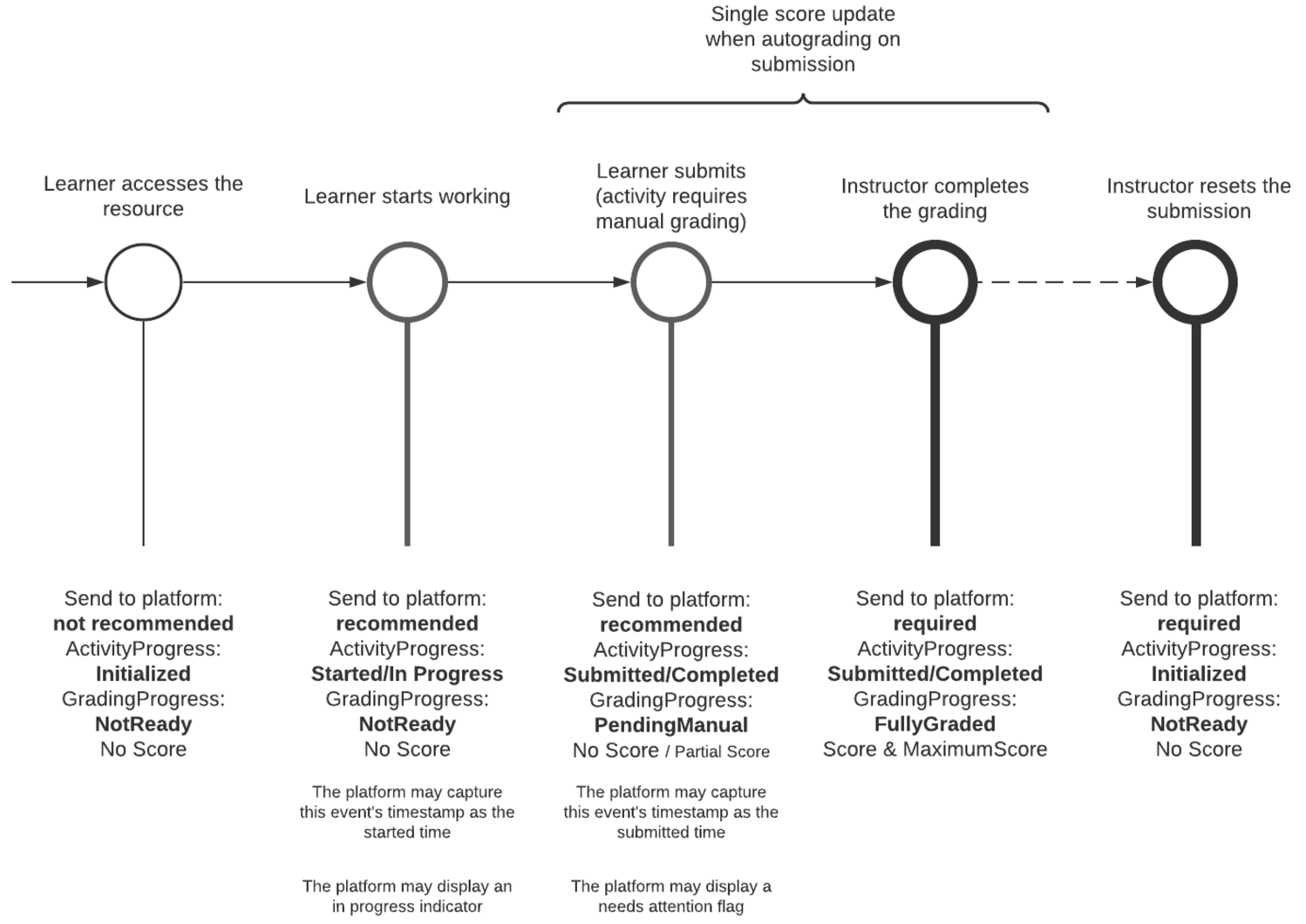
LTI distinguishes between Activity Progress and Grading Progress. The former represents the level of completion of the submission, while the latter represents the grading status of the submission. For example, a submission may be completed, but only partially graded.
LTI는 활동 진행 상태(Activity Progress)와 성적 진행 상태(Grading Progress)를 구분한다. 활동 진행 상태는 제출의 완료 수준을 나타내며, 성적 진행 상태는 제출에 대한 채점 상태를 나타낸다. 예를 들어, 제출은 완료되었지만 채점이 부분적으로만 이루어진 경우가 있을 수 있다.
As a best practice, the tool should notify the platform of the activity progress using the Assignment and Grade Services at least for the following events:
모범 사례로, 도구는 다음 이벤트에 대해 Assignment and Grade Services(AGS)를 사용하여 플랫폼에 활동 진행 상태를 알리는 것이 좋다.
- Assessment activity is started: activityProgress = started평가 활동 시작: activityProgress = started
- Any progress events can be notified with activityProgress = inProgress진행 상황 알림: activityProgress = inProgress
- The learner submits the activity: activityProgress = completed학습자가 활동을 제출: activityProgress = completed
The following diagram illustrates a typical submission flow from a learner accessing an assessment activity to the final grading of the submission, and whether a Score update should be sent to the platform or not:
다음 다이어그램은 학습자가 평가 활동에 접근하여 제출한 후 최종 채점에 이르기까지의 일반적인 제출 흐름과 성적 업데이트를 플랫폼에 전송할지 여부를 보여준다.
On top of the AGS score publish service and for analysis purposes, a tool may choose to send Caliper events to an LRS, but Learning Platforms gradebooks are not expected to update grades from Caliper events due to the non-transactional nature of the analytics events; Caliper events, in general, are processed on a best efforts basis in terms of timeliness of processing and failover (i.e. they are treated as informative rather than as updating a system of record).
또한, AGS 점수 게시 서비스와 별도로, 도구는 분석 목적으로 Caliper 이벤트를 LRS(Learning Record Store)에 보낼 수 있다. 그러나 학습 플랫폼의 성적표는 Caliper 이벤트에서 점수를 업데이트하지 않을 것으로 예상된다. 이는 분석 이벤트가 비트랜잭션 방식이며, 일반적으로 처리 시간 및 장애 대응(failover) 측면에서 최선을 다해 처리되기 때문이다. 즉, Caliper 이벤트는 정보 제공용으로 간주되며, 시스템 기록을 업데이트하는 것으로 간주되지 않는다.
6.5 Grading Progress
6.5 채점 진행 상태
Grading status is conveyed via the gradingProgress property of the AGS score publish service. Please refer to the specification for a description of each possible state.
채점 상태는 AGS 점수 게시 서비스(AGS score publish service)의 gradingProgress 속성을 통해 전달된다. 각 가능한 상태에 대한 설명은 표준 문서를 참조할 수 있다.
Learning Platforms support may vary: some platforms may ignore the activity progress flag, or only consider completed/submitted activities. Some may only consider score records with a FullyGraded status.
학습 플랫폼의 지원 수준은 다양하다. 일부 플랫폼은 활동 진행 상태(activity progress) 플래그를 무시하거나, 완료/제출된 활동만 고려할 수 있다. 또한, 일부 플랫폼은 FullyGraded 상태의 점수 기록만을 고려할 수도 있다.
In any case, it is still a best practice to send the started/in progress signals, as well as grading status such as pending grades rather than target which learning platforms should receive those scoring events. If a tool sends multiple statuses, it should do it in a consistent manner, for all grades and status updates of a given activity.
어떤 경우에도, started/inProgress 신호와 함께 pending 상태와 같은 채점 상태를 보내는 것은 여전히 모범 사례이다. 이를 통해 학습 플랫폼이 어떤 채점 이벤트를 수신해야 하는지 결정할 수 있다. 도구가 여러 상태를 전송하는 경우, 특정 활동에 대한 모든 점수와 상태 업데이트에서 일관된 방식으로 이를 수행해야 한다
6.6 Coming soon? Course Groups
6.6 곧 출시 예정? 강좌 그룹
If the tool has group capabilities, the traditional way is to build the groups within the tool (or use some proprietary API to gather that information from the learning platform). LTI Course Groups specification was introduced to remedy this. It offers a simple API to allow platforms to expose the groups defined within a course context. It exposes groups, group sets (groups of groups), and their members. The specification also defines a substitution parameter that allows the tool to get all the group ids the launching user is a member of, avoiding the need to call on the service.
도구가 그룹 기능을 제공하는 경우, 기존 방식은 도구 내에서 그룹을 생성하거나 학습 플랫폼의 정보를 수집하기 위해 독점 API를 사용하는 것이다. 이를 해결하기 위해 LTI 강좌 그룹(Course Groups) 표준이 도입되었다. 이 표준은 플랫폼이 강좌 컨텍스트 내에서 정의된 그룹을 노출하도록 허용하는 간단한 API를 제공한다. 이를 통해 그룹, 그룹 세트(그룹의 그룹), 및 해당 멤버를 확인할 수 있다. 또한, 이 표준은 실행 사용자와 관련된 모든 그룹 ID를 도구가 서비스 호출 없이 가져올 수 있는 대체 매개변수를 정의한다.
While support for this specification is growing, it is too early to rely on it being available on most platforms, and tools must build internal group support if they need it.
이 표준에 대한 지원이 점차 확대되고 있지만, 대부분의 플랫폼에서 이를 사용할 수 있다고 가정하기에는 아직 이르다. 따라서 도구는 필요한 경우 자체적인 그룹 지원을 구축해야 한다.
Read more on Course groups on 1EdTech site.
강좌 그룹에 대한 추가 정보는 1EdTech 웹사이트에서 확인할 수 있다.
LTI does not support reporting grades for a group. If there is a group activity, the tool still needs to return a score per group member, even if all the scores are the same.
LTI는 그룹에 대한 성적 보고를 지원하지 않는다. 그룹 활동이 있는 경우, 도구는 각 그룹 구성원에 대한 점수를 반환해야 하며, 모든 점수가 동일하더라도 개별적으로 보고해야 한다.
The Course Group specification also does not expose any platform relationship between activities and groups. For example, if within the platform, an activity is assigned to a group, this information is not visible to the tool (not included in the LTI Launch nor exposed through the API).
강좌 그룹 표준은 활동과 그룹 간의 플랫폼 관계도 노출하지 않는다. 예를 들어, 플랫폼 내에서 활동이 특정 그룹에 할당된 경우, 이 정보는 도구에서 볼 수 없으며, 도구가 이를 알 수 없다.
LTI 실행에 포함되지 않거나 API를 통해 노출되지 않음
6.7 Accommodations
6.7 학습 조정
LTI does not provide any built-in mechanism to allow tailoring the assessment experience of test-takers with special needs. As a workaround, a tool may choose to offer distinct versions of the same assessment with different supports: extra students tools such as read-aloud functionality, glossaries, extended timers, etc. In that case, the course manager will need to add those versions as distinct activities via Deep Linking, and use the Learning Platform assignment functionalities to present the relevant version to each student. Depending on the chosen rostering approach, the assignment of the variants might also happen directly in the tool.
LTI는 시험 응시자 중 특별한 요구 사항이 있는 사람들의 평가 경험을 조정하는 내장 메커니즘을 제공하지 않는다. 이를 보완하기 위해 도구는 서로 다른 지원을 제공하는 동일 평가의 별도 버전을 제공할 수 있다. 예를 들어, 음성 읽어주기 기능, 용어집, 연장된 타이머 등을 포함한 추가 학습자 도구를 제공할 수 있다. 이 경우, 강좌 관리자는 이러한 버전을 별도의 활동으로 딥 링크(Deep Linking)를 통해 추가하고, 학습 플랫폼의 할당 기능을 사용하여 각 학생에게 적절한 버전을 제공해야 한다. 선택한 로스터링 접근 방식에 따라, 변형된 평가의 할당은 도구 내에서 직접 이루어질 수도 있다.
A course manager may also decide to model student groups with special needs using the course groups functionality of the Learning Platform (see Coming soon? Course Groups). They will also need to map specific groups to specific versions of the assessment in the Tool, so the students will be automatically presented with the relevant version. This approach might, however, cause privacy issues.
강좌 관리자는 학습 플랫폼의 강좌 그룹 기능(곧 출시 예정? 강좌 그룹 참조)을 사용하여 특별한 요구가 있는 학생 그룹을 모델링하기로 결정할 수 있다. 그런 다음, 특정 그룹을 도구 내 특정 평가 버전에 매핑하여 학생들에게 자동으로 적절한 버전을 제공할 수 있다. 그러나 이 접근 방식은 개인정보 보호 문제를 야기할 수 있다.
A tool might choose to leave it up to the student to select the supports that they want to use prior to starting the delivery. Of course, this only applies if self-selection of support is appropriate, which might not be the case for all kinds of supports (e.g. extra time, for example).
도구는 학생이 제공된 지원 중 사용할 항목을 시작 전에 직접 선택하도록 허용할 수 있다. 물론, 이 방법은 모든 종류의 지원(예: 추가 시간 등)에 적합하지 않을 수 있다.
The tool should also try to follow the highest possible number of WCAG guidelines to guarantee an inclusive experience for all students, with proper support for real aloud devices or keyboard navigation. WCAG guidelines are published by the W3C and are freely available.
도구는 또한 모든 학생에게 포괄적인 경험을 보장하기 위해 가능한 한 많은 WCAG(Web Content Accessibility Guidelines) 지침을 따르도록 노력해야 한다. 이에는 음성 읽어주기 장치나 키보드 탐색에 대한 적절한 지원이 포함된다. WCAG 지침은 W3C에서 제공하며 무료로 이용할 수 있다.
There is also an 1EdTech information model that can be used to describe a user's personal needs and preferences: Access for All (AfA) Personal Needs and Preferences (PNP). However, LTI does not yet define any way to link/embed a user's PNP to a message. 1EdTech AfA Digital Resource Description (DRD) can also be used to specify how a resource accommodates specific user PNP, but this is also not supported by LTI.
또한, 사용자의 개인적 요구와 선호 사항을 설명하기 위해 사용할 수 있는 1EdTech 정보 모델인 Access for All(AfA) 개인 요구 및 선호(PNP) 정보 모델이 있다. 그러나 LTI는 아직 사용자 PNP를 메시지에 연결하거나 포함하는 방법을 정의하지 않았다. 1EdTech AfA 디지털 리소스 설명(DRD)는 리소스가 특정 사용자 PNP를 어떻게 충족하는지 지정하는 데 사용될 수 있지만, 이것 역시 LTI에서 지원되지 않는다.
Relevant links:
관련 링크.
- AfA 3.0 Best Practice and Implementation GuideAfA 3.0 모범 사례 및 구현 가이드
- The Effect of a Candidate PNP on the Candidate's Assessment Session Presentation지원 후보자의 평가 세션 발표에 대한 후보자의 PNP 효과
- Access for All (AfA) Personal Needs and Preferences (PNP) Information Model Version 3.0Access for All(AfA) 개인 요구 및 선호(PNP) 정보 모델 버전 3.0
- Some PNP examples일부 PNP 예제들
7. Assessment Activity Review and Grading
7. 평가 활동 검토 및 채점
The interactions with the assessment submissions after delivery can be done either via the submission review message (if supported), the Resource Link Message, or both.
평가 제출물과의 상호작용은 (지원되는 경우) 제출 검토 메시지(Submission Review Message), 리소스 링크 메시지(Resource Link Message), 또는 두 가지를 통해 수행할 수 있다.
Those interactions will typically consist in:
이 상호작용은 일반적으로 다음을 포함한다.
- For the Learner, to review his submission with extra information such as scores, correct responses, instructor's feedback, etc.학습자(Learner): 자신의 제출물을 검토하며, 점수, 정답, 교사의 피드백 등 추가 정보를 확인.
- For the Instructor, to grade open-ended responses, write comments and feedback, view the individual results of the items composing the assessment, etc.교사(Instructor): 개방형 응답을 채점하고, 의견 및 피드백을 작성하며, 평가를 구성하는 개별 항목의 결과를 확인.
7.1 Coming soon? Using Submission Review Message
7.1 곧 출시 예정? 제출 검토 메시지 사용
The LTI Submission Review Message is tailored for those use cases, allowing a user to access a submission completed by himself (typically, a Learner reviewing its own submission) or by another user (typically, an Instructor reviewing a Learner submission). Again, the tool should use the role of the message issuer to decide what should be the review experience.
LTI 제출 검토 메시지(Submission Review Message)는 특정 유즈케이스를 위해 설계되었으며, 사용자가 자신의 제출물이나 다른 사용자의 제출물에 접근할 수 있도록 한다. 도구는 메시지 발신자의 역할을 활용하여 적합한 검토 경험을 결정해야 한다.
일반적으로 학습자가 자신의 제출물을 검토
일반적으로 교사가 학습자의 제출물을 검토
Note: that the submission review message always relates to a given score: the link would typically be displayed next to a given score (eg, in the gradebook), while the score itself might be updated via the Assignment and Grade Services (AGS) during the review. Currently, it is not possible to use this message for launching a grading session on the whole course roster; if this is a requirement, then the Resource Link Message should be used instead.
제출 검토 메시지는 항상 특정 점수와 관련이 있다. 링크는 일반적으로 특정 점수(예: 성적표 내)에 인접해 표시되며, 검토 중 과제 및 성적 서비스(Assignment and Grade Services, AGS)를 통해 점수가 업데이트될 수 있다. 현재로서는 강좌 전체 로스터에 대한 채점 세션을 시작하기 위해 이 메시지를 사용하는 것은 불가능하다. 이러한 요구 사항이 있는 경우, 리소스 링크 메시지(Resource Link Message)를 대신 사용해야 한다.
The current adoption of Learning Platforms is limited but growing.
학습 플랫폼에서의 현재 채택률은 제한적이지만 점차 증가하고 있다.
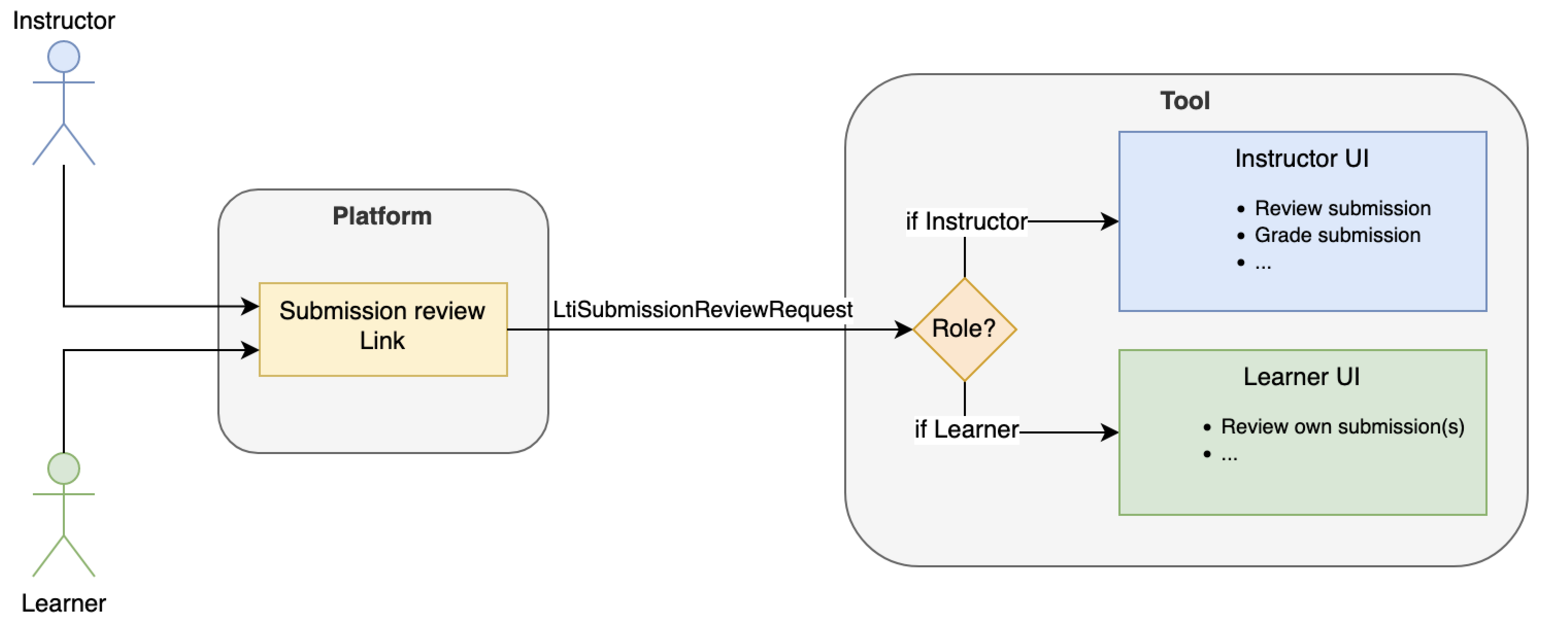
7.2 Using the Resource Link Message of the Activity
7.2 활동의 리소스 링크 메시지 사용
If the Submission Review Message is not implemented in the platform, or if grading/review of multiple submissions at once is needed, then it is always possible to fall back (again!) on the Resource Link Message. Again, the tool will have to decide on the user experience it wants to provide based on the user role:
플랫폼에서 제출 검토 메시지(Submission Review Message)가 구현되지 않았거나, 여러 제출물을 동시에 검토/채점해야 하는 경우, 리소스 링크 메시지(Resource Link Message)를 대안으로 사용할 수 있다. 도구는 사용자 역할에 따라 제공할 사용자 경험을 결정해야 한다.
- A Learner can be proposed to create a new submission or to review their previously submitted ones학습자(Learner): 새 제출을 생성하거나 이전에 제출한 내용을 검토할 수 있도록 제안할 수 있다.
- An Instructor can be given a broader range of possibilities, such as grading submissions, reviewing them, or even accessing some reporting features.교사(Instructor): 제출물을 채점하거나 검토하고, 일부 보고 기능에 접근하는 등 더 폭넓은 기능을 제공할 수 있다.
7.3 Assessment Activity Results and Reporting
7.3 평가 활동 결과 및 보고
LTI Advantage allows, via the Assignment and Grade Services interfaces, for the tool to communicate the overall activity score over the maximum possible score. That information is typically reflected in the course gradebook.
LTI Advantage는 Assignment and Grade Services(AGS) 인터페이스를 통해 도구가 가능한 최대 점수 대비 전체 활동 점수를 학습 플랫폼에 전달할 수 있도록 한다. 이 정보는 일반적으로 강좌 성적표에 반영된다.
LTI does not currently provide the ability to exchange finer-grained results such as individual item scores, student actual responses, correct responses, the time spent on each item, the history of each test-taker attempt, etc. There is no defined way of exchanging this kind of information in machine consumable formats such as QTI Result Reporting (XML) or consolidated CSV that could be used for item calibration.
현재 LTI는 개별 항목 점수, 학습자의 실제 응답, 정답, 각 항목에 소요된 시간, 시험 응시자의 시도 이력 등 세부 결과를 교환할 수 있는 기능을 제공하지 않는다. 또한, QTI 결과 보고(XML 형식)나 항목 보정에 사용할 수 있는 통합 CSV와 같은 기계가 읽을 수 있는 형식으로 이러한 정보를 교환하는 방법도 정의되지 않았다.
There is, however, a best practice on how to return QTI results reporting data for LTI 1.x along with the Basic Outcome request (the forerunner of AGS), documented in the QTI specification. The basic idea is to either:
그러나 LTI 1.x에서는 기본 결과 요청(Basic Outcome Request, AGS의 전신)과 함께 QTI 결과 보고 데이터를 반환하는 모범 사례가 QTI 표준에 문서화되어 있다. 기본 아이디어는 다음과 같다.
- Provide a JSON representation of the QTI Results Reporting information directly in the request bodyQTI 결과 보고 정보의 JSON 표현을 요청 본문에 직접 제공.
- Provide a URL that will allow the platform to query a tool's endpoint returning the full results플랫폼이 도구의 엔드포인트를 쿼리하여 전체 결과를 반환받을 수 있는 URL 제공.
In an LTI Advantage context, the possibilities can be one of the following:
LTI Advantage 문맥에서 가능성 있는 접근 방식은 다음과 같다:
- Use the legacy Basic Outcome - still available in LTI 1.3 - request as explained above, if it's not possible to use AGS기존 Basic Outcome Request 사용: AGS를 사용할 수 없는 경우, LTI 1.3에서도 여전히 사용할 수 있는 Basic Outcome Request를 위 방식대로 활용.
- Follow the same pattern by extending the AGS score publish payloadAGS 점수 게시 페이로드 확장을 통해 동일한 패턴 따르기.
- Provide reporting capabilities to the instructor on the tool side behind the Resource Link Message도구 측에서 리소스 링크 메시지 뒤에 교사를 위한 보고 기능 제공.
- Use the submission review message for the instructor to access the detailed results of a submission교사가 제출의 상세 결과에 접근할 수 있도록 제출 검토 메시지 사용.
In either case, sending result data back to the Learning Platform should be discussed with the vendor and institution to determine if the enriched payload would actually be processed. It should not be considered good practice to always include the result data for now as general-purpose Learning Platforms have not implemented any support for it.
어떤 경우든, 결과 데이터를 학습 플랫폼으로 다시 전송하는 것은 공급업체와 기관 간의 논의를 통해 페이로드가 실제로 처리될지를 확인해야 한다. 일반 학습 플랫폼은 이러한 기능을 구현하지 않았으므로, 결과 데이터를 항상 포함시키는 것은 현재로서는 좋은 관행으로 간주되지 않는다.
7.4 Coming Soon? Caliper Analytics Connector Service
7.4 곧 출시 예정? Caliper 분석 커넥터 서비스
If the Tool can emit Caliper events, the LTI Caliper Analytics Connector will allow the event store to group the events associated to a single user session regardless of whether they occurred within the platform or the tool. In practice, the Platform will declare a Caliper endpoint in the LTI Resource Link launch for the Tool to emit events to, as well as a correlation identifier that the tool should use to identify the user session.
도구가 Caliper 이벤트를 전송할 수 있는 경우, LTI Caliper Analytics Connector는 플랫폼 또는 도구에서 발생한 여부와 상관없이 단일 사용자 세션과 관련된 이벤트를 그룹화할 수 있도록 이벤트 저장소를 지원한다. 실제로 플랫폼은 LTI 리소스 링크 실행 시 도구에 Caliper 이벤트를 전송할 수 있는 Caliper 엔드포인트와 도구가 사용자 세션을 식별하는 데 사용할 상관 식별자(Correlation Identifier)를 선언한다.
이 서비스는 Caliper 이벤트를 활용하여 플랫폼과 도구 간의 사용자 활동 데이터를 통합적으로 분석할 수 있는 가능성을 제공한다.
8. Coming Soon? An Alternate Integration Mode - Activity Item
8. 곧 출시 예정? 대체 통합 모드 - 활동 항목(Activity Item)
LTI historically has been focused on importing ‘first level' activities in Learning Platform's courses, a reading, an assessment, a simulation... If those activities are graded, they each have their own column in the platform's grade book. What if, rather, an instructor would want to include LTI resources within an actual native Learning Platform activity? The concrete and foremost example is using LTI to provide questions (items) inside a native's platform quiz.
LTI는 전통적으로 학습 플랫폼 강좌에서 '1차 활동'(first-level activities)을 가져오는 데 초점을 맞추었다. 예를 들어, 읽기 자료, 평가, 시뮬레이션 등이 이에 해당한다. 이러한 활동이 채점되면 각 활동은 플랫폼 성적표에 자체 열을 가진다. 그러나 교사가 LTI 리소스를 학습 플랫폼의 실제 네이티브 활동 내에 포함시키고 싶다면 어떻게 될까? 가장 대표적인 예는 LTI를 사용하여 네이티브 플랫폼 퀴즈에 질문 항목(items)을 제공하는 경우이다.
That is the idea with the Activity Item specification: use the LTI mechanics of importing resources, delivering and grading/reviewing them, but adapted to deliver those as children of another activity. For example, there is no more a dedicated gradebook column for the LTI resource item, but rather the grades reported are kept within the context of the native parent activity. Only that native activity has a representation in the gradebook, aggregating all items scores (some items native to the platform, some externally delivered through LTI).
활동 항목(Activity Item) 표준은 이러한 아이디어를 기반으로 한다. 리소스를 가져오고, 전달하며, 채점/검토하는 기존 LTI 메커니즘을 활용하지만, 다른 활동의 하위 요소로 전달하도록 조정한다. 예를 들어, 이제 LTI 리소스 항목에 대해 전용 성적표 열이 더 이상 없으며, 보고된 점수는 네이티브 상위 활동(parent activity)의 컨텍스트 내에 유지된다. 성적표에는 이 네이티브 활동만 표시되며, 이는 모든 항목 점수를 집계한다.
플랫폼 네이티브 항목과 LTI를 통해 외부에서 제공된 항목
While profiling mostly already existing LTI Specifications in a comprehensive bundle to support the use case, this specification does introduce a few extensions needed to complete the experience: for example, since native assessment engines often allow multiple submissions, the Activity Item offers a mechanic to pass the current submission, so that users may attempt and receive grades multiple times.
이 표준은 해당 유즈케이스를 지원하기 위해 기존 LTI 표준을 포괄적으로 묶는 것을 목표로 하지만, 경험을 완성하는 데 필요한 몇 가지 확장을 도입한다. 예를 들어, 네이티브 평가 엔진이 종종 여러 제출을 허용하기 때문에, 활동 항목은 현재 제출 상태를 전달할 수 있는 메커니즘을 제공하여 사용자가 여러 번 시도하고 점수를 받을 수 있도록 한다.
This specification has been sponsored by D2L and, at the time of this writing, is only available in the Brightspace LMS.
이 표준은 D2L에서 후원하였으며, 이 문서 작성 시점에서는 Brightspace LMS에서만 사용 가능하다
9. Integration with the Institution Ecosystem
9. 기관 생태계와의 통합
9.1 LIS Learning Information System Identifiers
9.1 LIS(Learning Information System) 식별자
The Learning Platform is usually just one element of a wider ecosystem of software services owned by the institution or school. There is often a central registrar of users and courses which hydrates the other systems such as the LMS. The identifiers generated by the registrar (often referred as SIS Student Information System) offer more interoperability than the learning platform's generated ones. If a tool needs to communicate directly with the registrar service (for example to get roster feeds) or other institution's services, it will need to use the registrar-issued identifiers.
학습 플랫폼은 일반적으로 기관 또는 학교에서 소유한 더 넓은 소프트웨어 서비스 생태계의 일부에 불과하다. 사용자와 강좌를 관리하는 중앙 등록 시스템이 있으며, 이는 LMS와 같은 다른 시스템에 데이터를 전달한다. SIS가 생성한 식별자는 학습 플랫폼이 생성한 식별자보다 더 높은 상호운용성을 제공한다. 도구가 등록 시스템과 직접 통신해야 하는 경우(예: 로스터 피드 가져오기) 또는 기관의 다른 서비스와 연동해야 하는 경우, 등록 시스템이 발급한 식별자를 사용해야 한다.
보통 SIS, Student Information System으로 불림
Those identifiers may be passed on launch in the tool, and may also be exposed in the Names and Roles Membership Service.
이러한 식별자는 도구 실행 시 전달될 수 있으며, Names and Roles Membership Service에서도 노출될 수 있다.
In the LTI Message, if present, they will be included in the LIS (Learning Information System) claim:
LTI 메시지에서, 이 식별자가 존재하면 LIS(Learning Information System) 클레임에 포함된다.
{
  "https://purl.imsglobal.org/spec/lti/claim/lis": {
    "person_sourcedid": "example.edu:71ee7e42-f6d2-414a-80db-b69ac2defd4",
    "course_offering_sourcedid": "example.edu:SI182-F16",
    "course_section_sourcedid": "example.edu:SI182-001-F16"
  }
}
Refer to the LTI 1.3 specification - LIS claim and Annex D - for more details.
더 자세한 내용은 LTI 1.3 표준의 LIS 클레임 및 Annex D를 참조할 수 있다.
Here is an example of a Names and Roles Service response including the user LIS identifier:
다음은 사용자 LIS 식별자를 포함한 Names and Roles Service 응답의 예이다.
{
  "id": "https://lms.example.com/sections/2923/memberships",
  "context": {
    "id": "2923-abc",
    "label": "CPS 435",
    "title": "CPS 435 Learning Analytics"
  },
  "members": [
    {
      "status": "Active",
      "name": "Jane Q. Public",
      "given_name": "Jane",
      "family_name": "Doe",
      "email": "jane@platform.example.edu",
      "user_id": "0ae836b9-7fc9-4060-006f-27b2066ac545",
      "lis_person_sourcedid": "59254-6782-12ab",
      "roles": ["http://purl.imsglobal.org/vocab/lis/v2/membership#Instructor"]
    }
  ]
}
9.2 LIS Feeds - One Roster - Edu API
9.2 LIS 피드 - OneRoster - Edu API
Akin to the LMS, some tools may need to pre-provision users and/or courses directly from the Student Information System. 1EdTech has dedicated specifications covering the exchange of data with the central registry system. LIS, One Roster (for K12) and the upcoming EDU-API expose batch-oriented and more real-time flows to exchange rostering data. That data is often richer than what is exposed from the LMS: it can provide roster data not only for users but also CourseSections (Classes), Courses, Groups and for OneRoster also Demographics, Grading Periods, Assessment Results, Assessment LineItems, Grading Categories, LineItems, Score Scales, Resource allocation for courses, classes, and users.
LMS와 마찬가지로, 일부 도구는 사용자와 강좌를 Student Information System(SIS)에서 직접 사전 프로비저닝(pre-provisioning)해야 할 필요가 있다. 1EdTech는 중앙 등록 시스템과 데이터를 교환하기 위한 전용 표준을 제공한다. LIS, OneRoster(K12용), 곧 출시될 EDU-API는 일괄처리 중심(batch-oriented) 및 실시간 흐름을 통해 로스터링 데이터를 교환하는 방법을 제공한다. 이 데이터는 LMS에서 노출되는 것보다 더 풍부할 수 있으며, 사용자뿐만 아니라 강좌 섹션(Classes), 강좌(Courses), 그룹(Groups)에 대한 데이터를 제공할 수 있다. 특히 OneRoster는 인구 통계(Demographics), 채점 기간(Grading Periods), 평가 결과(Assessment Results), 평가 라인 아이템(Assessment LineItems), 채점 카테고리(Grading Categories), 점수 척도(Score Scales), 강좌, 수업, 사용자에 대한 리소스 할당과 같은 데이터를 추가로 포함할 수 있다.
The LIS claim provides the glue between the LTI launch and the pre-fed enrollment data retrieved directly from the SIS.
LIS 클레임은 LTI 실행과 SIS에서 직접 가져온 사전 등록 데이터를 연결하는 역할을 한다.
While One Roster/LIS/EDU-API do provide a means to report scoring directly in the SIS, it is usually only meaningful to standalone tools i.e. the ones not integrated through the Learning Platform. If an activity is launched through the Learning Platform, the tool reports the real-time progress directly to the platform, which is itself integrated with the SIS and will eventually report the relevant class scores to the SIS.
OneRoster/LIS/EDU-API는 점수를 SIS에 직접 보고하는 수단을 제공하기도 한다. 그러나 이 경우는 주로 LMS를 통해 통합되지 않은 독립형 도구에 의미가 있다. 활동이 학습 플랫폼을 통해 실행되는 경우, 도구는 실시간 진행 상황을 학습 플랫폼에 직접 보고하며, 학습 플랫폼은 SIS와 통합되어 관련 수업 점수를 SIS에 보고하게 된다.
Consult the 1EdTech's section on One Roster/LIS/EDU-API for more details.
OneRoster/LIS/EDU-API에 대한 자세한 내용은 1EdTech의 관련 섹션을 참조할 수 있다.
10. Common Cartridge
10. 공통 카트리지
1EdTech Common cartridge is a long-established specification to exchange Course Content across Learning Platforms. A common cartridge is an archive that contains the actual content and a manifest file. The manifest file includes:
1EdTech Common Cartridge(CC)는 학습 플랫폼 간 강좌 콘텐츠를 교환하기 위한 활용되는 오래된 표준이다. 공통 카트리지는 실제 콘텐츠와 매니페스트(manifest) 파일을 포함하는 아카이브로 구성된다. 매니페스트 파일에는 다음이 포함된다:
- Metadata about the archive such as 1EdTech Learning Object Metadata (LOM) and (new in CC 1.4) metadata on accessibility features (e.g. captions available), which could be very useful for assessment activities in particular아카이브 메타데이터: 예를 들어, 1EdTech 학습 객체 메타데이터(LOM) 및 CC 1.4에서 새롭게 추가된 접근성 기능에 대한 메타데이터(예: 자막 지원 여부). 이는 특히 평가 활동에서 유용하다.
- The actual resource definition (referring to a file included in the archive or possibly inlined for LTI Links in thin cartridges), with Metadata. Those metadata may for example be alignments to Learning Standards.실제 리소스 정의: 아카이브에 포함된 파일 또는 LTI 링크의 경우 Thin Cartridge에 인라인된 리소스를 메타데이터와 함께 정의. 이러한 메타데이터는 학습 표준과의 정렬 등을 포함할 수 있다.
- An optional organization of the resources in a course outline리소스의 강좌 개요 내 조직(선택 사항)
LTI Links has always been a supported type to be included in cartridges. An LTI Link is mostly just a URL marked as an LTI Link. No tool configuration is included in the cartridge. The platform uses a mechanics of domain matching to decide on import if an installed tool is matching the URL's domain and can be used to launch the LTI Link. See the LTI Implementation Guide for more details on Domain Matching.
LTI 링크는 카트리지에 포함될 수 있는 지원 유형 중 하나로, 주로 LTI 링크로 표시된 URL이다. 도구 설정은 카트리지에 포함되지 않으며, 플랫폼은 가져오기 시 URL의 도메인과 설치된 도구의 도메인을 매칭하여 LTI 링크 실행 가능 여부를 결정한다. 자세한 내용은 LTI 구현 가이드의 도메인 매칭(Domain Matching)을 참조할 수 있다.
New with Common Cartridge 1.4, an LTI Link may be marked as graded and include the default points possible. This may be used by the platform to create a gradebook column on import, similar to the deep linking flow when adding an LTI Resource Link containing a line item definition.
Common Cartridge 1.4의 새로운 기능:
LTI 링크에 채점 여부 및 기본 점수 포함 가능: 플랫폼은 이를 사용하여 가져오기 시 성적표 열을 생성할 수 있으며, 라인 아이템 정의를 포함한 LTI 리소스 링크를 추가하는 딥 링크 흐름과 유사하다.
Some Learning Platforms also support returning a Common Cartridge through Deep Linking flow (although not part of the default content types, the Deep Linking Specification allows for type extensions). This adds the benefit of being able to support importing a content organization (i.e. resources organized in ‘folders' rather than just a flat list of resources) at the cost of losing the extra links options available through deep linking.
일부 학습 플랫폼은 딥 링크 흐름을 통해 공통 카트리지를 반환하는 것을 지원한다. 이를 통해 콘텐츠 조직(예: 리소스를 단순한 리스트가 아닌 '폴더'로 구성)을 가져올 수 있지만, 딥 링크가 제공하는 추가 링크 옵션을 사용할 수 없게 되는 단점이 있다.
기본 콘텐츠 유형에는 포함되지 않으나, 딥 링크 표준은 유형 확장을 허용한다
The Thin common cartridge is a simplified version of the common cartridge specification, only supporting LTI links (with Metadata). Since LTI links may be inlined in the manifest, a thin common cartridge may just be the manifest XML file rather than a full archive.
Thin Common Cartridge는 공통 카트리지 표준의 간소화 버전으로, LTI 링크(메타데이터 포함)만 지원한다. LTI 링크는 매니페스트에 인라인될 수 있으므로, Thin Common Cartridge는 전체 아카이브가 아닌 매니페스트 XML 파일로만 구성될 수 있다.
11. Proprietary Extensions
11. 사용자 확장
Many LTI Specifications make room for platform extensions. This allows each platform to offer means to push the integration further while retaining a common baseline of interoperability and staying within the LTI Trust contract. For example, Instructure Canvas has extended the Assignment and Grades Service Score to allow submission information to be passed.
많은 LTI 표준은 플랫폼 확장을 위한 여지를 제공한다. 이를 통해 각 플랫폼은 LTI 신뢰 계약(LTI Trust Contract)을 유지하면서 상호운용성의 공통 기반을 보존하고, 통합을 더욱 확장할 수 있는 수단을 제공한다. 예를 들어, Instructure Canvas는 Assignment and Grades Service Score를 확장하여 제출 정보를 전달할 수 있도록 했다.
In addition, platforms may also offer their own REST API decoupled from LTI. A tool may decide to leverage the API to cover gaps not covered by the specification. Note that this usually means managing an additional trust contract (the REST API application). Often those APIs do rely on User Grant, which means the access tokens are user-bound rather than OAuth-client bound. The tool must therefore account for the User Grant flow when a new user launches in the tool.
또한, 플랫폼은 LTI와 분리된 자체 REST API를 제공할 수도 있다. 도구는 표준에서 다루지 않는 부분을 보완하기 위해 이러한 API를 활용할 수 있다. 그러나 이는 보통 추가적인 신뢰 계약(REST API 애플리케이션 관리)을 요구한다. 이러한 API는 사용자 인증(User Grant)에 의존하는 경우가 많아, 액세스 토큰이 OAuth 클라이언트가 아닌 사용자에 종속된다. 따라서 도구는 새 사용자가 실행될 때 사용자 인증 흐름(User Grant Flow)을 처리할 수 있어야 한다.
While proprietary extensions may allow the tool to enhance the integration experience, the best practice remains to build a strong LTI integration and only use platform extensions as optional improvements. If the tool has a great LTI experience, this makes a strong baseline across platforms, limits the amount of long-term maintenance, and lowers the time to onboard new platforms.
사용자 확장은 도구가 통합 경험을 향상하도록 도울 수 있지만, 모범 사례는 강력한 LTI 통합을 구축하고, 플랫폼 확장을 선택적 개선으로만 사용하는 것이다. 도구가 우수한 LTI 경험을 제공하면 모든 플랫폼 간에 강력한 기반을 구축하고, 장기적인 유지 보수의 부담을 줄이며, 새로운 플랫폼을 온보딩하는 데 걸리는 시간을 단축할 수 있다.
A. References
A. 참고문헌
A.1 Normative references
A.1 규범적 참조
[LTI-13]
1EdTech Learning Tools Interoperability (LTI)® Core Specification v1.3. C. Vervoort; N. Mills. 1EdTech Consortium. April 2019. 1EdTech Final Release. URL: https://www.imsglobal.org/spec/lti/v1p3/
[LTI-IMPL-13]
1EdTech Learning Tools Interoperability (LTI)® Advantage Implementation Guide. C. Vervoort; J. Rissler; M. McKell. 1EdTech Consortium. April 2019. 1EdTech Final Release. URL: https://www.imsglobal.org/spec/lti/v1p3/impl/
[QTI-IMPL-22]
QTI Best Practice and Implementation Guide v2.2. 1EdTech Consortium. September 2015. 1EdTech Final Release. URL: https://www.imsglobal.org/question/qtiv2p2/imsqti_v2p2_impl.html
[QTI-OVIEW-30]
Question & Test Interoperability (QTI) 3.0: Overview. Mark Hakkinen; Padraig O'hiceadha; Mike Powell; Tom Hoffman; Colin Smythe. 1EdTech Consortium. May 2022. 1EdTech Final Release. URL: https://www.imsglobal.org/spec/qti/v3p0/oview/
[RFC2119]
Key words for use in RFCs to Indicate Requirement Levels. S. Bradner. IETF. March 1997. Best Current Practice. URL: https://www.rfc-editor.org/rfc/rfc2119
B. List of Contributors
B. 기여자 목록
The following individuals contributed to the development of this document:
이 문서 개발에 기여한 사람들은 다음과 같다.
| Name | Organization | Role |
|---|---|---|
| Claude Vervoort | Cengage Group | Author |
| Christophe Noël | OAT | Author |
| Mark Molenaar | Apenutmize | Contributor |
| Padraig O'hiceadha | Houghton Mifflin Harcourt | Contributor |
| Michelle Lew | University of California System | Contributor |
| Dr. Charles Severance | Apereo | Contributor |
한국어 번역.
| Name | Organization | Role |
|---|---|---|
| 조용상 | 1EdTech Korea 의장 | 한림대 객원교수| 데이터드리븐, 위키드스톰, 에딘트 수석 아키텍처 | 번역 |
| 이정준 | 위키드스톰 | 검토 |
| 고동완 | 데이터드리븐 | 검토 |
| 김기범 | 데이터드리븐 | 검토 |
| 김동근 | 데이터드리븐 | 검토 |
| 원동일 | 에딘트 | 번역 |
| 이지훈 | 에딘트 | 번역 |