
Learning Tools Interoperability (LTI) Assignment and Grade Services Specification
LTI 과제 및 성적 서비스 표준 2.0
Final Release
Spec Version 2.0
| Document Version | 3 |
|---|---|
| Date Issued | 16 April 2019 |
| Status | This document is made available for adoption by the public community at large. |
| This version | https://www.imsglobal.org/spec/lti-ags/v2p0/ |
| Latest version | https://www.imsglobal.org/spec/lti-ags/latest/ |
| Errata | https://www.imsglobal.org/spec/lti-ags/v2p0/errata/ |
| Internal reference | 1ETK-LTI-AGS-20:2025 |
|---|---|
| Legacy internal reference | 1EdTech-LTI-2025-04 |
| Proposal date | 25 October 2025 |
| Adoption date | 25 December 2025 |
| Translation completed | December 2025 |
위 관리번호는 1EdTech Consortium의 공식 표준 식별자가 아니라 1EdTech Korea의 번역 출판 관리를 위한 내부 식별자입니다.
이 표준의 한국어 정보 및 공개는 2023년도 정부(과학기술정보통신부)의 재원으로 정보통신기획평가원의 지원을 받아 수행된 연구임(No.RS-2023-00229780, 맞춤형 교육을 위한 과정 중심 평가(학습진단) 인공지능 기술 개발)
요약
1. Overview
1. 개요
Assignment and Grade Services are based on IMS Learning Information Services (LIS) [LIS-20]. The Basic Outcomes service introduced in LTI 1.1 [LTI-11] provides a simple facility for associating a single gradebook column with each resource link and allows a tool to manage results in these columns as decimal normalized values. The creation of the gradebook column is typically part of the LTI link configuration within the tool platform's interface.
과제 및 성적 서비스(Assignment and Grade Services)는 IMS 학습 정보 서비스(LIS) [LIS-20]를 기반으로 한다. LTI 1.1 [LTI-11]에서 소개된 기본 결과 서비스(Basic Outcomes service)는 각 리소스 링크에 단일 성적표 열(gradebook column)을 연관시키는 간단한 기능을 제공하며, 도구(tool)가 이러한 열의 결과를 소수점으로 정규화된 값으로 관리할 수 있다. 성적표 열의 생성은 일반적으로 도구 플랫폼의 인터페이스 내에서 LTI 링크 구성의 일부로 수행된다.
This document builds upon the concepts and terms introduced in the LTI 1.3 specification [LTI-13], specifically:
이 문서는 LTI 1.3 표준 [LTI-13]에서 소개된 개념과 용어를 기반으로 작성되었으며, 구체적으로 다음을 포함한다.
- The notions of platforms and tools as participants in an LTI workflowLTI 워크플로우에서 플랫폼(platform)과 도구(tool)의 참여자 역할.
- The organization of collections of resources within contexts컨텍스트 내 리소스 모음(collections of resources)의 구성.
- The interactions of messages and services메시지와 서비스 간의 상호작용.
The Assignment and Grade Services, as described in this document, replace the Basic Outcomes service and significantly extends the ability of the tool to interact with the tool platform's gradebook by:
이 표준에서 설명하는 과제 및 성적 서비스(Assignment and Grade Services)는 기본 결과 서비스(Basic Outcomes service)를 대체하며, 도구(tool)가 도구 플랫폼의 성적표(gradebook)와 상호작용할 수 있는 능력을 크게 확장한다. 주요 기능은 다음과 같다.
- Supporting the declarative model established by basic outcome (tool platform creating a gradebook column on link creation)기본 결과 서비스에서 수립된 선언적 모델 지원: 도구 플랫폼이 링크 생성 시 성적표 열(gradebook column)을 생성한다.
- Allowing direct access and management of the gradebook columns (allowing the tool to programmatically create gradebook columns)성적표 열에 대한 직접 액세스 및 관리 허용: 도구가 프로그래밍 수준으로 성적표 열을 생성할 수 있다.
- More expressiveness on the score information including maximum points and grading status점수 정보의 표현력 확장: 최대 점수(maximum points) 및 채점 상태(grading status)와 같은 추가 정보를 포함한다.
Notably, the Assignment and Grade Services removes the strict one-to-one relationship between a resource link and a line item:
특히, 과제 및 성적 서비스(Assignment and Grade Services)는 리소스 링크(resource link)와 라인 아이템(line item) 간의 엄격한 일대일 관계를 제거 한다.
- Resource link may have more than one related line items리소스 링크는 둘 이상의 관련 라인 아이템을 가질 수 있다.
- Line items may be created without any explicit relationship to any Resource Link라인 아이템은 특정 리소스 링크와 명시적인 관계없이 생성될 수 있다.
The specification supports the auto-create flow to support simpler cases where the creation of the line item is delegated to the platform upon resource link creation (either as a setting or a line item declaration in the content item definition), allowing a straight migration from the basic outcome service.
이 표준은 라인 아이템 생성을 리소스 링크 생성 시 플랫폼에 위임하는 자동 생성 흐름(auto-create flow)을 지원하며, 간단한 사례를 처리하고 기본 결과 서비스에서의 직관적인 마이그레이션이 가능하다. 설정 값으로 지정하거나 콘텐츠 항목 정의에서 라인 아이템 선언으로 처리
The Assignment and Grade Services are made of 3 services:
과제 및 성적 서비스는 세 가지 서비스로 구성된다.
- LineItem service: Management of line items라인 아이템 서비스(LineItem Service): 라인 아이템 관리.
- Score Service: Posting of scores by the tool. This service is a Write Only service (syncing grades to platform)점수 서비스(Score Service): 도구가 점수를 게시(post)하는 서비스. 이 서비스는 쓰기 전용(Write Only) 서비스로, 플랫폼으로 성적을 동기화한다.
- Result Service: Getting current grades from the platform's gradebook This is a Read Only service.결과 서비스(Result Service): 플랫폼 성적표에서 현재 성적을 가져오는 서비스. 이 서비스는 읽기 전용(Read Only) 서비스이다.
Note: that in any case the Assignment and Grade Services only expose gradebook information directly tied to the tool deployment. Other information in the tool platform's gradebook is not visible nor modifiable by the tool.
어떤 경우에도 과제 및 성적 서비스(Assignment and Grade Services)는 도구 배포에 직접 연결된 성적표 정보만 노출한다는 점에 유의해야 한다. 도구 플랫폼의 성적표에 있는 다른 정보는 도구에서 볼 수 없으며 수정할 수도 없다.
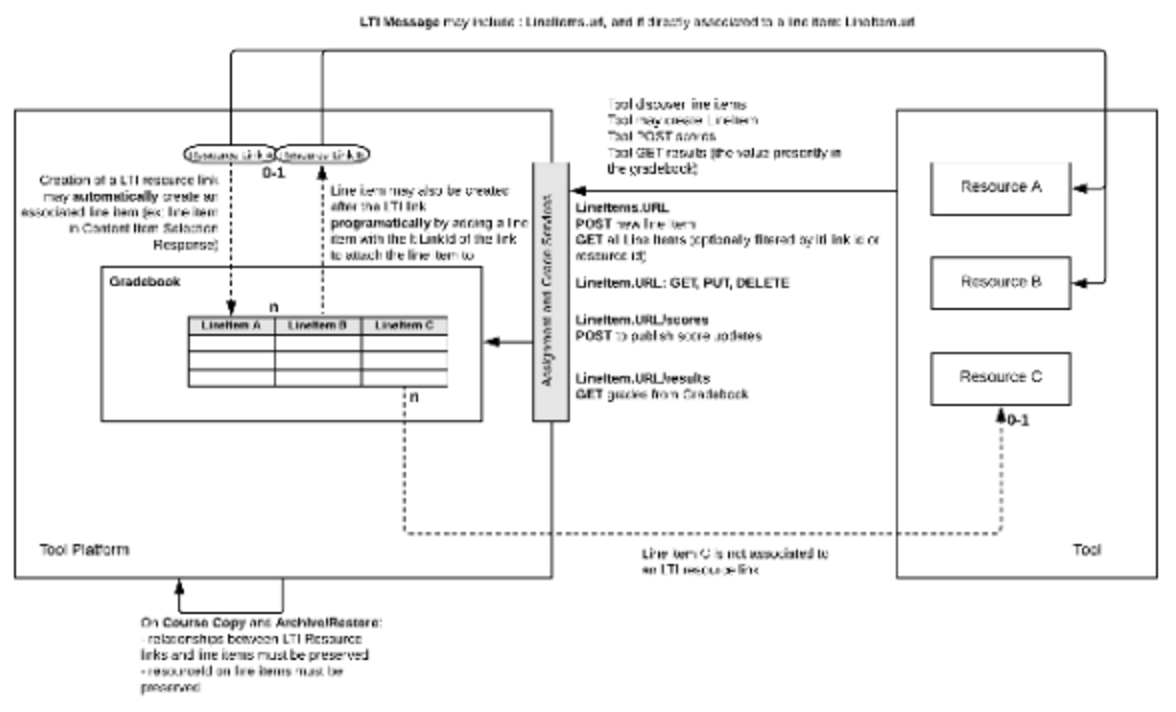
Figure 1 Assignment and Grade Services Overview
[그림 1] 과제 및 성적 서비스 개요
1.1 Terminology
1.1 용어
Line item
A line item is usually a column in the tool platform's gradebook; it is able to hold the results associated with a specific activity for a set of users. The activity is expected to be associated with a single LTI context within the platform, so there is a one-to-many relationship between a context and its line items.
라인 아이템(Line item)은 일반적으로 도구 플랫폼의 성적표에서 열(column)을 의미하며, 특정 활동과 관련된 결과를 사용자 집합과 연결할 수 있다. 이 활동은 플랫폼 내의 단일 LTI 컨텍스트(context)와 연결되는 것이 예상되므로, 컨텍스트와 해당 라인 아이템 간에는 일대다(one-to-many) 관계가 존재한다.
Line item container
A line item container has an array of line items. These line items might, for example, represent all those associated with a specific LTI context within the platform for the querying tool. Alternatively, the query may include a filter to query only line items associated to a resource link or a tool's resource. The actual content will depend upon the service request being used.
라인 아이템 컨테이너(Line item container)는 라인 아이템 배열을 포함한다. 예를 들어, 이는 특정 LTI 컨텍스트와 관련된 모든 라인 아이템을 나타낼 수 있다. 또는 쿼리에 필터를 추가하여 특정 리소스 링크나 도구의 리소스와 관련된 라인 아이템만 쿼리할 수도 있다. 실제 콘텐츠는 사용 중인 서비스 요청에 따라 달라진다.
Result
A result is usually a cell in the tool platform's gradebook; it is unique for a specific line item and user. The value may have a numeric score and a comment. All results for a specific line item will be deemed to have a status of “Initialized” when the line item is created. A tool platform may maintain a history of changes for each result value and also allow an instructor to override a value. However, this service only provides access to the latest result. If the value of the result is changed directly within the tool platform, any such changes will be reflected in GET requests for the result.
결과(Result)는 일반적으로 도구 플랫폼의 성적표에서 셀(cell)을 의미하며, 특정 라인 아이템과 사용자에 대해 고유하다. 결과 값은 숫자 점수(numeric score)와 주석(comment)을 포함할 수 있다. 특정 라인 아이템에 대한 모든 결과는 라인 아이템이 생성될 때 "초기화(Initialized)" 상태를 갖는 것으로 간주된다. 도구 플랫폼은 각 결과 값에 대한 변경 내역을 유지하고 교사가 값을 덮어쓸 수 있도록 허용할 수 있다. 하지만 이 서비스는 최신 결과에만 액세스할 수 있도록 제공된다. 결과 값이 도구 플랫폼 내에서 직접 변경되는 경우, 이러한 변경 사항은 결과에 대한 GET 요청에서 반영된다.
Score
A score represents the last score obtained by the student for the tool's activity. It also exposes the current status of the activity (like completed or in progress), and status of the grade (for example, grade pending a manual input from the instructor). The score is sent from the tool to the tool platform using the score service. The tool platform ingests that value to possibly alter the current result (value shown in the gradebook).
점수(Score)는 학생이 도구의 활동에서 마지막으로 얻은 점수를 나타낸다. 또한 활동의 현재 상태(예: 완료됨 또는 진행 중)와 성적 상태(예: 교사의 수동 입력 대기 중)를 노출한다. 점수는 점수 서비스를 사용하여 도구에서 도구 플랫폼으로 전송된다. 도구 플랫폼은 이 값을 수집하여 현재 결과(성적표에 표시된 값)를 변경할 수 있다.
Score container
The score container is the end point to push score updates for a given line item. It cannot be queried.
점수 컨테이너(Score container)는 특정 라인 아이템에 대한 점수 업데이트를 전송(push)하는 엔드포인트(end point)이다. 점수 컨테이너는 쿼리할 수 없다.
1.2 Conformance Statements
1.2 적합성 선언
As well as sections marked as non-normative, all authoring guidelines, diagrams, examples, and notes in this specification are non-normative. Everything else in this specification is normative.
비규범적(non-normative)으로 표시된 섹션뿐만 아니라, 이 표준에 포함된 모든 작성 가이드라인, 다이어그램, 예제, 및 주석은 비규범적이다. 이 외의 모든 내용은 규범적(normative)이다.
The key words MAY, MUST, MUST NOT, OPTIONAL, RECOMMENDED, REQUIRED, SHALL, SHALL NOT, SHOULD, and SHOULD NOT in this document are to be interpreted as described in [RFC2119].
이 문서에서 사용된 주요 용어인 MAY, MUST, MUST NOT, OPTIONAL, RECOMMENDED, REQUIRED, SHALL, SHALL NOT, SHOULD, 그리고 SHOULD NOT는 [RFC2119]에서 설명된 대로 해석해야 한다.
An implementation of this specification that fails to implement a MUST/REQUIRED/SHALL requirement or fails to abide by a MUST NOT/SHALL NOT prohibition is considered nonconformant. SHOULD/SHOULD NOT/RECOMMENDED statements constitute a best practice. Ignoring a best practice does not violate conformance but a decision to disregard such guidance should be carefully considered. MAY/OPTIONAL statements indicate that implementers are entirely free to choose whether or not to implement the option.
이 표준의 구현이 MUST/REQUIRED/SHALL 요구 사항을 구현하지 않거나 MUST NOT/SHALL NOT 금지를 준수하지 못하는 경우, 이는 비적합(nonconformant)으로 간주된다. SHOULD/SHOULD NOT/RECOMMENDED 문장은 모범 사례(best practice)를 나타낸다. 모범 사례를 무시하는 것은 적합성을 위반하지 않지만, 이러한 지침을 무시하기로 한 결정은 신중히 고려되어야 한다. MAY/OPTIONAL 문장은 구현자가 해당 옵션을 구현할지 여부를 완전히 자유롭게 선택할 수 있음을 나타낸다.
The Conformance and Certification Guide for this specification may introduce greater normative constraints than those defined here for specific service or implementation categories.
이 표준의 적합성 및 인증 가이드(Conformance and Certification Guide)는 특정 서비스나 구현 범주에 대해 여기서 정의된 것보다 더 강한 규범적 제약을 도입할 수 있다.
1.3 Document Set
1.3 문서 세트
1.3.1 Normative Documents
1.3.1 규범적 문서
LTI Advantage Conformance Certification Guide [LTI-CERT-13]
LTI Advantage 적합성 인증 가이드 [LTI-CERT-13]
The LTI Advantage Conformance Certification Guide describes the procedures for testing Platforms and Tools against the LTI v1.3 and LTI Advantage services using the IMS certification test suite.
LTI Advantage 적합성 인증 가이드는 IMS 인증 테스트 스위트를 사용하여 플랫폼과 도구를 LTI v1.3 및 LTI Advantage 서비스에 대해 테스트하는 절차를 설명한다.
1.3.2 Informative Documents
1.3.2 참고 문서
LTI Advantage Implementation Guide [LTI-IMPL-13]
LTI Advantage 구현 가이드 [LTI-IMPL-13]
The LTI Advantage Implementation Guide provides information to lead you to successful implementation and certification of the LTI Core v1.3 specification and the set of LTI Advantage specifications.
LTI Advantage 구현 가이드는 LTI Core v1.3 표준 및 LTI Advantage 표준 세트의 성공적인 구현과 인증을 안내하는 정보를 제공한다.
2. Relationship with other specifications
2. 다른 표준과의 관계
The Assignment and Grade Services relates to the following specifications:
과제 및 성적 서비스(Assignment and Grade Services)는 다음 표준과 관련이 있다.
- Deep Linking Message: The Deep Linking specification allows for a declarative option to create a line item by including its definition in the LTI Link's Content Item definition.Deep Linking Message: Deep Linking 표준은 LTI 링크의 콘텐츠 항목(Content Item) 정의에 라인 아이템(line item)의 정의를 포함하여 선언적으로 생성할 수 있는 옵션을 제공한다.
- Submission Review Message: The Submission Review Message specification allows the instructor and the student to launch from the gradebook back to the tool provider to see what's 'behind' a given result. This might for example allow the instructor to launch into a tool provider's grading interface in the context of a given student's submission.Submission Review Message: Submission Review Message 표준은 교사와 학생이 성적표에서 도구 제공자(tool provider)로 다시 이동하여 특정 결과와 관련된 내용을 확인할 수 있다. 예를 들어, 교사가 특정 학생의 제출물과 관련된 도구 제공자의 채점 인터페이스로 이동할 수 있다.
3. Services definition
3. 서비스 정의
3.1 Assignment and Grade Service claim
3.1 과제 및 성적 서비스 클레임
This specification introduces the claim https://purl.imsglobal.org/spec/lti-ags/claim/endpoint. This claim MUST be included in LTI messages if any of the Assignment and Grade Services are accessible by the tool in the context of the LTI message.
이 표준은 클레임(claim) https://purl.imsglobal.org/spec/lti-ags/claim/endpoint를 소개한다. 이 클레임은 LTI 메시지의 컨텍스트에서 도구(tool)가 과제 및 성적 서비스(Assignment and Grade Services)에 접근할 수 있는 경우 LTI 메시지에 반드시(MUST) 포함되어야 한다.
The claim defines the following properties:
클레임은 다음 속성을 정의한다.
- lineitems: the endpoint URL for accessing the line item container for the current context. May be omitted if the tool has no permissions to access this endpoint.lineitems: 현재 컨텍스트의 라인 아이템 컨테이너(line item container)에 접근하기 위한 엔드포인트(endpoint) URL. 도구가 이 엔드포인트에 접근할 권한이 없는 경우 생략될 수 있다.
- lineitem: when an LTI message is launching a resource associated to one and only one lineitem, the claim must include the endpoint URL for accessing the associated line item; in all other cases, this property must be either blank or not included in the claim.lineitem: LTI 메시지가 하나의 라인 아이템과만 연관된 리소스를 실행할 때, 해당 라인 아이템에 접근하기 위한 엔드포인트 URL을 반드시 포함해야 한다. 다른 모든 경우에는 이 속성이 비어 있거나 클레임에 포함되지 않아야 한다.
- scope: An array of scopes the tool may ask an access token for.scope: 도구가 액세스 토큰을 요청할 때 사용할 수 있는 범위(scope)의 배열.
The platform MAY change end point URLs as it deems necessary; therefore, by best practice, the tool should check with each message for the endpoint URL it should use with respect to the resource associated with the message. By best practice, the platform should maintain the presence of endpoints communicated within a message for some length of time, as tools may intend to perform asynchronous operations; for example, the tool may use the lineitem URL to update scores quite some time after the student has actually completed its associated activity.
플랫폼은 필요에 따라 엔드포인트 URL을 변경할 수(MAY) 있다. 따라서 모범 사례(best practice)로 도구는 메시지와 관련된 리소스에 사용할 엔드포인트 URL을 각 메시지에서 확인해야 한다. 모범 사례로, 플랫폼은 도구가 비동기 작업을 수행할 의도가 있을 수 있으므로, 메시지에서 통신된 엔드포인트의 유효성을 일정 기간 유지해야 한다. 예를 들어, 도구는 학생이 관련된 활동을 완료한 후 상당한 시간이 지나 점수를 업데이트하기 위해 lineitem URL을 사용할 수 있다.
3.1.1 Example Service Claims
3.1.1 서비스 클레임 예시
3.1.1.1 Example: link with one line item, tool has all permissions
3.1.1.1 예시: 하나의 라인 아이템과 연결된 링크, 도구가 모든 권한을 보유한 경우
Figure 2
"https://purl.imsglobal.org/spec/lti-ags/claim/endpoint": {
  "scope": [
    "https://purl.imsglobal.org/spec/lti-ags/scope/lineitem",
    "https://purl.imsglobal.org/spec/lti-ags/scope/result.readonly",
    "https://purl.imsglobal.org/spec/lti-ags/scope/score"
  ],
  "lineitems": "https://www.myuniv.example.com/2344/lineitems/",
  "lineitem": "https://www.myuniv.example.com/2344/lineitems/1234/lineitem"
}
3.1.1.2 Example: link has no line item (or many), tool can query and add line items
3.1.1.2 예시: 링크에 라인 아이템이 없거나 여러 개가 있으며, 도구가 라인 아이템을 조회하고 추가할 수 있는 경우
Figure 3
"https://purl.imsglobal.org/spec/lti-ags/claim/endpoint": {
  "scope": [
    "https://purl.imsglobal.org/spec/lti-ags/scope/lineitem",
    "https://purl.imsglobal.org/spec/lti-ags/scope/result.readonly",
    "https://purl.imsglobal.org/spec/lti-ags/scope/score"
  ],
  "lineitems": "https://www.myuniv.edu/2344/lineitems/"
}
3.1.1.3 Example: link has a single line item, tool can only POST score
3.1.1.3 예시: 링크에 단일 라인 아이템이 있으며, 도구가 점수를 POST할 수만 있는 경우
Figure 4
"https://purl.imsglobal.org/spec/lti-ags/claim/endpoint": {
  "scope": [
    "https://purl.imsglobal.org/spec/lti-ags/scope/score"
  ],
  "lineitem": "https://www.myuniv.edu/2344/lineitems/1234/lineitem"
}
3.1.2 Extensions
3.1.2 확장
Line item, score and result MAY be enriched with additional data. Any extension MUST be done by adding a new parameter to the JSON object. The key name MUST be a fully qualified URL uniquely identifying the property. The value MUST be any valid JSON data. The organization MAY provide a JSON Schema defining the format of the data added.
라인 아이템(line item), 점수(score), 결과(result)는 추가 데이터를 통해 확장될 수(MAY) 있다. 확장은 반드시 새로운 매개변수를 JSON 객체에 반드시(MUST) 추가하는 방식으로 이루어져야 한다. 키 이름은 반드시(MUST) 속성을 고유하게 식별하는 완전한 URL(fully qualified URL)이어야 한다. 값은 반드시(MUST) 유효한 JSON 데이터여야 한다. 조직은 추가된 데이터의 형식을 정의하는 JSON 스키마(JSON Schema)를 제공할 수(MAY) 있다.
For example, if a tool wanted to pass extra data to the platform when the score is updated, it MAY enrich the score as follows:
예를 들어, 도구가 점수를 업데이트할 때 플랫폼에 추가 데이터를 전달하고자 한다면, 점수를 다음과 같이 확장할 수(MAY) 있다.
Figure 5
{
  "timestamp": "2017-04-16T18:54:36.736+00:00",
  "activityProgress" : "Completed",
  "gradingProgress" : "PendingManual",
  "userId" : "5323497",
  "https://www.toolexample.com/lti/score": {
    "originality": 94,
    "submissionUrl": "https://www.toolexample.com/lti/score/54/5893/essay.pdf"
  }
}
3.2 Line item service scope and allowed http methods
3.2 라인 아이템 서비스 범위 및 허용된 HTTP 메소드
Access to this service MAY be controlled by authorization scopes. The authorization scope MAY differ per tool deployment and per context.
이 서비스에 대한 접근은 인증 범위(authorization scopes)에 의해 제어될 수(MAY) 있다. 인증 범위는 도구 배포(tool deployment) 및 컨텍스트(context)에 따라 다를 수(MAY) 있다.
| Scope | Description | Allowed HTTP Methods |
|---|---|---|
| 'https://purl.imsglobal.org/spec/lti-ags/scope/lineitem' | Tool can fully managed its line items, including adding and removing line items 도구는 라인 아이템을 추가하거나 제거하는 것을 포함하여 라인 아이템을 완전히 관리할 수 있다. | linetems URL: GET, POST - lineitem URL: GET, PUT, DELETE |
| 'https://purl.imsglobal.org/spec/lti-ags/scope/lineitem.readonly' | Tool can query the line items, no modification is allowed 도구는 라인 아이템을 조회할 수 있지만, 수정은 허용되지 않는다. | lineitems URL: GET - lineitem URL: GET |
3.2.1 Line item service Media types and schemas
3.2.1 라인 아이템 서비스 미디어 타입 및 스키마
The accompanying OpenAPI documentation [AGS-OpenAPI] defines the following media types and schemas used by the line item Service:
함께 제공하는 OpenAPI 문서 [AGS-OpenAPI]는 라인 아이템 서비스에서 사용되는 다음의 미디어 타입과 스키마를 정의한다.
- 'application/vnd.ims.lis.v2.lineitem+json'
- 'application/vnd.ims.lis.v2.lineitemcontainer+json'
The first media type provides a representation of a single line item; the second is a representation for a set of line items within a context.
첫 번째 미디어 타입은 단일 라인 아이템을 표현한다. 두 번째는 컨텍스트 내 라인 아이템 집합을 표현한다.
3.2.2 Example Line Item Requests
3.2.2 라인 아이템 요청 예시
3.2.2.1 Example GETting a single line item
3.2.2.1 예시: 단일 라인 아이템 GET 요청
Figure 6
HTTP/1.1 GET lineitem URL
Accept: application/vnd.ims.lis.v2.lineitem+json

200 OK
content-type: application/vnd.ims.lis.v2.lineitem+json
{
  "id" : "https://lms.example.com/context/2923/lineitems/1",
  "scoreMaximum" : 60,
  "label" : "Chapter 5 Test",
  "resourceId" : "a-9334df-33",
  "tag" : "grade",
  "resourceLinkId" : "1g3k4dlk49fk",
  "startDateTime": "2018-03-06T20:05:02Z",
  "endDateTime": "2018-04-06T22:05:03Z",
  "gradesReleased": false
}
3.2.2.2 Example GETting all line items for a given container
3.2.2.2 예시: 특정 컨테이너의 모든 라인 아이템 GET 요청
Figure 7
HTTP/1.1 GET lineitems URL
Accept: application/vnd.ims.lis.v2.lineitemcontainer+json

200 OK
content-type: application/vnd.ims.lis.v2.lineitemcontainer+json
[  {
    "id": "https://lms.example.com/context/2923/lineitems/1",
    "scoreMaximum": 60,
    "label": "Chapter 5 Test",
    "resourceId": "a-9334df-33",
    "tag": "grade",
    "resourceLinkId": "1g3k4dlk49fk",
    "endDateTime": "2018-04-06T22:05:03Z"
    "gradesReleased": true
  },
  {
    "id": "https://lms.example.com/context/2923/lineitems/47",
    "scoreMaximum": 100,
    "label": "Chapter 5 Progress",
    "resourceId": "a-9334df-33",
    "tag": "originality",
    "resourceLinkId": "1g3k4dlk49fk"
  },
  {
    "id": "https://lms.example.com/context/2923/lineitems/69",
    "scoreMaximum": 60,
    "label": "Chapter 2 Essay",
    "tag": "grade"
  }
]
3.2.3 Line Item id REST Endpoint
3.2.3 라인 아이템 ID REST 엔드포인트
The id property of the line item is the service endpoint URL to access or modify that line item. It must be a fully qualified URL addressable for read (HTTP GET), update (HTTP PUT) and delete (HTTP DELETE) operations. While it may occasionally change, a learning platform should aim at keeping it stable.
라인 아이템의 id 속성은 해당 라인 아이템에 접근하거나 수정하기 위한 서비스 엔드포인트 URL이다. 이 URL은 반드시 읽기(HTTP GET), 업데이트(HTTP PUT), 삭제(HTTP DELETE) 작업을 수행할 수 있는 완전한 URL(fully qualified URL)이어야 한다. URL은 경우에 따라 변경될 수 있지만, 학습 플랫폼은 이를 안정적으로 유지하려고 노력해야 한다.
The Line Item id URL also serves as a base URL for Score POST and Result GET operations.
라인 아이템 id URL은 또한 점수(Score) POST와 결과(Result) GET 작업의 기본 URL로도 사용된다.
3.2.4 Container Request Filters
3.2.4 컨테이너 요청 필터
A 'GET' request to the container endpoint MAY use one or more of the following query parameters to filter the response; the platform MUST implement the support for those filters:
컨테이너 엔드포인트에 대한 GET 요청은 응답을 필터링하기 위해 다음과 같은 하나 이상의 쿼리 매개변수를 사용할 수(MAY) 있다. 플랫폼은 반드시(MUST) 이러한 필터를 지원해야 한다.
- resource_link_id - to limit the line items returned to only those which have been associated with the specified tool platform's LTI link ID (as passed in the 'resource_link_id' LTI message parameter).지정된 도구 플랫폼의 LTI 링크 ID(‘resource_link_id’ LTI 메시지 매개변수에 전달된 값)와 연결된 라인 아이템만 반환하도록 제한한다.
- resource_id - to limit the line items returned to only those which have been associated with the specified tool resource identifier.지정된 도구 리소스 식별자와 연결된 라인 아이템만 반환하도록 제한한다.
- tag - to limit the line items returned to only those which have been associated with the specified tag.지정된 태그와 연결된 라인 아이템만 반환하도록 제한한다.
- limit - to restrict the number of line items returned; the platform MAY further reduce the number of items returned at its own discretion. If more items exist following the returned ones, a 'Link' http header (per [RFC8288]) with a URL pointing to the next page and a 'rel' value of 'next' MUST be included in the response; The platform MAY also include other relations including 'prev', 'first' and 'last'.반환되는 라인 아이템의 수를 제한한다. 플랫폼은 자체 재량으로 반환되는 항목의 수를 더 줄일 수(MAY) 있다. 반환된 항목 다음에 더 많은 항목이 존재하는 경우, 응답에 URL이 포함된 Link HTTP 헤더([RFC8288] 참조)와 rel 값이 next인 항목을 반드시(MUST) 포함해야 한다. 플랫폼은 또한 prev, first, last와 같은 다른 관계를 포함할 수도(MAY) 있다.
The URL for the 'next' link is left to the discretion of the implementer. The tool must use the 'next' URL as is and not re-apply filters to it. The tool platform must thus make sure the 'next' URL contains enough information to insure the next page displays the right set of elements based on the filters present on the original request.
next 링크의 URL은 구현자의 재량에 따라 결정된다. 도구는 next URL을 있는 그대로 사용해야 하며, 필터를 다시 적용해서는 안 된다. 따라서 도구 플랫폼은 next URL이 원래 요청의 필터를 기반으로 올바른 항목 집합을 표시하도록 충분한 정보를 포함하고 있어야 한다.
Link: <https://lms.example.com/sections/2923/lineitems/69?p=2>; rel="next"
If both 'resource_link_id' and 'resource_id' are used in the same query, then only those LineItems which are associated with BOTH the LTI link and the tool's resource MUST be included in the result set.
resource_link_id와 resource_id가 동일한 쿼리에서 함께 사용되는 경우, 결과 집합에는 LTI 링크와 도구의 리소스 둘 다와 연결된 라인 아이템(LineItems)만 반드시(MUST) 포함되어야 한다.
If there are no matching line items, the returned value MUST just be an empty array:
일치하는 라인 아이템이 없는 경우, 반환 값은 반드시(MUST) 빈 배열(empty array)만 포함해야 한다.
Figure 8
HTTP/1.1 GET lineitems URL?resource_id=d0d6212ecc4e4696a76f7359ef76e3f4
Accept: application/vnd.ims.lis.v2.lineitemcontainer+json

200 OK
content-type: application/vnd.ims.lis.v2.lineitemcontainer+json
[]
3.2.5 Creating a new line item
3.2.5 새로운 라인 아이템 생성
A new line item is added by POSTing a line item ('application/vnd.ims.lis.v2.lineitem+json' representation) to the lineitems endpoint URL. The response by the platform MUST be the newly created item, enriched by its URL.
새로운 라인 아이템은 lineitems 엔드포인트 URL에 application/vnd.ims.lis.v2.lineitem+json 형식의 라인 아이템을 POST하여 추가된다. 플랫폼의 응답은 반드시(MUST) 생성된 새 항목이어야 하며, 해당 항목의 URL로 보완(enriched)되어야 한다.
Figure 9
POST lineitems URL
Authorization: Bearer 78aerc7829z.890.duepz
Content-Type: application/vnd.ims.lis.v2.lineitem+json
{
  "scoreMaximum" : 60,
  "label" : "Chapter 5 Test",
  "resourceId" : "quiz-231",
  "tag" : "grade",
  "startDateTime": "2018-03-06T20:05:02Z",
  "endDateTime": "2018-04-06T22:05:03Z"
}

HTTP/1.1 201 Created
{
  "id" : "https://lms.example.com/context/2923/lineitems/1",
  "scoreMaximum" : 60,
  "label" : "Chapter 5 Test",
  "resourceId" : "quiz-231",
  "tag" : "grade",
  "startDateTime": "2018-03-06T20:05:02Z",
  "endDateTime": "2018-04-06T22:05:03Z"
}
Returned 'application/vnd.ims.lis.v2.lineitem+json' representation for platforms not supporting start and end times.
지원 플랫폼에서 시작 및 종료 시간을 지원하지 않는 경우 반환되는 application/vnd.ims.lis.v2.lineitem+json 표현.
Figure 10
HTTP/1.1 201 Created
{
  "id" : "https://lms.example.com/context/2923/lineitems/1",
  "scoreMaximum" : 60,
  "label" : "Chapter 5 Test",
  "resourceId" : "quiz-231",
  "tag" : "grade"
}
The platform MUST NOT modify the resourceId and tag values. It MAY modify the other properties, although preserving the original values from the tool is recommended.
플랫폼은 resourceId 및 tag 값을 수정해서는 안 된다(MUST NOT). 다른 속성은 수정할 수 있지만(MAY), 도구에서 제공한 원래 값을 유지하는 것이 권장된다.
Note: that the tool MAY provide a resourceLinkId value for the created line item; this supports the case where the tool may want to create a line item for an LTI Link resource link identifier that it has already received via a launch. The tool MAY NOT create a resource link identifier value of its own accord, nor use a resource link identifier for an LTI Context other than the one the platform already demonstrated owns that identifier. The platform may choose to ignore this property if provided by the tool, or treat it as a bad request if the tool improperly uses the resource link identifier value (for example, the link no longer exists in the LTI Context on the platform).
도구는 생성된 라인 아이템에 대해 resourceLinkId 값을 제공할 수(MAY) 있으며, 도구가 실행 중에 이미 수신한 LTI 링크 리소스 링크 식별자에 대해 라인 아이템을 생성하려는 경우를 지원한다. 그러나 도구는 자체적으로 리소스 링크 식별자를 생성하거나, 플랫폼이 해당 식별자를 소유하고 있음을 증명하지 않은 LTI 컨텍스트에 대한 리소스 링크 식별자를 사용할 수 없다(MAY NOT). 플랫폼은 도구가 제공한 이 속성을 무시하거나, 도구가 리소스 링크 식별자를 잘못 사용하는 경우 잘못된 요청(bad request)으로 처리할 수 있다. 예: 해당 링크가 플랫폼의 LTI 컨텍스트에서 더 이상 존재하지 않는 경우
3.2.6 Updating a line item
3.2.6 라인 아이템 업데이트
A tool may update a line item definition by PUTting a complete definition of the line item to the line item URL endpoint. Note that this operation replaces the line item definition with the new, complete definition provided by the tool; because of this, by best practice the tool should first GET the state of a line item to retrieve the platform's current complete definition -- this can help the tool avoid editing-conflict race conditions, unintentionally unsetting previously set line item properties, and so on.
도구는 라인 항목 URL 엔드포인트에 완전한 라인 항목 정의를 PUT하여 해당 정의를 업데이트할 수 있다. 이 작업은 도구가 제공하는 새로운 완전한 정의로 기존 정의를 대체한다는 점에 유의해야 한다. 따라서, 모범 사례로 도구는 먼저 GET 요청을 통해 라인 항목의 현재 상태를 가져와 플랫폼의 최신 정의를 확인해야 한다. 이렇게 하면 편집 충돌, 이전에 설정된 속성의 의도치 않은 초기화 등의 문제를 방지할 수 있다.
A tool MUST NOT change the id and resourceLinkId values. The tool may omit the id attribute. If the tool does provide a different value for one of these attributes on update, the platform MAY either ignore those values or treat the update request as invalid.
도구는 id 및 resourceLinkId 값을 변경해서는 안 된다. 도구는 id 속성을 생략할 수 있다. 만약 도구가 업데이트 시 이 속성들 중 하나에 다른 값을 제공하면, 플랫폼은 이를 무시하거나 요청을 유효하지 않은 것으로 처리할 수 있다. 플랫폼은 다른 속성에 대한 변경 사항을 무시할 수 있다. 플랫폼은 적용된 라인 아이템 정의를 반환해야 한다.
A platform may ignore changes to other attributes. The platform MUST return the line item definition as applied to the platform.
플랫폼은 다른 속성에 대한 변경 사항을 무시할 수 있다. 플랫폼은 반드시(MUST) 적용된 라인 아이템 정의를 반환해야 한다.
If the platform applies the scoreMaximum change, it is expected the results will be scaled to the updated value.
만약 플랫폼이 scoreMaximum 변경 사항을 적용하는 경우, 결과는 업데이트된 값에 맞게 스케일링될 것으로 예상된다.
In the example below, the tool updates the line item's end time and label and voids the start time. The platform does not apply the change to scoreMaximum.
아래 예시에서는 도구가 라인 아이템의 종료 시간과 라벨을 업데이트하고 시작 시간을 무효화한다. 플랫폼은 scoreMaximum 변경 사항을 적용하지 않는다.
Figure 11
PUT lineitems URL
Authorization: Bearer 78aerc7829z.890.duepz
Content-Type: application/vnd.ims.lis.v2.lineitem+json
{
  "scoreMaximum" : 60,
  "label" : "Chapter 5 Test",
  "resourceId" : "quiz-231",
  "tag" : "grade",
  "endDateTime": "2018-04-06T22:05:03Z"
}

HTTP/1.1 201 Created
{
  "id" : "https://lms.example.com/context/2923/lineitems/1",
  "scoreMaximum" : 50,
  "label" : "Chapter 5 Test",
  "resourceId" : "quiz-231",
  "tag" : "grade",
  "startDateTime": "",
  "endDateTime": "2018-04-06T22:05:03Z"
  "gradesReleased": true
}
3.2.7 Label
3.2.7 라벨
The label is a short string with a human readable text for the line item. It MUST be specified and not blank when posted by the tool. A platform must always include the label.
라벨은 라인 아이템에 대한 사람이 읽을 수 있는 짧은 문자열이다. 도구에서 POST할 때 반드시(MUST) 지정되어야 하며, 비어 있어서는 안 된다. 플랫폼은 항상 라벨을 포함해야 한다.
3.2.8 scoreMaximum
3.2.8 최대 점수
The maximum score for this line item. Maximum score MUST be a numeric non-null value, strictly greater than 0.
이 라인 아이템의 최대 점수이다. 최대 점수는 반드시(MUST) 0보다 큰 숫자 값이어야 하며, null 값일 수 없다.
3.2.9 resourceLinkId and binding a line item to a resource link resourceLinkId
3.2.9 와 라인 아이템을 리소스 링크에 바인딩하기
A line item MAY be attached to a resource link by including a 'resourceLinkId' in the payload. The resource link MUST exist in the context where the line item is created, and MUST be a link owned by the same tool. If not, the line item creation MUST fail with a response code of Not Found 404.
라인 아이템은 페이로드에 resourceLinkId를 포함하여 리소스 링크에 연결될 수(MAY) 있다. 리소스 링크는 반드시(MUST) 라인 아이템이 생성된 컨텍스트 내에 존재해야 하며, 반드시(MUST) 동일한 도구가 소유한 링크여야 한다. 그렇지 않은 경우, 라인 아이템 생성은 반드시(MUST) 404 Not Found 응답 코드와 함께 실패해야 한다.
The platform MAY remove the line items attached to a resource link if the resource link itself is removed.
플랫폼은 리소스 링크가 제거된 경우, 해당 리소스 링크에 연결된 라인 아이템을 제거할 수(MAY) 있다.
3.2.10 Tool resource identifier resourceId
3.2.10 도구 리소스 식별자
A tool MAY identify which of its resources the line item is attached to by including a non blank value for resourceId in the payload. This value is a string. For example, resourceId can be 'quiz-231' or any other resource identifier uniquely identifying a resource in a given context.
도구는 resourceId에 비어 있지 않은 값을 페이로드에 포함하여 라인 아이템이 연결된 리소스를 식별할 수 있다(MAY). 이 값은 문자열이며, 예를 들어 resourceId는 quiz-231 또는 주어진 컨텍스트에서 리소스를 고유하게 식별하는 다른 식별자가 될 수 있다.
Multiple line items can share the same resourceId within a given context. resourceId must be preserved when a context is copied if the line items are included in the copy.
주어진 컨텍스트 내에서 여러 라인 아이템이 동일한 resourceId를 공유할 수 있다. resourceId는 컨텍스트가 복사될 때 라인 아이템이 포함되어 있는 경우 반드시(MUST) 유지되어야 한다.
If no resourceId is defined for a lineitem, the platform may omit this attribute, or include it with a blank or null value.
라인 아이템에 대해 resourceId가 정의되지 않은 경우, 플랫폼은 이 속성을 생략하거나 비어 있거나 null 값으로 포함할 수 있다.
3.2.11 tag
3.2.11 태그
A tool MAY further qualify a line item by setting a value to tag. The attribute is a string. For example, one assignment resource may have 2 line items, one with tag as 'grade' and the other tagged as 'originality'.
도구는 tag에 값을 설정하여 라인 아이템을 추가로 구분할 수(MAY) 있다. 이 속성은 문자열이다. 예를 들어, 하나의 과제 리소스가 두 개의 라인 아이템을 가질 수 있으며, 하나는 grade tag를, 다른 하나는 originality 태그를 가질 수 있다.
Multiple line items can share the same tag within a given context. tag must be preserved when a context is copied if the line items are included in the copy.
주어진 컨텍스트 내에서 여러 라인 아이템이 동일한 tag를 공유할 수 있다. tag는 컨텍스트가 복사될 때 라인 아이템이 포함되어 있다면 반드시(MUST) 유지되어야 한다.
If no tag is defined for a lineitem, the platform may omit this attribute, or include it with a blank or null value.
라인 아이템에 대해 tag가 정의되지 않은 경우, 플랫폼은 이 속성을 생략하거나 비어 있거나 null 값으로 포함할 수 있다.
3.2.12 startDateTime
3.2.12 startDateTime (시작 일시)
A tool MAY specify the initial start time submissions for this line item can be made by learners. The initial value may subsequently be changed within the platform.
도구는 학습자가 이 라인 아이템에 대한 제출을 시작할 수 있는 초기 시작 시간을 지정할 수(MAY) 있다. 초기 값은 이후 플랫폼 내에서 변경될 수 있다.
ISO 8601 Date and time when the line item can start receiving submissions [ISO8601]. The datetime value MUST include a time zone designator (Z designator or +00:00 offset to specify UTC, or time offset from UTC for another time zone).
ISO 8601 날짜 및 시간 형식을 사용하며, 라인 아이템이 제출물을 받을 수 있는 시작 시간을 나타낸다([ISO8601]). 날짜 및 시간 값은 반드시(MUST) 시간대 지시자(time zone designator)를 포함해야 한다 (예: UTC를 지정하는 Z 지시자 또는 +00:00 오프셋, 또는 다른 시간대의 UTC로부터의 시간 오프셋).
If the platform does not have any start time for the line item but supports that functionality, it SHOULD include the parameter with a blank or null value.
플랫폼이 라인 아이템에 대한 시작 시간을 가지지 않지만 해당 기능을 지원하는 경우, 이 매개변수를 비어 있거나 null 값으로 포함해야(SHOULD) 한다.
If the platform does not support that functionality, it should omit this parameter.
플랫폼이 해당 기능을 지원하지 않는 경우, 이 매개변수를 생략해야 한다.
3.2.13 endDateTime
3.2.13 endDateTime (종료 일시)
A tool MAY specify the initial end time submissions for this line item can be made by learners. The initial value may subsequently be changed within the platform.
도구는 학습자가 이 라인 아이템에 대해 제출을 종료할 수 있는 초기 종료 시간을 지정할 수(MAY) 있다. 초기 값은 이후 플랫폼 내에서 변경될 수 있다.
ISO 8601 Date and time when the line item stops receiving submissions [ISO8601]. The datetime value MUST include a time zone designator (Z designator or +00:00 offset to specify UTC, or time offset from UTC for another time zone).
ISO 8601 날짜 및 시간 형식을 사용하며, 라인 아이템이 제출물을 받을 수 있는 종료 시간을 나타낸다([ISO8601]). 날짜 및 시간 값은 반드시(MUST) 시간대 지시자(time zone designator)를 포함해야 한다. (예: UTC를 나타내는 Z 지시자, +00:00 오프셋, 또는 다른 시간대의 UTC로부터의 시간 오프셋)
If the platform does not have any end time but supports that functionality, it SHOULD include the parameter with a blank or null value.
플랫폼이 종료 시간을 가지지 않지만 해당 기능을 지원하는 경우, 이 매개변수를 비어 있거나 null 값으로 포함해야(SHOULD) 한다.
If the platform does not support that functionality, it should omit this parameter.
플랫폼이 해당 기능을 지원하지 않는 경우, 이 매개변수를 생략해야 한다.
3.2.14 gradesReleased
3.2.14 gradesReleased (성적 공개 여부)
A tool MAY specify to the platform if it wishes the grades to be released or not. A platform can decide how to handle this, as the platform owns its gradebook behavior.
도구는 성적을 공개할지 여부를 플랫폼에 지정할 수(MAY) 있다. 플랫폼은 성적표(gradebook) 동작을 소유하므로 이를 처리하는 방법을 자체적으로 결정할 수 있다.
3.2.15 Course copy and export/import
3.2.15 과정 복사 및 내보내기/가져오기
When line items are copied (or exported and imported), all their attributes MUST be preserved, with the exception of the 'resource_link_id' which will now be the id of the link in the copied/imported course. If the line items to be copied/imported are attached to a link that will not be restored/copied, the tool platform MUST NOT copy/import those line items.
라인 아이템이 복사되거나 내보내기/가져오기 되는 경우, resource_link_id를 제외한 모든 속성은 반드시(MUST) 유지되어야 한다. resource_link_id는 복사되거나 가져온 과정에서 링크의 새로운 ID로 대체된다. 복사 또는 가져올 라인 아이템이 복원되거나 복사되지 않을 링크에 연결된 경우, 도구 플랫폼은 해당 라인 아이템을 복사하거나 가져오면 안 된다(MUST NOT).
A tool MUST NOT create a new line item in a copied/restored course if that line item would result in a duplicate. The tool MUST use the line items URL to query the existing line items and use the resourceLinkId, resourceId and/or tag values to internally apply the binding with the matching line item URLs.
도구는 복사되거나 복원된 과정에서 중복을 초래할 라인 아이템을 새로 생성해서는 안 된다(MUST NOT). 도구는 라인 아이템 URL을 사용하여 기존 라인 아이템을 조회하고, resourceLinkId, resourceId, 및/또는 tag 값을 사용하여 내부적으로 해당 라인 아이템 URL과의 바인딩을 적용해야 한다.
Alternatively, for line item associated to resource links, it MAY just wait for the resource link to be launched and discover the associated line item using the line item parameter passed in the launch message.
또는, 리소스 링크와 연결된 라인 아이템의 경우, 리소스 링크가 실행될 때까지 기다렸다가 실행 메시지에 포함된 라인 아이템 매개변수를 사용하여 연결된 라인 아이템을 확인할 수(MAY) 있다.
3.3 Result Service
3.3 결과 서비스
Result Service allows the tool to query the tool platform for the current results of its own line items. A result represents the current grade for a given line item and user in the platform's gradebook, including any change done directly to the grade within the tool platform. A result cannot be directly altered by the tool, and so only GET operations are supported. See Score Service for posting grades to the Tool Consumer.
결과 서비스(Result Service)는 도구(Tool)가 플랫폼(Tool Platform)에서 자체 라인 아이템에 대한 현재 성적 데이터를 조회하는 기능이다. 여기서 결과(Result)는 플랫폼의 성적표에서 특정 라인 아이템과 사용자에 대한 현재 성적을 나타내며, 플랫폼 내부에서 직접 수정된 성적 변경 사항도 포함된다. 결과는 외부 도구가 직접 변경할 수 없으므로, 결과 서비스에서는 GET 작업만 지원된다. 성적을 플랫폼의 성적표에 게시하려면 점수 서비스(Score Service)를 참조해야 한다.
3.3.1 Result service endpoint
3.3.1 결과 서비스 엔드포인트
The results service endpoint is a subpath of the line item resource URL: it MUST be the line item resource URL with the path appended with '/results'. Any query or route parameters from the line item resource URL must also be added.
결과 서비스 엔드포인트는 라인 아이템 리소스 URL의 하위 경로(subpath)이다. 이는 반드시(MUST) 라인 아이템 리소스 URL에 '/results' 경로가 추가된 형태여야 한다. 라인 아이템 리소스 URL에서 사용하는 쿼리 또는 라우트 매개변수도 추가되어야 한다.
3.3.2 Result service scope and allowed http methods
3.3.2 결과 서비스 범위 및 허용된 HTTP 메소드
Access to this service MAY be controlled by authorization scope. The authorization scope MAY differ per tool deployment and per context.
이 서비스에 대한 접근은 인증 범위(authorization scope)에 의해 제어될 수(MAY) 있다. 인증 범위는 도구 배포(tool deployment) 및 컨텍스트(context)에 따라 다를 수(MAY) 있다.
| Scope | Description | Allowed HTTP Methods |
|---|---|---|
| 'https://purl.imsglobal.org/spec/lti-ags/scope/result.readonly' | Tool can access current results for its line items 도구는 자체 라인 아이템에 대한 현재 결과에 접근할 수 있다. | line item URL/results: GET |
3.3.3 Result service Media type and schema
3.3.3 결과 서비스 미디어 타입 및 스키마
Since the service URL is derived from the line item resource URL, it is NOT included in LTI messages.
서비스 URL은 라인 아이템 리소스 URL에서 유도되므로, LTI 메시지에 포함되지 않는다(NOT).
This service only supports GET operations and MUST return all the results for this line item (i.e. across all users enrolled in the line item's context). When a context member does not have a result for a line item, the platform MAY omit the result or return a result without any score.
이 서비스는 GET 작업만 지원하며, 반드시(MUST) 해당 라인 아이템에 대한 모든 결과를 반환해야 한다. 특정 컨텍스트 구성원이 라인 아이템에 대한 결과를 가지지 않는 경우, 플랫폼은 결과를 생략하거나 점수가 없는 결과를 반환할 수(MAY) 있다. 예, 라인 아이템의 컨텍스트에 등록된 모든 사용자에 대한 결과
The results can be narrowed to a single user result by filtering by 'user_id'.
결과는 user_id로 필터링하여 단일 사용자 결과로 좁힐 수 있다.
3.3.4 Media type and schema
3.3.4 미디어 타입 및 스키마
The accompanying OpenAPI documentation [AGS-OpenAPI] defines the following media type and schemas used by the Result service:
동반되는 OpenAPI 문서 [AGS-OpenAPI]는 결과 서비스(Result service)에서 사용되는 미디어 타입 및 스키마를 정의한다.
3.3.4.1 Example of GETting the results for a line item
3.3.4.1 라인 아이템의 결과를 GET하는 예시
Figure 12
GET lineitem URL/results
Authentication: Bearer 8789.ghiurn2.polgw1
Accept: application/vnd.ims.lis.v2.resultcontainer+json

HTTP/1.1 200 OK
content-type: application/vnd.ims.lis.v2.resultcontainer+json
[{
  "id": "https://lms.example.com/context/2923/lineitems/1/results/5323497",
  "scoreOf": "https://lms.example.com/context/2923/lineitems/1",
  "userId": "5323497",
  "resultScore": 0.83,
  "resultMaximum": 1,
  "scoringUserId": "4567890",
  "comment": "This is exceptional work."
}]
3.3.4.2 id
3.3.4.2 id
URL uniquely identifying the result record.
결과 기록(result record)을 고유하게 식별하는 URL.
3.3.4.3 scoreOf
3.3.4.3 scoreOf
URL identifying the Line Item to which this result belongs. Must be the same as the line item id and the value of the lineitem claim when included in the LTI message.
이 결과가 속한 라인 아이템을 식별하는 URL. LTI 메시지에 포함된 경우, 반드시 라인 아이템 ID와 lineitem 클레임의 값과 동일해야 한다.
3.3.4.4 userId
3.3.4.4 userId
The userId contains the LTI user ID identifying the recipient of the Result (usually a learner). The userId MUST be present.
userId 는 결과(Result)의 수신자(일반적으로 학습자)를 식별하는 LTI 사용자 ID를 포함한다. userId 는 반드시(MUST) 존재해야 한다.
3.3.4.5 resultScore
3.3.4.5 resultScore
The current score for this user. The value must be a numeric value. If no value exists, this attribute may be omitted, or have an explicit null value.
해당 사용자의 현재 점수. 값은 반드시 숫자여야 한다. 값이 존재하지 않는 경우, 이 속성은 생략되거나 명시적으로 null 값을 가질 수 있다.
3.3.4.6 resultMaximum
3.3.4.6 resultMaximum
The 'resultMaximum' value MUST be a positive number (with 0 considered a negative number); if no value is specified, then a default maximum value of 1 must be used.
resultMaximum 값은 반드시(MUST) 양의 숫자여야 한다(0은 음수로 간주됨). 값이 지정되지 않은 경우, 기본 최대값으로 1이 사용되어야 한다.
3.3.4.7 scoringUserId
3.3.4.7 scoringUserId
The scoringUserId contains the LTI user ID identifying the provider of the Result (usually an instructor). If no value exists, this attribute may be omitted (if the Platform does not support this property, or if the item's result was provided by machine-scoring, for example).
scoringUserId는 결과(Result)를 제공한 사람(일반적으로 교사)을 식별하는 LTI 사용자 ID를 포함한다. 값이 존재하지 않는 경우, 이 속성은 생략될 수 있다. (예: 플랫폼이 이 속성을 지원하지 않거나, 항목의 결과가 자동 채점으로 제공된 경우 등)
3.3.4.8 comment
3.3.4.8 comment
The current value for the comment. The value must be a string. If no value exists, this attribute may be omitted, blank or have an explicit null value.
현재 주석(comment)의 값. 값은 반드시 문자열이어야 한다. 값이 존재하지 않는 경우, 이 속성은 생략되거나 비어 있거나 명시적으로 null 값을 가질 수 있다.
3.3.5 Platform MAY skip empty results
3.3.5 플랫폼에서 빈 결과를 생략할 수 있음
A GET on Results URL MUST return a result record for each user that has a non empty 'resultScore' for the queried upon line item. The platform MAY skip empty results.
결과(Result) URL에 대한 GET 요청은 반드시(MUST) 조회된 라인 아이템에 대해 resultScore가 비어 있지 않은 각 사용자에 대한 결과 기록을 반환해야 한다. 플랫폼은 빈 결과를 생략할 수(MAY) 있다.
3.3.6 Container Request Filters
3.3.6 컨테이너 요청 필터
A 'GET' request to the container endpoint MAY use the following query parameters to filter the response:
GET 요청을 컨테이너 엔드포인트에 보낼 때, 응답을 필터링하기 위해 다음과 같은 쿼리 매개변수를 사용할 수(MAY) 있다.
- user_id: to filter the results to a single user. The results MUST contain at most 1 result. An empty array MAY be returned if the user does not have any result recorded.user_id: 특정 사용자에 대한 결과를 필터링하기 위해 사용. 결과는 반드시(MUST) 최대 1개의 결과를 포함해야 한다. 사용자가 기록된 결과를 가지고 있지 않은 경우, 빈 배열이 반환될 수(MAY) 있다.
- limit: to restrict the number of results returned; the platform MAY further reduce the number of results returned at its own discretion.limit: 반환되는 결과의 수를 제한. 플랫폼은 자체 재량으로 반환되는 결과 수를 더 줄일 수(MAY) 있다.
If more result records exist following the returned ones, a 'Link' http header (per [RFC8288]) with a URL pointing to the next page and a 'rel' value of 'next' MUST be included in the response. The platform MAY also include other relations including 'prev', 'first' and 'last'.
반환된 결과 다음에 더 많은 결과 기록이 있는 경우, 응답에는 rel 값이 next인 URL이 포함된 Link HTTP 헤더([RFC8288] 참조)가 반드시(MUST) 포함되어야 한다. 플랫폼은 또한 prev, first, last와 같은 다른 관계를 포함할 수도(MAY) 있다.
3.4 Score publish service
3.4 점수 게시 서비스
A score represents the grade and, more generally, the status of a user in regards to a given line item within the tool. The score service is used by the tool to publish the latest tool scores to the platform. The score service is write only, GET operations are explicitly not supported.
점수(score)는 특정 라인 아이템과 관련된 사용자의 성적을 나타내며, 더 일반적으로는 해당 라인 아이템에 대한 사용자의 상태를 나타낸다. 점수 서비스는 도구(tool)가 최신 점수를 플랫폼에 게시하는 데 사용된다. 점수 서비스는 쓰기 전용(write only)이며, GET 작업은 명시적으로 지원되지 않는다.
3.4.1 Service endpoint
3.4.1 서비스 엔드포인트
The scores service endpoint MUST be the line item resource URL with the path appended with '/scores'. Any query or route parameters from the line item URL must also be added.
점수 서비스 엔드포인트는 반드시(MUST) 라인 아이템 리소스 URL에 /scores 경로가 추가된 형태여야 한다. 라인 아이템 URL에 포함된 쿼리 또는 라우트 매개변수도 추가되어야 한다.
Since the service URL is derived from the line item resource URL, it is NOT included in LTI messages.
서비스 URL은 라인 아이템 리소스 URL에서 유도되므로, LTI 메시지에는 포함되지 않는다(NOT).
3.4.2 Score service scope and allowed http methods
3.4.2 점수 서비스 범위 및 허용된 HTTP 메소드
Access to this service MAY be controlled by authorization scope. The authorization scope MAY differ per tool deployment and per context.
이 서비스에 대한 접근은 인증 범위(authorization scope)에 의해 제어될 수(MAY) 있다. 인증 범위는 도구 배포(tool deployment) 및 컨텍스트(context)에 따라 다를 수(MAY) 있다.
| Scope | Description | Allowed HTTP Methods |
|---|---|---|
| 'https://purl.imsglobal.org/spec/lti-ags/scope/score' | Tool can publish score updates to its line items | {LineItem.url}/scores: POST |
3.4.3 Score service Media type and schema
3.4.3 점수 서비스 미디어 타입 및 스키마
The accompanying OpenAPI documentation [AGS-OpenAPI] defines the following media types and schemas used by the Score service:
동반되는 OpenAPI 문서 [AGS-OpenAPI]는 점수 서비스(Score service)에서 사용되는 다음의 미디어 타입 및 스키마를 정의한다.
- 'application/vnd.ims.lis.v1.score+json'
3.4.3.1 Example POSTing a final score update
3.4.3.1 예시: 최종 점수 업데이트 POST 요청
Figure 13
POST lineitem URL/scores
Content-Type: application/vnd.ims.lis.v1.score+json
Authentication: Bearer 89042.hfkh84390xaw3m
{
  "timestamp": "2017-04-16T18:54:36.736+00:00",
  "scoreGiven" : 83,
  "scoreMaximum" : 100,
  "comment" : "This is exceptional work.",
  "activityProgress" : "Completed",
  "gradingProgress": "FullyGraded",
  "userId" : "5323497",
  "scoringUserId": "4567890"
}

HTTP/1.1 204 No Content
3.4.3.2 Example POSTing a progress started score update
3.4.3.2 예시: 진행 시작 점수 업데이트 POST 요청
Figure 14
POST lineitem URL/scores
Content-Type: application/vnd.ims.lis.v1.score+json
Authentication: Bearer 89042.hfkh84390xaw3m
{
  "timestamp": "2017-03-16T18:54:36.736+00:00",
  "activityProgress" : "InProgress",
  "gradingProgress": "NotReady",
  "userId" : "5323497",
  "submission": {
    "startedAt": "2017-03-13T16:12:27.000+00:00",
    "submittedAt": "2017-03-14T18:42:15.000+00:00"
  }
}

HTTP/1.1 204 No Content
3.4.4 scoreGiven and scoreMaximum scoreGiven
3.4.4 및 scoreMaximum
All scoreGiven values MUST be positive number (including 0). scoreMaximum represents the denominator and MUST be present when scoreGiven is present. When scoreGiven is not present or null, this indicates there is presently no score for that user, and the platform should clear any previous score value it may have previously received from the tool and stored for that user and line item.
모든 scoreGiven 값은 반드시(MUST) 0을 포함한 양수여야 한다. scoreMaximum은 분모를 나타내며, scoreGiven이 존재할 때 반드시(MUST) 포함되어야 한다. scoreGiven이 존재하지 않거나 null인 경우, 이는 현재 해당 사용자에 대한 점수가 없음을 나타내며, 플랫폼은 도구에서 이전에 수신하여 저장한 점수 값을 삭제해야 한다.
The platform MUST support scoreGiven higher than scoreMaximum. For example, if the tool passes normalized score, ranging from 0 to 1, the scoreMaximum would be 1. scoreGiven: 1.1 would be a valid score.
플랫폼은 반드시(MUST) scoreGiven이 scoreMaximum보다 큰 값을 지원해야 한다. 예를 들어, 도구가 0에서 1 사이의 정규화된 점수를 전달하는 경우, scoreMaximum은 1로 설정될 수 있다. 이때 scoreGiven: 1.1은 유효한 점수로 간주된다.
A scoreGiven MAY be used to pass actual points value, in which case a value for scoreMaximum would be the maximum points possible for that student. For example, the tool MAY pass scoreGiven: 1, scoreMaximum: 3 instead of scoreGiven: 0.33333, scoreMaximum: 1.
scoreGiven은 실제 점수 값을 전달하는 데 사용될 수(MAY) 있다. 이 경우, scoreMaximum 값은 해당 학생에게 가능한 최대 점수를 나타낸다. 예를 들어, 도구는 scoreGiven: 1, scoreMaximum: 3을 전달할 수 있으며, 이는 scoreGiven: 0.33333, scoreMaximum: 1과 같은 결과를 나타낼 수 있다.
Usually a platform will just re-scale the value to the line item's scoreMaximum. For example, if the line item maximum is 6 in the above example, then it would show 2 points as the given score; accordingly, the result would contain resultScore of 2 and resultMaximum of 6.
일반적으로 플랫폼은 주어진 값을 라인 아이템의 scoreMaximum에 맞게 재조정(rescale)한다. 예를 들어, 위 사례에서 라인 아이템의 최대 점수가 6인 경우, 플랫폼은 2점을 주어진 점수로 표시한다. 결과는 resultScore: 2 및 resultMaximum: 6을 포함하게 된다.
3.4.5 userId
3.4.5 userId
The userId contains the LTI user ID identifying the recipient of the Score (usually a learner). The userId MUST be present.
userId는 점수(Score)의 수신자(일반적으로 학습자)를 식별하는 LTI 사용자 ID를 포함한다. userId는 반드시(MUST) 존재해야 한다.
3.4.6 scoringUserId
3.4.6 scoringUserId
The scoringUserId contains the LTI user ID identifying the provider of the Score (usually an instructor). If present, this property must contain an LTI user ID (it may not be null or empty); this property is optional and need not be provided (if, for example, the Tool doesn't support the property or the Score is determined by machine-scoring).
scoringUserId는 점수(Score)를 제공한 사람(일반적으로 교사)을 식별하는 LTI 사용자 ID를 포함한다. 이 속성이 존재하는 경우, 반드시 LTI 사용자 ID를 포함해야 하며(null이거나 비어 있을 수 없음), 선택적 속성으로 반드시 제공될 필요는 없다. (예: 도구가 이 속성을 지원하지 않거나 점수가 기계 채점으로 결정된 경우)
3.4.7 activityProgress
3.4.7 activityProgress
activityProgress MUST be used to indicate to the tool platform the status of the user towards the activity's completion.
activityProgress는 반드시(MUST) 도구 플랫폼에 사용자의 활동 완료 상태를 나타내기 위해 반드시 사용되어야 한다.
The activityProgress property of a score MUST have one of the following values:
점수의 activityProgress 속성은 반드시(MUST) 다음 값 중 하나를 가져야 한다.
- Initialized – the user has not started the activity, or the activity has been reset for that student.사용자가 활동을 시작하지 않았거나, 해당 학생에 대해 활동이 초기화된 상태.
- Started – the activity associated with the line item has been started by the user to which the result relates.라인 아이템과 연관된 활동이 사용자가 시작한 상태.
- InProgress - the activity is being drafted and is available for comment.활동이 작성 중이며, 댓글을 받을 수 있는 상태.
- Submitted - the activity has been submitted at least once by the user but the user is still able make further submissions.사용자가 활동을 한 번 이상 제출했지만, 추가 제출이 가능한 상태.
- Completed – the user has completed the activity associated with the line item.사용자가 라인 아이템과 연관된 활동을 완료한 상태
It is up to the tool to determine the appropriate 'activityProgress' value. A tool platform MAY ignore statuses it does not support.
activityProgress 값은 도구에서 적절히 결정해야 한다. 도구 플랫폼은 지원하지 않는 상태를 무시할 수(MAY) 있다.
The activityProgress property SHOULD be updated and transmitted to the platform anytime any meaningful state change in the activity takes place. For example, if a student begins an activity the activityProgress should be updated to 'Started' and sent to the platform.
활동에서 의미 있는 상태 변화가 발생할 때마다 activityProgress 속성은 업데이트되어 플랫폼에 전송되어야(SHOULD) 한다. 예를 들어, 학생이 활동을 시작하면 activityProgress는 Started로 업데이트되어 플랫폼에 전송되어야 한다.
3.4.8 gradingProgress
3.4.8 gradingProgress
gradingProgress MUST be used to indicate to the platform the status of the grading process, including allowing to inform when human intervention is needed.
gradingProgress는 채점 과정의 상태를 플랫폼에 나타내기 위해 반드시(MUST) 사용되어야 한다. 이를 통해 인간의 개입이 필요한 시점을 알릴 수 있다.
The gradingProgress property of a score must have one of the following values:
점수의 gradingProgress 속성은 반드시 다음 값 중 하나를 가져야 한다.
- FullyGraded: The grading process is completed; the score value, if any, represents the current Final Grade; the gradebook may display the grade to the learner채점이 완료된 상태. 점수 값이 있는 경우, 이는 현재 최종 성적을 나타내며, 성적표는 학습자에게 성적을 표시할 수 있다.
- Pending: Final Grade is pending, but does not require manual intervention; if a Score value is present, it indicates the current value is partial and may be updated.최종 성적이 대기 중인 상태로, 수동 개입이 필요하지 않다. 점수 값이 있는 경우, 이는 현재 값이 부분적인 점수이며 업데이트될 수 있음을 나타낸다.
- PendingManual: Final Grade is pending, and it does require human intervention; if a Score value is present, it indicates the current value is partial and may be updated during the manual grading.최종 성적이 대기 중인 상태로, 수동 개입이 필요하다. 점수 값이 있는 경우, 이는 현재 값이 부분적인 점수이며 수동 채점 중 업데이트될 수 있음을 나타낸다.
- Failed: The grading could not complete.채점을 완료할 수 없는 상태.
- NotReady: There is no grading process occurring; for example, the student has not yet made any submission.채점 과정이 이루어지지 않는 상태. 예를 들어, 학생이 아직 제출물을 제출하지 않은 경우.
It is up to the tool to determine the appropriate gradingProgress value. A tool platform MAY ignore scores that are not FullyGraded as those have to be considered partial grades.
gradingProgress 값은 도구에서 적절히 결정해야 한다. 도구 플랫폼은 FullyGraded 상태가 아닌 점수를 무시할 수(MAY) 있다. 이 점수들은 부분 성적으로 간주되어야 한다.
The gradingProgress property SHOULD be updated and transmitted to the platform anytime any meaningful state change in the activity takes place.
gradingProgress 속성은 활동에서 의미 있는 상태 변화가 발생할 때마다 업데이트되어 플랫폼에 전송되어야(SHOULD) 한다.
3.4.8.1 Example 'application/vnd.ims.lis.v1.score+json' of a Score Pending Manual grading representation
3.4.8.1 예시: 수동 채점 대기 상태를 나타내는 application/vnd.ims.lis.v1.score+json 점수 표현
Figure 15
{
  "timestamp": "2017-04-16T18:54:36.736+00:00",
  "activityProgress" : "Completed",
  "gradingProgress" : "PendingManual",
  "userId" : "5323497"
}
3.4.9 timestamp
3.4.9 timestamp
The timestamp MUST be present and indicate when the score was changed; it is intended to be used by the platform as a way to guard against out of order score updates. Score timestamp represents the server time when the Score state was modified. It MUST always be strictly increasing, so, for example, if a score has a value 'V1' at timestamp 'T1', then the score is updated at 'T2' to be 'V2', then reverted to 'V1', then the revert MUST have a timestamp 'T3' such that 'T1 < T2 < T3' and the three updates MUST have been sent to the platform in the following order:
timestamp는 반드시(MUST) 존재해야 하며, 점수가 변경된 시점을 나타내며, 플랫폼에서 점수 업데이트가 순서대로 처리되도록 보장하는 데 사용된다. 점수의 타임스탬프는 점수 상태가 수정된 서버 시간(server time)을 나타낸다. 타임스탬프는 항상 엄격히(MUST) 증가해야 한다. 예를 들어, 점수가 타임스탬프 T1에서 값 V1*을 가지고 있다가 T2에서 V2로 업데이트되며, 다시 T3에서 V1로 되돌아가는 경우, 반드시(MUST) T1 < T2 < T3를 만족해야 한다. 이 세 업데이트는 반드시(MUST) 다음 순서대로 플랫폼에 전송되어야 한다.
- (V1, T1)
- (V2, T2)
- (V1, T3)
Timestamp values MUST be formatted using ISO 8601 with a sub-second precision. The value MUST include a time zone designator (Z designator or +00:00 offset to specify UTC, or time offset from UTC for another time zone).
타임스탬프 값은 반드시(MUST) ISO 8601 형식을 사용하여 서브초(sub-second) 단위의 정밀도로 포맷되어야 한다. 값은 반드시(MUST) 시간대 지시자(time zone designator)를 포함해야 한다. (예: UTC를 나타내는 Z 지시자 또는 +00:00 오프셋, 혹은 다른 시간대의 UTC로부터의 시간 오프셋)
A tool MUST NOT send multiple score updates of the same (line item, user) with the same timestamp.
도구는 동일한 라인 아이템 및 사용자(예: line item, user)에 대해 동일한 타임스탬프를 가진 점수 업데이트를 여러 번 전송해서는 안 된다(MUST NOT).
The platform MUST NOT update a result if the last timestamp on record is later than the incoming score update. It may just ignore the incoming score update, or log it if it maintains any kind of history or for traceability.
플랫폼은 기록된 마지막 타임스탬프가 수신된 점수 업데이트의 타임스탬프보다 이후인 경우 결과를 업데이트해서는 안 된다(MUST NOT). 대신 수신된 점수 업데이트를 무시하거나, 기록을 유지하거나 추적 가능성을 위해 로그로 저장할 수(MAY) 있다.
3.4.9.1 Example of valid timestamps
3.4.9.1 유효한 타임스탬프 예시
Figure 16
"timestamp": "2017-04-16T18:54:36.736+00:00"
"timestamp": "2017-04-16T18:54:36.736Z"
"timestamp": "2017-04-16T18:54:36.736+00"
3.4.10 submission (Optional)
3.4.10 submission (선택 사항)
The submission MAY be present and contains metadata about the submission attempt.
submission은 선택적으로 포함될 수 있으며(MAY), 제출 시도의 메타데이터를 포함한다.
3.4.10.1 startedAt (Optional)
3.4.10.1 startedAt (선택 사항)
The startedAt MAY be present and indicates when work on the line item submission was first started by the student. If present, the value MUST be formatted using ISO 8601 with a sub-second precision. The value MUST include a time zone designator (Z designator or +00:00 offset to specify UTC, or time offset from UTC for another time zone).
startedAt은 선택적으로 포함될 수 있으며(MAY), 학생이 라인 아이템 제출 작업을 처음 시작한 시간을 나타낸다. 포함된 경우, 값은 반드시(MUST) ISO 8601 형식으로 서브초 단위의 정밀도를 사용하여 포맷되어야 하며, 시간대 지시자(Z 지시자, +00:00 오프셋, 또는 다른 시간대의 UTC 오프셋)를 반드시(MUST) 포함해야 한다.
The tool should include the startedAt in subsequent score updates. However, if not present, the platform should use the last value it received unless the activityProgress is set back to Initialized, in which case the startedAt value should be cleared.
도구는 이후의 점수 업데이트에서 startedAt 값을 포함해야 한다. 그러나 값이 포함되지 않은 경우, 플랫폼은 마지막으로 수신한 값을 사용해야 한다. 다만, activityProgress가 Initialized로 다시 설정된 경우, startedAt 값은 초기화되어야 한다.
In the abscence of startedAt, the learning platform should continue to use the timestamp of the 1st score event it receives with an activityProgress of Started or InProgress as the startedAt value.
startedAt이 없는 경우, 학습 플랫폼은 activityProgress가 Started 또는 InProgress로 설정된 첫 번째 점수 이벤트에서 수신한 타임스탬프를 startedAt 값으로 사용해야 한다.
3.4.10.2 submittedAt (Optional)
3.4.10.2 submittedAt (선택 사항)
The submittedAt MAY be present and indicates when work on the line item submission was completed by the student. If present, the value MUST be formatted using ISO 8601 with a sub-second precision. The value MUST include a time zone designator (Z designator or +00:00 offset to specify UTC, or time offset from UTC for another time zone).
submittedAt은 선택적으로 포함될 수 있으며(MAY), 학생이 라인 아이템 제출 작업을 완료한 시간을 나타낸다. 포함된 경우, 값은 반드시(MUST) ISO 8601 형식으로 서브초 단위의 정밀도를 사용하여 포맷되어야 하며, 시간대 지시자(Z 지시자, +00:00 오프셋, 또는 다른 시간대의 UTC 오프셋)를 반드시(MUST) 포함해야 한다.
If this field, and the startedAt field are both present, then this field must be equal to, or later in time than, the startedAt field. The tool should include the submittedAt in subsequent score updates. However, if not present, the platform should use the last value it received unless the activityProgress is set back to Initialized, Started or InProgress, in which case the submittedAt value should be cleared.
submittedAt 필드와 startedAt 필드가 모두 존재하는 경우, submittedAt 값은 반드시 startedAt 값과 같거나 그 이후여야 한다. 도구는 이후의 점수 업데이트에서 submittedAt 값을 포함해야 한다. 그러나 이 값이 포함되지 않은 경우, 플랫폼은 마지막으로 수신한 값을 사용해야 한다. 다만, activityProgress가 Initialized, Started, 또는 InProgress로 다시 설정된 경우, submittedAt 값은 초기화되어야 한다.
In the abscence of submittedAt, the learning platform should continue to use the timestamp of the 1st score event it receives with an activityProgress of Submitted or Completed as the submittedAt value.
submittedAt이 없는 경우, 학습 플랫폼은 activityProgress가 Submitted 또는 Completed로 설정된 첫 번째 점수 이벤트에서 수신한 타임스탬프를 submittedAt 값으로 사용해야 한다.
3.4.11 comment
3.4.11 comment
A score object MAY include a comment. A comment value MUST be a string in plain text format. comment is intended to be seen by both the student and the instructors. This specification does not support an history of comments; the platform MUST update its comment with every score update. If a score update does not contain a comment, a blank or null, then the comment value MUST be cleared in the platform if the previously recorded comment was also a comment sent from the tool.
점수 객체(score object)는 주석(comment)을 포함할 수(MAY) 있다. comment 값은 반드시(MUST) 일반 텍스트 형식의 문자열이어야 한다. comment 은 학생과 교사 모두가 볼 수 있도록 의도되었다. 이 표준은 주석의 기록 이력을 지원하지 않는다. 따라서 플랫폼은 반드시(MUST) 점수 업데이트가 있을 때마다 주석을 업데이트해야 한다. 점수 업데이트에 comment 가 포함되지 않거나 비어 있거나 null인 경우, 이전에 도구에서 전송한 주석이 플랫폼에 기록되어 있었다면 해당 주석 값은 반드시(MUST) 플랫폼에서 삭제되어야 한다.
4. Implementation guidelines
4. 구현 가이드라인
4.1 Difference between result and score services
4.1 결과 서비스와 점수 서비스의 차이
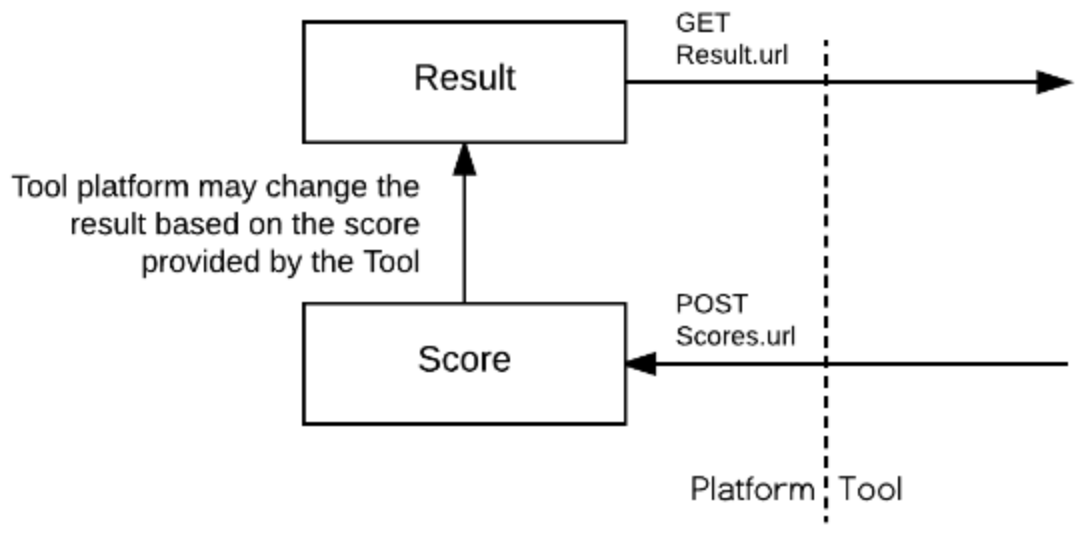
Figure 17 Diagram illustrating the working flow of Result and Score between a platform and a tool.
[그림 17] 플랫폼과 도구 간 결과(Result) 및 점수(Score) 작동 흐름을 나타내는 다이어그램
The Result is the current score within the Tool Consumer for the line item and user i.e. the value currently showing in the cell for that column and user in a typical tabular gradebook. This value can only be read by the tool, as the platform has the final say on what should be a student final score; for example, an instructor may force a grade through a manual entry directly in the gradebook. Or a modifier may be applied (late work, ...).
결과(Result)는 도구 소비자(Tool Consumer) 내에서 특정 라인 아이템과 사용자에 대한 현재 점수를 나타낸다. 이것은 일반적인 표 형식 성적표에서 해당 열과 사용자 셀에 현재 표시되는 값이다. 이 값은 도구에서 읽을 수만 있으며, 플랫폼이 학생의 최종 점수에 대해 최종 결정을 내린다. 예를 들어, 교사가 성적표에서 수동 입력을 통해 점수를 강제로 설정하거나, 지연 제출과 같은 수정자가 적용될 수 있다.
The Score is the last score (or status change) the user got within the tool itself. It is published to the platform so that it may be used to update the current result. This value is write-only.
점수(Score)는 사용자가 도구 내에서 마지막으로 받은 점수(또는 상태 변경)를 나타낸다. 이는 플랫폼에 게시되어 현재 결과(Result)를 업데이트하는 데 사용될 수 있다. 이 값은 쓰기 전용(write-only)이다.
4.2 Datetime values
4.2 날짜 및 시간 값
It's highly recommend that all datetime values sent by both platform and tool be UTC (using either the Z designator or the +00:00 UTC time offset value).
플랫폼과 도구에서 전송하는 모든 날짜 및 시간 값은 UTC로 사용하는 것이 강력히 권장된다. UTC 값은 Z 지시자 또는 +00:00 UTC 시간 오프셋 값을 사용하여 표시해야 한다.
4.3 Coupled vs decoupled line items
4.3 연결된 vs 독립된 라인 아이템
With the Assignment and Grade Services, there are now 2 main models of interaction to create and manage line items:
과제 및 성적 서비스(Assignment and Grade Services)를 통해 라인 아이템을 생성하고 관리하는 두 가지 주요 상호작용 모델이 존재한다.
4.3.1 Declarative:
4.3.1 선언적 모델
The platform creates the line item, usually at the time of the resource link creation. The resource link and line item are coupled. On resource link launch, substitution parameters related to the line item must be passed to the tool. The platform owns the lifecycle of the line item. This is the historical flow for line items lifecycle in LTI.
플랫폼이 라인 아이템을 생성하며, 이는 일반적으로 리소스 링크(resource link)가 생성될 때 이루어진다. 이 경우 리소스 링크와 라인 아이템은 연결된 상태(coupled)로 관리된다. 리소스 링크가 실행될 때, 라인 아이템과 관련된 대체 매개변수(substitution parameters)가 도구로 전달되어야 한다. 라인 아이템의 수명주기는 플랫폼이 관리하며, LTI에서 전통적으로 사용된 라인 아이템 수명주기 흐름이다.
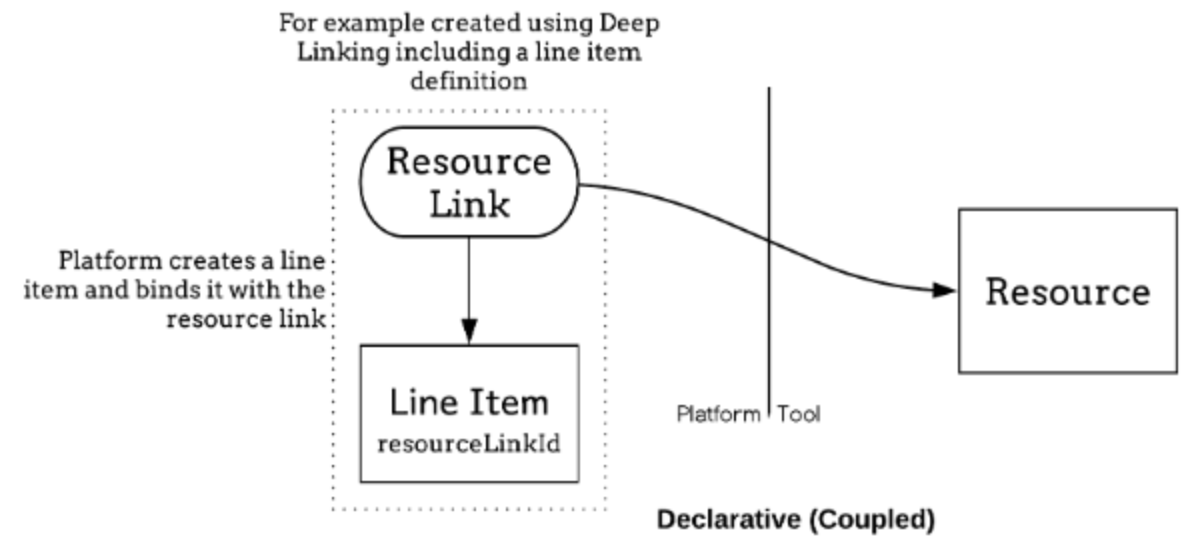
Figure 18 Diagram illustrating the lifecycle of the line item.
[그림 18] 라인 아이템의 수명주기를 나타내는 다이어그램.
4.3.2 Programmatic:
4.3.2 프로그래밍적 모델
The tool uses the line item service to manage its own line items. Those line items are typically not attached to any resource link i.e. it no longer requires a resource link to return grades. This is the decoupled model introduced by this specifications.
도구는 라인 아이템 서비스를 사용하여 자체 라인 아이템을 관리한다. 이러한 라인 아이템은 일반적으로 어떤 리소스 링크(resource link)에도 연결되지 않으며, 즉 성적을 반환하기 위해 리소스 링크가 필요하지 않다. 이 모델은 본 표준에서 도입된 독립된 모델(decoupled model)이다.
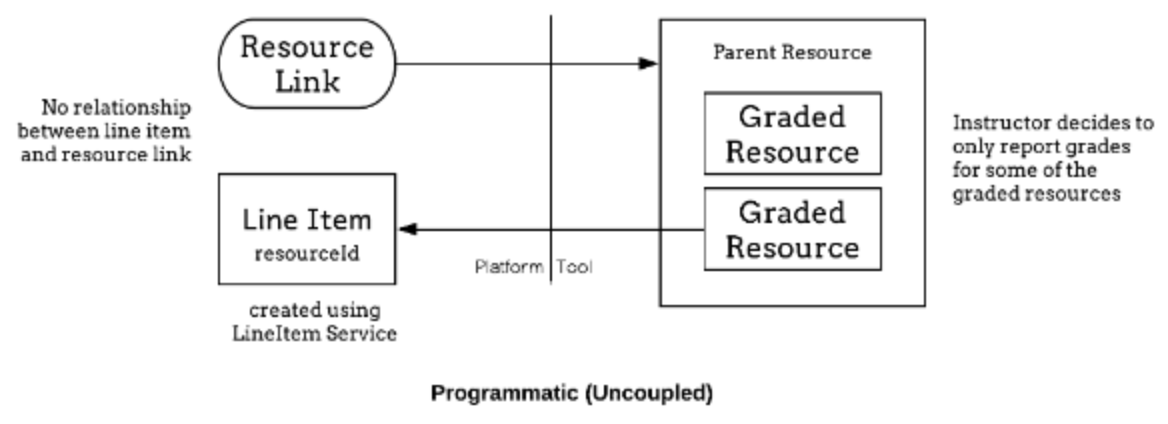
Figure 19 Diagram illustrating programmatic or uncoupled line items.
[그림 19] 프로그래밍적 또는 독립된 라인 아이템을 나타내는 다이어그램.
The decoupled approach offers much greater flexibility to the tool; for example it may push grades obtained through a different channel like a mobile app, or handle more complex tool offering complex experiences made of many activities behind a single link. It however requires an elevated level of trust from the platform which might be cautious to which tools it grants POST on 'LineItems.url'. The tool should prefer the simpler declarative model if it fits its requirement.
독립된 모델(decoupled approach)은 도구에 훨씬 더 큰 유연성을 제공한다. 예를 들어, 도구는 모바일 앱과 같은 다른 채널을 통해 얻은 성적을 전달하거나, 단일 링크 뒤에 여러 활동으로 구성된 복잡한 경험을 제공하는 복잡한 도구를 처리할 수 있다. 그러나 이 접근법은 플랫폼으로부터 높은 수준의 신뢰를 요구하며, 플랫폼은 LineItems.url에 대한 POST 권한을 부여하는 도구에 대해 신중할 수 있다. 도구는 요구 사항에 맞는 경우, 더 간단한 선언적 모델(declarative model)을 선호해야 한다.
4.4 Substitution parameters available on launch
4.4 실행 시 사용 가능한 대체 매개변수
'LineItem.url' can only be resolved if there is only a single associated line item with the resource link. In that case, the corresponding matching parameters MUST be present in the launch data. This is a convenience that simplifies the most common use case and offers a natural migration from Basic Outcome Service. If, however, there is more than one line item, or no direct relationship between the resource link and line items, the platform cannot pass any of those values. The tool will need to use the 'LineItems.url' and filter by either 'resource_link_id', 'resource_id' and/or 'tag' depending on the binding model chosen. The tool should then persist that information to avoid querying the 'lineItems.url' each time a grade operation is needed.
LineItem.url은 리소스 링크와 연결된 라인 아이템이 단 하나만 존재하는 경우에만 해석될 수 있다. 이 경우, 해당하는 매개변수는 반드시(MUST) 실행 데이터에 포함되어야 한다. 이 방법은 가장 일반적인 사용 사례를 간소화하고 기본 결과 서비스(Basic Outcome Service)에서 자연스럽게 마이그레이션할 수 있는 편의성을 제공한다. 그러나 리소스 링크와 여러 라인 아이템이 연결되어 있거나, 리소스 링크와 라인 아이템 간에 직접적인 관계가 없는 경우, 플랫폼은 해당 값을 전달할 수 없다. 이 경우 도구는 LineItems.url을 사용하고, 선택한 바인딩 모델에 따라 resource_link_id, resource_id, 및/또는 tag로 필터링해야 한다. 도구는 이후 점수 작업이 필요할 때마다 LineItems.url을 쿼리하지 않도록 이 정보를 지속적으로 유지(persist)해야 한다.
4.5 Migrating from basic outcomes service
4.5 기본 결과 서비스에서의 마이그레이션
Tools already using the Basic Outcomes service introduced in LTI 1.1 can migrate their implementations to by using the score and result services and, if appropriate, also take advantage of the line item service to add further line items.
LTI 1.1에서 도입된 기본 결과 서비스(Basic Outcomes service)를 이미 사용 중인 도구는 점수 서비스(score service)와 결과 서비스(result service)를 사용하여 구현을 마이그레이션할 수 있다. 필요에 따라 라인 아이템 서비스를 활용하여 추가 라인 아이템을 추가하는 것도 가능하다.
Migration from basic outcome service can be achieved in the following way:
기본 결과 서비스에서의 마이그레이션은 다음과 같은 방식으로 이루어질 수 있다.
| Basic outcome | Assignment and Grade Service |
|---|---|
| lis_outcome_service_url, lis_result_sourcedid | LineItem.url, user_id |
| ReplaceResult | POST score with scoreGiven=normalizedScore, scoreMaximum=1 and gradingProgress: FullyGraded to {LineItem.url}/scores |
| DeleteResult | POST score with no score, gradingProgress: NotReady, activityProgress: Initialized to {LineItem.url}/scores |
| ReadResult | GET from {LineItem.url}/results?user_id={user_id}, returns an array of at most 1 result |
The associated line item is the same as the one which would be accessed using the Basic Outcomes service if the platform offered both services, in which case the services could be used interchangeably.
연결된 라인 아이템은 플랫폼이 기본 결과 서비스(Basic Outcomes service)와 두 서비스를 모두 제공하는 경우, 기본 결과 서비스를 사용하여 접근할 수 있는 것과 동일하다. 이 경우 두 서비스는 상호 교환적으로 사용할 수 있다.
4.6 Submission Review Message
4.6 제출 검토 메시지
The Submission Review Message is a companion specification which allows launches from a result in the platform's gradebook (or wherever the result is displayed) back to the Tool in the context of the result; for example, a student can see an 82% and click on the grade to actually see the submission, or an instructor can directly access the student's submission to review and grade it.
제출 검토 메시지(Submission Review Message)는 플랫폼의 성적표(gradebook) 또는 결과가 표시되는 곳에서 결과의 컨텍스트로 도구(Tool)로 다시 이동할 수 있는 실행할 수 있는 보조 표준(companion specification)이다. 예를 들어, 학생은 82%의 점수를 보고 해당 점수를 클릭하여 실제 제출물을 확인할 수 있으며, 교사는 학생의 제출물을 직접 검토하고 채점하기 위해 접근할 수 있다.
The ability for the Tool to exchange statuses in addition to score values offers the infrastructure for a richer integration; for example:
도구가 점수 값 외에도 상태를 교환할 수 있는 기능은 더 풍부한 통합을 위한 기반을 제공한다. 예를 들어,
- The tool posts a Score with a gradingProgress: pendingManual도구가 gradingProgress: pendingManual 상태로 점수를 POST한다.
- The platform decorates the gradebook cell with a needs attention indicator플랫폼이 성적표 셀에 "주의 필요(needs attention)" 표시를 추가한다.
- The instructor can then click on the indicator교사가 이 표시를 클릭한다.
- An LtiSubmissionReviewRequest launches the user into the grading interface of the tool, directly in context of the activity and student to be gradedLtiSubmissionReviewRequest가 실행되며, 사용자를 도구의 채점 인터페이스로 이동시킨다. 이 인터페이스는 채점할 활동과 학생의 컨텍스트를 직접 보여준다.
- After grading, the tool sends a score update through a POST to the Score endpoint and redirects the user back the Learning Platform using the return URL included in the launch채점이 완료되면, 도구가 점수 업데이트를 점수 엔드포인트(Score endpoint)에 POST로 전송하고, 실행에 포함된 반환 URL을 사용하여 사용자를 학습 플랫폼으로 다시 리디렉션한다.
- The tool platform updates the grade and status of the activity for that student 도구 플랫폼이 해당 학생의 활동 성적 및 상태를 업데이트한다.
4.7 Scores and gradingProgress
4.7 점수 및 gradingProgress
The Tool must set the 'gradingProgress' to 'FullyGraded' when communicating the actual student's final score. The platform may decide to not record any score that is not final ('FullyGraded').
도구는 학생의 최종 점수를 전달할 때 gradingProgress를 반드시 FullyGraded로 설정해야 한다. 플랫폼은 최종 점수(FullyGraded)가 아닌 점수를 기록하지 않기로 결정할 수 있다.
4.8 Managing Multiple Line Items
4.8 여러 라인 아이템 관리
These new services enable a tool to return multiple results to a tool consumer for a single resource. For example, a percentage progress measure could be maintained as well as the grade achieved in the tool consumer gradebook. The typical workflow for achieving this is as follows (assuming that the LineItem, Score and Result services are enabled for the tool by the tool consumer, and the 'LineItems.url' capability has been agreed between the parties):
이 새로운 서비스는 도구가 단일 리소스에 대해 여러 결과를 도구 소비자(Tool Consumer)에게 반환할 수 있다. 예를 들어, 도구 소비자의 성적표에 기록된 성적과 함께 진행 상태를 백분율로 유지할 수 있다. 이를 구현하기 위한 일반적인 워크플로는 다음과 같다. (라인 아이템(LineItem), 점수(Score), 결과(Result) 서비스가 도구 소비자에 의해 도구에 대해 활성화되었고, LineItems.url 기능이 양 당사자 간에 합의되었다고 가정)
- On receipt of the first launch from a resource link, the tool sends a 'GET' request to the 'LineItems.url'. It may specify the 'resource_link_id' query parameter to only get the line items associated with the link. The response is checked for any existing line items and, for those which are not present (based on the value of their 'tag' or 'resourceId' element), the tool sends a POST request to the line item container endpoint with the 'resourceLinkId' element set to the value of the 'resource_link_id' message parameter and an appropriate value for the 'tag' element; for example, "grade" or "progress". The 'id' elements is extracted from the response(s) received and saved for future reference. It will serve as the base to get results and post scores.리소스 링크에서 처음 실행을 수신하면, 도구는 LineItems.url에 GET 요청을 보낸다. 이때 resource_link_id 쿼리 매개변수를 지정하여 링크와 연결된 라인 아이템만 가져올 수 있다. 응답에서 기존 라인 아이템을 확인하고, tag 또는 resourceId 값에 따라 존재하지 않는 라인 아이템에 대해 도구는 라인 아이템 컨테이너 엔드포인트에 POST 요청을 보낸다. 이 요청은 resourceLinkId 요소를 resource_link_id 메시지 매개변수 값으로 설정하고, tag 요소에 "grade" 또는 "progress"와 같은 적절한 값을 설정한다. 응답에서 반환된 id 요소를 추출하여 저장하고, 이후 참조를 위해 사용한다. 이 id는 결과를 가져오거나 점수를 게시하는 기본 경로로 사용된다.
- As a learner progresses through the resource, scores may be 'POST'ed to the 'scores' endpoint.학습자가 리소스를 진행함에 따라 점수는 scores 엔드포인트에 POST 될 수 있다.
- When the learner completes the activity, score may be 'POST'ed to the 'scores' endpoint with an 'activityProgress' of 'Completed'.학습자가 활동을 완료하면, 점수는 scores 엔드포인트에 activityProgress가 Completed로 설정된 상태로 POST 될 수 있다.
- When the final score is set on the activity, score must 'POST'ed to the 'scores' endpoint with a 'gradingProgress' of 'FullyGraded'.활동에 최종 점수가 설정되면, 점수는 gradingProgress가 FullyGraded로 설정된 상태로 scores 엔드포인트에 반드시 POST 되어야 한다.
Note: that for simpler interaction, there may only need to be a single POST to scores, when the activity is completed and graded.
더 간단한 상호작용을 위해 활동이 완료되고 채점된 경우, scores에 단일 POST만 필요할 수 있다.
Further, line items can be created in the same way; giving each a unique 'tag' or 'resourceId' value allows their purpose to be identified when requesting a line item container and, for example, when a resource link has been copied within the tool consumer (thereby giving it a new resource link ID).
또한, 라인 아이템은 동일한 방식으로 생성될 수 있다. 각 라인 아이템에 고유한 tag 또는 resourceId 값을 부여하면, 라인 아이템 컨테이너를 요청하거나, 예를 들어 도구 소비자 내에서 리소스 링크가 복사되어 새로운 리소스 링크 ID를 가지게 된 경우 그 목적을 식별할 수 있다.
The flow is similar when a binding to a resource ID rather than to a resource link ID is used.
리소스 링크 ID가 아닌 리소스 ID와 바인딩하는 경우에도 흐름은 유사하다.
4.9 Line Item Declaration through Deep Linking Deep Linking
4.9 을 통한 라인 아이템 선언
Alternatively to being created programmatically using the LineItems Service, line items may also be created declaratively by embedding their definitions within the LTI link definition as part of a Deep Linking message exchange (see https://www.imsglobal.org/spec/lti-dl/v2p0).
라인 아이템은 LineItems Service를 사용하여 프로그래밍적으로 생성하는 것 외에도, Deep Linking 메시지 교환의 일부로 LTI 링크 정의 내에 라인 아이템 정의를 포함하여 선언적으로 생성할 수도 있다. (참조: https://www.imsglobal.org/spec/lti-dl/v2p0)
A. Revision history
A. 수정 이력
This section is non-normative.
이 섹션은 비규범적(non-normative)이다.
LTI Assignment and Grade Services v2.0 follows from, and replaces, the Outcomes Management v1.0 specification and the Gradebook Services specification (later rebranded as IMS LTI Assignment and Grades Services).
LTI Assignment and Grade Services v2.0은 Outcomes Management v1.0 표준과 Gradebook Services 표준을 기반으로 하며 이를 대체한다. 나중에 IMS LTI Assignment and Grades Services로 이름 변경됨
A.1 Version History
A.1 버전 이력
| Spec Version No. | Document Version No. | Release Date | Comments |
|---|---|---|---|
| Outcomes Management v1.0 | 5 January 20015 | The first version of the Outcomes Management specification, including the Basic Outcomes service model 첫 번째 Outcomes Management 표준 버전은 Basic Outcomes 서비스 모델을 포함한다. | |
| Assignment and Grade Services v2.0 | 16 April 2019 | Replaces the Outcomes Management and Basic Outcomes specifications. Outcomes Management와 Basic Outcomes 표준을 대체한다. | |
| Assignment and Grade Services v2.0 | 24 June 2020 | Errata: corrects the reference to the Submission Review Message document in section 1.5. Errata: 섹션 1.5에서 Submission Review Message 문서에 대한 참조를 수정. | |
| Assignment and Grade Services v2.0 | 20 October 2020 | Errata: removes references to LTI 2.0 and 1.1; simplification and clarification on usage of optional; additional examples; formatting. Errata: LTI 2.0 및 1.1에 대한 참조 제거, 선택적 사용 방식의 단순화 및 명확화, 추가 예제 제공, 서식 수정. | |
| Assignment and Grade Services v2.0 | 1 July 2021 | Errata: clarifies wording around FullyGraded. Errata: FullyGraded와 관련된 문구를 명확히 함. | |
| Assignment and Grade Services v2.0 | 2 | 24 January 2023 | Clarification: Line Item service PUT; platform MUST respond with JSON. Clarification: Line Item 서비스 PUT 작업에 대해 플랫폼은 반드시(MUST) JSON으로 응답해야 한다. Add gradesReleased to LineItem. (docs) 추가: gradesReleased 속성을 LineItem에 추가. Clarification: The userId is the LTI User ID for the score recipient. (docs) Clarification: userId는 점수 수신자를 위한 LTI 사용자 ID임을 명확히 함. Add startedAt and submittedAt to Score#submission. (docs) 추가: startedAt 및 submittedAt 속성을 Score#submission에 추가. Clarification: activityProgress and gradingProgress. (docs) Clarification: activityProgress 및 gradingProgress에 대한 설명을 명확히 함. Update some descriptions to new Submission Review name. Submission Review의 새로운 명칭에 맞게 일부 설명 업데이트. Minor grammar corrections. 문법 오류 수정. |
| Assignment and Grade Services v2.0 | 3 | 23 January 2024 | Clarification: Line Item Id is the service endpoint URL for the line item Clarification: Line Item ID는 라인 아이템의 서비스 엔드포인트 URL임을 명확히 함. Updated to newer 1Edtech Respec template. 최신 1Edtech Respec 템플릿으로 업데이트. |
B. References
B. 참고문헌
B.1 Normative references
B.1 규범적 참조
[AGS-OpenAPI]
Learning Tools Interoperability® Assignment and Grade Services Version 2.0 OpenAPI Specs. Colin Smythe. IMS Global Learning Consortium. URL: https://www.imsglobal.org/spec/lti-ags/v2p0/openapi/
[ISO8601]
Representation of dates and times. ISO 8601:2004.. International Organization for Standardization (ISO). 2004. ISO 8601:2004. URL: http://www.iso.org/iso/catalogue_detail?csnumber=40874
[LIS-20]
IMS Global Learning Information Services v2.0. L. Feng; W. Lee; C. Smythe. IMS Global Learning Consortium. June 2011. URL: https://www.imsglobal.org/lis/
[LTI-11]
IMS Global Learning Tools Interoperability® Implementation Guide. G. McFall; M. McKell; L. Neumann; C. Severance. IMS Global Learning Consortium. March 13, 2012. URL: https://www.imsglobal.org/specs/ltiv1p1
[LTI-13]
IMS Global Learning Tools Interoperability® Core Specification v1.3. C. Vervoort; N. Mills. IMS Global Learning Consortium. April 2019. IMS Final Release. URL: https://www.imsglobal.org/spec/lti/v1p3/
[LTI-CERT-13]
IMS Global Learning Tools Interoperability® Advantage Conformance Certification Guide. D. Haskins; M. McKell. IMS Global Learning Consortium. April 2019. IMS Final Release. URL: https://www.imsglobal.org/spec/lti/v1p3/cert/
[LTI-IMPL-13]
IMS Global Learning Tools Interoperability® Advantage Implementation Guide. C. Vervoort; J. Rissler; M. McKell. IMS Global Learning Consortium. April 2019. IMS Final Release. URL: https://www.imsglobal.org/spec/lti/v1p3/impl/
[RFC2119]
Key words for use in RFCs to Indicate Requirement Levels. S. Bradner. IETF. March 1997. Best Current Practice. URL: https://www.rfc-editor.org/rfc/rfc2119
[RFC8288]
Web Linking. M. Nottingham. IETF. October 2017. Proposed Standard. URL: https://httpwg.org/specs/rfc8288.html
C. List of Contributors
C. 기여자 목록
The following individuals contributed to the development of this document:
이 문서 개발에 기여한 사람들은 다음과 같다.
| Name | Organization | Role |
|---|---|---|
| Paul Gray | Learning Objects | |
| Viktor Haag | D2L | |
| Dereck Haskins | IMS Global | |
| Martin Lenord | Turnitin | |
| Karl Lloyd | Instructure | |
| Mark McKell | IMS Global | Editor |
| Nathan Mills | Instructure | |
| Bracken Mosbacker | Lumen Learning | |
| Padraig O'hiceadha | HMH | |
| Marc Phillips | Instructure | |
| Eric Preston | Blackboard | Editor |
| James Rissler | IMS Global | Editor |
| James Tse | ||
| Charles Severance | University of Michigan | |
| Lior Shorshi | McGraw-Hill Education | |
| Colin Smythe | IMS Global | |
| Claude Vervoort | Cengage | Editor |
한국어 번역.
| Name | Organization | Role |
|---|---|---|
| 조용상 | 1EdTech Korea 의장 | 한림대 객원교수| 데이터드리븐, 위키드스톰, 에딘트 수석 아키텍처 | 번역 |
| 이정준 | 위키드스톰 | 검토 |
| 고동완 | 데이터드리븐 | 번역 |
| 김기범 | 데이터드리븐 | 번역 |
| 김동근 | 데이터드리븐 | 번역 |
| 원동일 | 에딘트 | 검토 |
| 이지훈 | 에딘트 | 검토 |