
Learning Tools Interoperability (LTI)® Advantage Implementation Guide
학습 도구 상호운용성 확장 기능 구현 가이드
| Date Issued: | 16 April 2019 |
|---|---|
| Status: | This document is made available for adoption by the public community at large. |
| This version: | https://www.imsglobal.org/spec/lti/v1p3/impl/ |
| Internal reference: | 1ETK-LTI-IMPL-13:2025 |
|---|---|
| Proposal date: | 25 October 2025 |
| Adoption date: | 25 December 2025 |
| Translation completed: | December 2025 |
문서 식별 안내. 1ETK-LTI-IMPL-13:2025는 1EdTech Korea의 내부 관리번호이며 1EdTech Consortium이 부여한 공식 표준번호가 아니다. 기술적 해석과 적합성 판단에는 1EdTech Consortium의 영어 원문을 기준으로 한다.
이 표준의 한국어 정보 및 공개는 2023년도 정부(과학기술정보통신부)의 재원으로 정보통신기획평가원의 지원을 받아 수행된 연구임(No.RS-2023-00229780, 맞춤형 교육을 위한 과정 중심 평가(학습진단) 인공지능 기술 개발)
요약
1. Introduction
1. 소개
This guide is provided to lead you to successful implementation of the LTI v1.3 specification and the services included in LTI Advantage. More than that, this guide helps you along the way to achieving conformance certification.
이 가이드는 LTI v1.3 표준과 LTI Advantage에 포함된 서비스를 성공적으로 구현할 수 있도록 안내한다. 뿐만 아니라, 이 가이드는 적합성 인증(conformance certification)을 달성하는 데에도 도움을 준다.
If your interested in learning more about the LTI Advantage program read more here.
LTI Advantage 프로그램에 대해 더 알고 싶다면 원문을 참고할 수 있다.
Various Acronyms that are referred to in this document can be found here.
이 문서에서 언급되는 다양한 약어는 원문에서 확인할 수 있다.
1.1 Message versus Service
1.1 메시지와 서비스의 차이
An understanding of the difference between a message and a service within the LTI context is important.
LTI 컨텍스트에서 메시지와 서비스의 차이를 이해하는 것은 중요하다.
LTI Advantage includes three feature-based services: Assignment and Grade Services v2.0 [LTI-AGS-20], Names and Role Provisioning Services v2.0 [LTI-NRPS-20], and Deep Linking v2.0 [LTI-DL-20] (technically implemented as a type of message).
LTI Advantage는 다음과 같은 세 가지 기능 기반 서비스를 포함한다. Assignment and Grade Services v2.0 [LTI-AGS-20], Names and Role Provisioning Services v2.0 [LTI-NRPS-20], Deep Linking v2.0 [LTI-DL-20].
기술적으로 메시지의 한 유형으로 구현됨
A service is a call that occurs between a Tool and Platform when one 'pulls' data from the other (using an HTTP GET) or 'pushes' data (using HTTP PUT or POST) to the other.
서비스는 도구(Tool)와 플랫폼(Platform) 간의 호출로, 한쪽이 다른 쪽으로부터 데이터를 '가져오기(pull)' 위해 HTTP GET을 사용하거나, 데이터를 '보내기(push)' 위해 HTTP PUT 또는 POST를 사용하는 경우에 발생한다.
A message is a request or a response between a Tool and a Platform.
메시지는 도구와 플랫폼 간의 요청(request) 또는 응답(response)이다.
1.2 Specification Documents
1.2 표준 문서
The LTI Advantage specification documents are available on the 1EdTech website:
LTI Advantage 표준 문서는 1EdTech 웹사이트에서 확인할 수 있다.
- LTI Core 표준 v1.3
[LTI-13] - LTI Advantage SpecificationsLTI Advantage 표준
- Assignment and Grade Services v2.0(과제 및 성적 서비스)
[LTI-AGS-20]- OpenAPI Swagger 보기
- Names and Role Provisioning Services v2.0(이름 및 역할 프로비저닝 서비스)
[LTI-NRPS-20] - Deep Linking v2.0(딥 링킹)
[LTI-DL-20]
- 적합성 인증 가이드
[LTI-CERT-13] - 1EdTech 보안 프레임워크 v1.0
[SEC-10]
1.3 Where Can I Get Help?
1.3 도움을 받을 수 있는 곳은?
If you have questions or need help with implementing LTI or achieving conformance certification, here are some available resources:
LTI 구현이나 적합성 인증(conformance certification)과 관련하여 질문이 있거나 도움이 필요하다면, 다음 리소스를 참고할 수 있다.
- Public Forum for all members of the 1EdTech community.공개 포럼: 1EdTech 커뮤니티의 모든 구성원이 사용할 수 있는 포럼.
- Affiliate Forum for Learning Tools and Content Alliance, Affiliate, and Contributing Members.Affiliate 포럼: Learning Tools and Content Alliance, Affiliate 및 Contributing Members를 위한 포럼.
- 1EdTech Contributing Members have access to private github repositories and a slack channel for LTI Project Group discussions and collaborations. Contact an 1EdTech staff member to gain access.1EdTech Contributing Members 전용 리소스: LTI 프로젝트 그룹 논의와 협업을 위해 비공개 GitHub 저장소 및 Slack 채널에 액세스할 수 있다. 액세스 권한을 얻으려면 1EdTech 직원에게 문의해야 한다.
- LTI Advantage FAQs If you have a question, an answer may already be waiting. If not, please contact us.LTI Advantage FAQ: 질문이 있는 경우, 답변이 이미 준비되어 있을 수 있다. 그렇지 않다면 문의할 수 있다.
1.4 Conformance Certification
1.4 적합성 인증
1EdTech offers a process for testing the conformance of products using the 1EdTech certification test suite. Certification designates passing a set of tests that verify the standard has been implemented correctly and guarantees a product’s interoperability across hundreds of other certified products. The LTI Advantage Conformance Certification Guide [LTI-CERT-13] provides details about the testing process, requirements, and how to get started.
1EdTech는 1EdTech 인증 테스트 도구를 사용하여 제품의 적합성을 테스트하는 과정을 제공한다. 인증은 표준이 올바르게 구현되었음을 검증하는 일련의 테스트를 통과했음을 의미하며, 수백 개의 다른 인증된 제품 간의 상호운용성을 보장한다. LTI Advantage Conformance Certification Guide [LTI-CERT-13]는 테스트 과정, 요구사항, 그리고 시작 방법에 대한 세부 정보를 제공한다.
Conformance certification is much better than claims of “compliance," since the only way 1EdTech can guarantee interoperability is by obtaining certification for the latest version of the standard. Only products listed in the official 1EdTech Certified Product Directory can claim conformance certification. 1EdTech certification provides the assurance that a solution will integrate securely and seamlessly into an institution's digital learning ecosystem.
적합성 인증은 단순히 "준수(compliance)"를 주장하는 것보다 훨씬 더 우수하다. 1EdTech가 상호운용성을 보장할 수 있는 유일한 방법은 최신 표준 버전에 대해 인증을 받는 것이다. 오직 1EdTech의 Certified Product Directory에 등재된 제품만이 적합성 인증을 주장할 수 있다. 1EdTech 인증은 솔루션이 기관의 디지털 학습 생태계에 안전하고 원활하게 통합될 것임을 보장한다.
In order to become LTI certified a paid 1EdTech membership is necessary. Here's why: while conformance certification provides a "seal" for passing prescribed tests it is much more than that. It is a commitment by a supplier to the 1EdTech community for continuous support for achieving "plug and play" integration. Certification implies ongoing community commitment to resolve problems, revise implementations and retest as need. For that reason, only 1EdTech Contributing Members, Affiliate Members and Learning Tools and Content Alliance members are eligible to apply for conformance certification. Details and benefits of membership are listed here: https://www.imsglobal.org/imsmembership.html.
LTI 인증을 받기 위해서는 유료 1EdTech 회원 자격이 필요하다. 그 이유는 다음과 같다. 적합성 인증은 지정된 테스트를 통과했음을 나타내는 "인증 마크"를 제공할 뿐만 아니라, "플러그 앤 플레이(plug and play)" 연계를 달성하기 위한 1EdTech 커뮤니티에 대한 공급업체의 지속적인 지원 약속을 의미한다. 인증은 문제를 해결하고, 구현을 수정하며, 필요에 따라 다시 테스트하는 등의 지속적인 커뮤니티 의무를 포함한다. 이러한 이유로, 오직 1EdTech Contributing Members, Affiliate Members, Learning Tools and Content Alliance Members만이 적합성 인증을 신청할 자격이 있다. 회원 자격의 세부 정보와 혜택은 여기에서 확인할 수 있다. https://www.imsglobal.org/imsmembership.html.
This document is an informative resource in the Document Set of the LTI Advantage specification [LTI-13]. As such, it does not include any normative requirements. Occurrences in this document of terms such as MAY, MUST, MUST NOT, SHOULD or RECOMMENDED have no impact on the conformance critera for implementors of this specification.
이 문서는 LTI Advantage 표준(LTI-13) 문서 세트의 정보성 자료이다. 따라서 규범적(normative) 요구사항은 포함하지 않는다. 이 문서에 등장하는 MAY, MUST, MUST NOT, SHOULD, RECOMMENDED와 같은 용어는 이 표준의 구현자를 위한 적합성 기준에 영향을 미치지 않는다.
1.5 Product Directory Listing
1.5 제품 디렉토리 등재
The 1EdTech Certified Product Directory is the official listing of products that have passed 1EdTech interoperability. Products that are listed in this directory are guaranteed to meet the 1EdTech standards for which they have passed testing. If you experience an integration issue with a product listed here, 1EdTech will work with the supplier to resolve the problem. If a product is NOT listed here it has either not passed 1EdTech testing or its certification has expired.
1EdTech 인증 제품 디렉토리는 1EdTech 상호운용성 테스트를 통과한 제품의 공식 목록이다. 이 디렉토리에 등재된 제품은 테스트를 통과한 1EdTech 표준을 충족함이 보장된다. 만약 이 목록에 등재된 제품과의 통합 과정에서 문제가 발생할 경우, 1EdTech는 해당 공급업체와 협력하여 문제를 해결할 것이다. 반면, 이 디렉토리에 등재되지 않은 제품은 1EdTech 테스트를 통과하지 않았거나 인증이 만료된 것이다.
2. LTI Advantage Use Cases
2. LTI Advantage 활용 사례
2.1 Value Statement
2.1 가치 명제
Institutions adopting educational technology solutions want standardized ways to enable the seamless integration of a diverse set of educational tool providers and learning platforms. Tool creators and platforms also want standardized approaches to facilitate this seamless access between solutions. LTI Advantage provides a standardized approach that allows tools and platforms to deliver to customers a robust integration with a consistent user experience across many platforms while lowering the cost to support and maintain these integrations.
에듀테크 솔루션을 채택하는 기관들은 다양한 에듀테크 도구 제공업체와 학습 플랫폼을 매끄럽게 통합할 수 있는 표준화된 방법을 원한다. 도구 제작자와 플랫폼 역시 이러한 통합을 용이하게 하는 표준화된 접근 방식을 선호한다. LTI Advantage는 도구와 플랫폼이 다양한 플랫폼에서 일관된 사용자 경험을 제공하면서도 강력한 통합을 고객에게 전달할 수 있도록 지원하며, 이러한 통합의 지원 및 유지비용을 절감할 수 있는 표준화된 접근 방식을 제공한다.
2.2 Use Cases - Digital Publisher
2.2 활용 사례 - 디지털 출판사
2.2.1 Case: Instructor adds publisher digital resources to course
2.2.1 사례: 교사가 출판사의 디지털 리소스를 강좌에 추가
Description: An instructor has adopted a digital solution from a publisher for use in an online and blended learning experience. The instructor would like to be able to use different resources in different ways. Some resources are structured as a course and the instructor would like to have the course retain its structure in the platform. The instructor would like to use other resources as specific discrete learning objects in a blended learning fashion.
설명: 교사는 온라인 및 혼합형 학습 경험을 위해 출판사의 디지털 솔루션을 채택했다. 교사는 다양한 리소스를 다양한 방식으로 활용하고자 한다. 일부 리소스는 강좌(course) 형식으로 구성되어 있으며, 교사는 플랫폼에서 강좌의 구조를 유지하고 싶어 한다. 다른 리소스는 특정한 개별 학습 객체로 활용하며 혼합형 학습 방식으로 사용하고 싶어 한다.
User Experience: The instructor logs into the institution’s LMS platform that has been configured with the publisher’s LTI tool. The instructor launches the publisher’s tool within the platform and selects the digital product to view a list of available resources. The instructor selects items for inclusion in the course and submits the selection(s). The instructor has the flexibility to pick and choose which resources to select and can easily select all or a subset of resources. This streamlines the instructor’s flow for completing this activity and provides them complete control over the design or the learning activity for their students. The result is that content links are added to the LMS course.
사용자 경험: 교사는 출판사의 LTI 도구가 설정된 기관의 LMS 플랫폼에 로그인한다. 교사는 플랫폼 내에서 출판사의 도구를 실행하여 디지털 제품을 선택하고 사용 가능한 리소스 목록을 본다. 교사는 강좌에 포함할 항목을 선택한 후 이를 제출한다. 교사는 필요한 리소스를 선택하거나 전체 또는 일부 리소스를 쉽게 선택할 수 있는 유연성을 가진다. 이 활동을 완료하기 위한 교사의 워크플로우를 간소화하며, 학생들을 위한 학습 활동의 설계 및 구성을 완전히 제어할 수 있도록 한다. 그 결과, 콘텐츠 링크가 LMS 강좌에 추가된다.
LTI Specifications: LTI Core, Deep Linking.
LTI 표준: LTI Core, Deep Linking
2.2.2 Case: Instructor adds gradable publisher digital activities to course
2.2.2 사례: 교사가 채점 가능한 출판사 디지털 활동을 강좌에 추가
Description: An instructor has adopted a digital solution from a publisher for use in an online or blended learning experience. The instructor wants to ensure that grades are always up to date, even if grading occurs outside the flow of a student launch of a resource.
설명: 교사는 온라인 또는 혼합형 학습 경험을 위해 출판사의 디지털 솔루션을 채택했다. 교사는 리소스를 학생이 실행하지 않는 흐름에서도 항상 최신 상태의 성적을 유지할 수 있기를 원한다.
User Experience: The student logs into the institution’s LMS platform that has been configured with the publisher’s LTI tool. The student is working on a course that consists of learning resources from the publisher. The student completes two learning activities during this session. One of the activities has a short five question quiz that is machine graded. The tool automatically creates a line item for this quiz in the platform’s gradebook and provides the platform the maximum score and the student’s result which is immediately visible to the course instructor. The next item is a short essay that requires manual grading in the tool. The tool also creates a line item for this activity in the platform gradebook that shows the instructor that it is not a final grade and is pending a manual score. When the scoring is complete in the tool, the score is sent to the platform gradebook immediately and does not require any interaction by the student or instructor in the LMS platform to do so.
사용자 경험: 학생은 출판사의 LTI 도구가 설정된 기관의 LMS 플랫폼에 로그인한다. 학생은 출판사의 학습 리소스로 구성된 강좌를 진행한다. 이 세션 동안 학생은 두 가지 학습 활동을 완료한다. 첫 번째 활동은 5개의 짧은 문제로 구성된 퀴즈이며, 자동 채점된다. 도구는 플랫폼의 성적표(gradebook)에 이 퀴즈에 대한 항목을 자동으로 생성하고, 최대 점수와 학생의 결과를 플랫폼에 제공한다. 이 결과는 즉시 교사가 확인할 수 있다. 두 번째 활동은 짧은 에세이로, 도구 내에서 수동 채점이 필요하다. 도구는 이 활동에 대한 항목도 성적표에 생성하며, 교사에게 해당 항목이 최종 점수가 아니며 수동 채점이 필요하다는 것을 보여준다. 채점이 도구 내에서 완료되면, 점수는 플랫폼의 성적표로 즉시 전송되며, 학생이나 교사가 LMS 플랫폼에서 별도의 작업을 수행할 필요가 없다.
LTI Specifications: LTI Core, Deep linking, Assignment and Grade Services.
LTI 표준: LTI Core, Deep Linking, Assignment and Grade Services.
2.2.3 Case: Instructor reviews student engagement with materials
2.2.3 사례: 교사가 학생의 학습 자료 활용도를 검토
Description: For publisher resources, the instructor may wish to see which students have viewed or engaged with the material. For this to happen, the Tool requests the course roster from the Platform in order to display the list of all students. The Tool then uses its information about student access to show which have engaged with the material and which have not.
설명: 출판사의 리소스와 관련하여 교사는 어떤 학생이 자료를 확인하거나 활용했는지 확인하고 싶을 수 있다. 이를 위해, 도구(Tool)는 플랫폼(Platform)에서 강좌 수강생 명단(course roster)을 요청하여 모든 학생의 목록을 표시한다. 그런 다음 도구는 학생의 접근 정보를 활용해 어떤 학생이 자료를 활용했는지, 활용하지 않았는지를 보여준다.
User Experience: The instructor accesses the Tool and navigates to a place where she can review student engagement. She is able to review summary information of the materials or the students to determine engagement with the materials.
사용자 경험: 교사는 도구에 접속하여 학생의 자료 활용도를 검토할 수 있는 화면으로 이동한다. 교사는 자료 또는 학생별 요약 정보를 검토하여 자료 활용도를 확인할 수 있다.
LTI Specifications: LTI Core, Names and Role Provisioning Services.
LTI 표준: LTI Core, Names and Role Provisioning Services.
2.3 Use Cases - Assessment Tool Providers
2.3 활용 사례 - 평가 도구 제공업체
2.3.1 Case: Instructor creates individual assessments in course
2.3.1 사례: 교사가 강좌에서 개별 평가 문항을 생성
Description: When a Tool is used for assessment, it’s common for there to be multiple assessments that might be used in a particular course. It’s preferable that each assessment item can be seen and managed individually within the Platform’s course outline or learning sequence. This is preferable to an experience where all of the assessments for a given Tool must be grouped together under a single launch, or where the instructor has to manage custom LTI parameters to create this experience.
설명: 학습 도구(Tool)가 평가(assessment) 용도로 사용될 때, 특정 강좌에서 여러 개의 평가 문항이 사용되는 경우가 일반적이다. 각 평가 문항이 플랫폼(Platform)의 강좌 개요(course outline) 또는 학습 순서(learning sequence) 내에서 개별적으로 확인되고 관리되는 것이 바람직하다. 이와 같은 방식은 모든 평가 문항이 하나의 실행(시험) 단위로 묶거나, 교사가 이러한 경험을 제공하기 위해 사용자 정의 LTI 매개변수를 직접 관리하는 방식보다 더 많이 활용된다.
User Experience: The instructor starts the add content or activity workflow of the Platform and selects the Tool. The instructor creates an assessment in the Tool. The Tool adds the resource link for the specific assessment into the Platform’s course outline or learning sequence. The instructor can then move that assessment around into the proper location in the course outline or learning sequence. Other assessments created by the same Tool can be moved independently in the outline or sequence.
사용자 경험: 교사는 플랫폼에서 콘텐츠나 활동 추가 워크플로우를 시작하고, 도구를 선택한다. 교사는 도구 내에서 평가 문항을 생성한다. 도구는 특정 평가 문항에 대한 리소스 링크를 플랫폼의 강좌 개요 또는 학습 순서에 추가한다. 이후 교사는 해당 평가 문항을 강좌 개요 또는 학습 순서의 적절한 위치로 이동시킬 수 있다. 동일한 도구로 생성된 다른 평가 문항도 개요나 순서에서 독립적으로 이동할 수 있다.
LTI Specifications: LTI Core, Deep Linking
LTI 표준: LTI Core, Deep Linking
2.3.2 Case: Instructor sees student submission status
2.3.2 사례: 교사가 학생 제출 상태를 확인
Description: For a given assessment, the instructor may wish to see which students have submitted and which have not. For this to happen, the Tool requests the course roster from the Platform in order to display the list of all students. The Tool then uses its information about student submissions to show which have submitted and which have not.
설명: 평가를 위해 교사는 어떤 학생들이 과제를 제출했는지, 제출하지 않았는지를 확인하고 싶을 수 있다. 이를 위해 도구는 플랫폼에서 강좌의 참가자 명단을 요청하여 모든 학생들의 목록을 표시한다. 그런 다음, 도구는 학생들의 제출 정보를 사용하여 과제를 제출한 학생들과 제출하지 않은 학생들을 표시한다.
User Experience: The instructor accesses an assessment created by a Tool. She is able to see the list of students in the course and which have submitted the assignment to the Tool and which students have not.
사용자 경험: 교사는 도구를 통해 생성된 평가에 접근한다. 교사는 강좌에 속한 학생들의 목록을 확인하고, 도구를 통해 과제를 제출한 학생과 제출하지 않은 학생들을 구별할 수 있다.
LTI Specifications: LTI Core, Names and Role Provisioning Services
LTI 표준: LTI Core, Names and Role Provisioning Services
2.3.3 Case: Instructor grades student submissions for an assessment
2.3.3 사례: 교사가 평가에 대한 학생 제출물을 채점
Description: The grading workflow for an assessment Tool is often entirely in the Tool. However, this grade is often then used in the Platform to aggregate score information from across Tools and solutions, apply calculations or scales, present an aggregate grade to the student, and sometimes report to another system of record (SIS). Therefore, the Tool must interact with the Platform gradebook in a robust, secure, and constrained way where the Tool has full control over the records associated with the Tool but not other parts of the Platform’s gradebook.
설명: 평가 도구의 성적 처리 워크플로는 주로 도구 내에서 이루어진다. 그러나 이렇게 처리한 성적은 종종 플랫폼에서 다른 도구와 솔루션 전반의 점수를 집계하고, 계산이나 척도를 적용하며, 학생에게 종합 성적을 제공하거나, 때로는 다른 기록 시스템(SIS)에 보고하는 데 사용된다. 따라서 도구는 플랫폼의 성적표(gradebook)와 강력하고 안전하며 제한적인 방식으로 상호작용해야 한다. 이 과정에서 도구는 해당 도구와 연관된 기록에 대해 완전한 제어 권한을 가지지만, 플랫폼 성적표의 다른 부분에 대한 제어는 할 수 없다.
User Experience: The instructor manages an assessment in the Tool, configuring settings related to the grade. These settings are passed to the Platform automatically along with the results of any grading activity managed in the Tool. As the instructor sets and manages assessment grades in the Tool, these appear in the Platform’s gradebook where they can then be used in further calculations.
사용자 경험: 교사는 도구에서 과제를 관리하며, 성적과 관련된 설정을 구성한다. 이러한 설정은 도구에서 관리되는 모든 성적 활동의 결과와 함께 플랫폼으로 자동으로 전달된다. 교사가 도구에서 과제의 성적을 설정하고 관리하면, 해당 성적은 플랫폼의 성적표(gradebook)에 표시되며 추가적인 (성적) 산출에 활용될 수 있다.
LTI Specifications: LTI Core, Assignment and Grade Services
LTI 표준: LTI Core, Assignment and Grade Services
2.3.4 Case: Instructor manages multiple grades for a single assessment
2.3.4 사례: 교사가 하나의 평가에서 여러 성적을 관리
Description: For some assessments from Tools, multiple grades may be reported to the Platform. For example, the student might receive one grade for their work product and another grade for the self-reflection they authored at the time of submission.
설명: 일부 도구에서 제공하는 과제의 경우, 여러 성적이 플랫폼에 보고될 수 있다. 예를 들어, 학생이 제출한 결과물에 대한 성적과 제출 시 작성한 자기 성찰에 대한 성적이 각각 별도로 제공될 수 있다.
User Experience: The instructor manages an assessment in the Tool. Within that tool, she is able to define multiple grades for a single resource. These are managed automatically in the Platform gradebook including any scores added or changed in the Tool.
사용자 경험: 교사는 도구에서 과제를 관리한다. 해당 도구에서 교사는 단일 자원에 대해 여러 성적을 정의할 수 있다. 이러한 성적은 도구에서 추가되거나 변경된 점수를 포함하여 플랫폼의 성적표(gradebook)에서 자동으로 관리된다.
LTI Specifications: Assignment and Grade Services
LTI 표준: LTI Core, Names and Role Provisioning Services
2.3.5 Case: Instructor edits an assessment due date
2.3.5 사례: 교사가 평가 마감일을 수정
Description: Due dates are important for both a Platform and a Tool to have for a given assessment--the Platform may display this on a calendar or send notification reminders; the Tool may need to restriction submission or handle late submissions differently. Changes to due dates need to be coordinated for greater consistency.
설명: 마감일(due date)은 플랫폼(Platform)과 도구(Tool) 모두에게 중요한 요소이다. 플랫폼은 마감일을 캘린더에 표시하거나 알림을 보낼 수 있으며, 도구는 제출 제한이나 지연 제출 처리와 관련하여 마감일이 필요하다. 마감일 변경은 일관성을 위해 조정될 필요가 있다.
User Experience: The instructor edits a due date in the Platform. The next time that resource is launched by a user, the updated due date is received by the Tool and the due date is updated. The instructor edits a due date in the Tool. The Tool notifies the Platform through the Assignment and Grade Services.
사용자 경험: 교사는 플랫폼에서 마감일을 수정한다. 이후 사용자가 해당 리소스를 실행하면, 수정된 마감일이 도구에 전달되어 업데이트된다. 교사가 도구에서 마감일을 수정하면, 도구는 Assignment and Grade Services를 통해 플랫폼에 알린다.
LTI Specifications: LTI Core, Assignment and Grade Services
LTI 표준: LTI Core, Assignment and Grade Services
2.4 Use Cases - Interactive Tool
2.4 활용 사례 - 상호작용 도구
2.4.1 Case: Instructor creates activity in a course
2.4.1 사례: 교사가 강좌에서 활동을 생성
Description: A Tool often has definitions of a particular type of activity or a time-bound session for a real-time activity such as a virtual classroom experience. It’s common for there to be a number of such unique activities that might be used in a particular course. It’s preferable that each activity item can be seen and managed individually within the Platform’s course outline or learning sequence. This is preferable to an experience where all of the assessments for a given Tool must be grouped together under a single launch, or where the instructor has to manage custom LTI parameters to create this experience.
설명: 도구(Tool)는 특정 유형의 활동이나 시간제한이 있는 실시간 활동(예: 가상 교실 경험)에 대한 정의를 포함하는 경우가 많다. 특정 강좌에서 이러한 고유한 활동이 여러 개 사용되는 경우가 일반적이다. 각 활동 항목이 플랫폼(Platform)의 강좌 개요(course outline) 또는 학습 순서(learning sequence) 내에서 개별적으로 확인되고 관리될 수 있는 것이 바람직하다. 모든 활동 항목이 하나의 실행 단위 아래 묶이거나, 교사가 이러한 경험을 제공하기 위해 사용자 정의 LTI 매개변수를 직접 관리하는 방식보다 더 많이 활용된다.
User Experience: The instructor starts the add content or activity workflow of the Platform and selects the Tool. The instructor creates the activity in the Tool. The Tool adds the resource link for the specific activity into the Platform’s course outline or learning sequence. The instructor can then move that activity item around into the proper location in the course outline or learning sequence. Other activity items created by the same Tool can be moved independently in the outline or sequence.
사용자 경험: 교사는 플랫폼에서 콘텐츠나 활동 추가 워크플로우를 시작하고, 도구를 선택한다. 교사는 도구 내에서 활동을 생성한다. 도구는 특정 활동에 대한 리소스 링크를 플랫폼의 강좌 개요 또는 학습 순서에 추가한다. 이후 교사는 해당 활동 항목을 강좌 개요 또는 학습 순서의 적절한 위치로 이동시킬 수 있다. 동일한 도구로 생성된 다른 활동 항목도 개요나 순서에서 독립적으로 이동할 수 있다.
LTI Specifications: LTI Core, Deep Linking
LTI 표준: LTI Core, Deep Linking
2.4.2 Case: Instructor sees student engagement for activity
2.4.2 사례: 교사가 활동에 대한 학생 참여도를 확인
Description: For a given activity, the instructor may wish to see which students have accessed or participated and which have not. For this to happen, the Tool requests the course roster from the Platform in order to display the list of all students. The Tool then uses its information about student access to show which have engaged with the activity and which have not.
설명: 특정 활동과 관련하여, 교사는 어떤 학생이 해당 활동에 접근하거나 참여했는지 또는 그렇지 않았는지를 확인하고 싶을 수 있다. 이를 위해, 도구(Tool)는 플랫폼(Platform)에서 강좌 수강생 명단(course roster)을 요청하여 모든 학생의 목록을 표시한다. 그런 다음 도구는 학생의 접근 정보를 활용해 활동에 참여한 학생과 참여하지 않은 학생을 보여준다.
User Experience: The instructor accesses the activity created by a Tool. She is able to see the list of students in the course and which have participated in the activity and which students have not.
사용자 경험: 교사는 도구로 생성된 활동에 접속한다. 교사는 강좌 내 학생 목록을 확인하고, 어떤 학생이 해당 활동에 참여했는지, 어떤 학생이 참여하지 않았는지를 볼 수 있다.
LTI Specifications: LTI Core, Names and Role Provisioning Services
LTI 표준: LTI Core, Names and Role Provisioning Services
2.4.3 Case: Student receives multiple grades for an interactive tool
2.4.3 사례: 학생이 상호작용 도구에서 여러 성적을 받음
Description: An interactive tool may have many graded activities for students who always access through a central point.
설명: 상호작용 도구는 학생이 항상 중앙의 플랫폼을 통해 접근하더라도 여러 개의 채점된 활동을 포함할 수 있다.
User Experience: The student always lands in a single place in the interactive tool, but as they complete different activities, multiple grades are returned to the platform gradebook.
사용자 경험: 학생은 항상 상호작용 도구의 한 지점으로 이동하지만, 다양한 활동을 완료할 때마다 여러 성적이 플랫폼의 성적표(gradebook)로 반환된다.
LTI Specifications: LTI Core, Assignment and Grade Services
LTI 표준: LTI Core, Assignment and Grade Services
3. Best Practices
3. 모범 사례
3.1 Migration from Previous LTI Versions to LTI 1.3
3.1 이전 LTI 버전에서 LTI 1.3으로의 전환
The LTI Migration Guide (currently under development) provides best practice guidance on migrating from earlier version of LTI to LTI v1.3.
현재 개발 중인 LTI Migration Guide는 이전 LTI 버전에서 LTI v1.3으로 전환하는 모범 사례 지침을 제공한다.
3.2 Security
3.2 보안
With LTI 1.3, the LTI specifications have been updated to adopt current practices in securing Web Applications by embracing OAuth 2.0 and OpenId Connect. The same best practices that apply to any Web Applications should be applied to the development of LTI platforms and tools, and implementors should rely on those to continually ensure that their applications remain properly secured.
LTI 1.3에서는 OAuth 2.0 및 OpenID Connect를 채택하여 웹 애플리케이션 보안에 관한 최신 실행방법을 반영하도록 LTI 표준이 업데이트되었다. 모든 웹 애플리케이션에 적용되는 동일한 모범 사례를 LTI 플랫폼과 도구 개발에도 적용해야 하며, 구현하는 기관 또는 개발자는 이를 기반으로 애플리케이션의 보안이 적절히 유지되도록 지속적으로 보장해야 한다.
When a Tool wants to use an LTI service, it must first request an access token from the Authorization Service (AS). To do so, it must assert its identity by providing the AS with a JWT as its client credentials.
도구(Tool)가 LTI 서비스를 사용하려면 먼저 Authorization Service (AS)로부터 액세스 토큰을 요청해야 한다. 이를 위해 도구는 클라이언트 자격 증명으로서 JWT를 AS에 제공함으로써 자신의 식별정보를 입증해야 한다.
Note: Section 5 in [RFC7523] the aud claim's entry calls out these values as needing out-of-band agreement amongst the involved parties.
참고: [RFC7523]의 섹션 5에 따르면, aud 클레임의 항목 값은 관련 당사자 간의 비공식적인(out-of-band) 합의가 필요하다고 명시되어 있다.
sub
This is an identifier for the subject for which the access token is to be granted.
이 값은 액세스 토큰이 발급될 주체(subject)의 식별자이다.
In the LTI case, since it is using client credentials grant, that's the LTI Tool itself, identified by its OAuth 2 Client Identifier obtained during the registration with the registrar (Platform or AS).
LTI의 경우, 클라이언트 자격 증명 방식(client credentials grant)을 사용하므로 이것은 LTI 도구 자체를 의미하며, 등록 과정에서 등록기관(Platform 또는 AS)으로부터 받은 OAuth 2 클라이언트 식별자(client identifier)로 식별된다.
The AS will eventually be giving service access tokens that the subject (the tool itself) can use to make LTI service calls. It's clear from these specifications that in the LTI case, the OAuth 2 client identifier must act as the value for the sub claim.
AS는 최종적으로 도구가 직접 LTI 서비스 호출을 수행하기 위해 사용할 수 있는 서비스 액세스 토큰을 발급한다. LTI 사례에서 OAuth 2 클라이언트 식별자가 sub 클레임 값으로 활용해야 한다.
The appropriate references for this value are:
이 값과 관련된 참조 문서는 다음과 같다.
[RFC7519] (section 4.1.2)
[RFC7523] (section 3, point 2)
[SEC-10] 1EdTech Security Framework (section 4.1.1)
iss
This is a unique identifier for the entity that issued the JWT.
이 값은 JWT를 발급한 엔티티의 고유 식별자이다.
Because this value will indicate the party issuing the Tool's JWT client assertions, it must be this entity that is associated with the keyset URL containing the keys used to sign JWTs produced by this issuer. That is, at registration, the registrar (Platform or AS) will directly associate the keyset URL with the identity of the issuer using those keys.
이 값은 도구(Tool)의 JWT 클라이언트 주장을 발급하는 당사자를 나타내므로, JWT를 서명하는 데 사용된 키가 포함된 키셋 URL과 연관된 엔티티여야 한다. 즉, 등록 시에 등록기관(Platform 또는 AS)은 해당 키를 사용하는 발급자(issuer)의 식별정보와 키셋 URL을 직접 연결해야 한다.
Because Deep Linking already asserts that the client identifier must populate the iss claim for Deep Linking Response messages, in the LTI case we must be stricter than standard OAuth and insist that the client identifier be used for both the sub claim, and this iss claim.
Deep Linking에서는 클라이언트 식별자가 Deep Linking 응답 메시지의 iss 클레임을 채워야 한다고 명시하고 있으므로, LTI의 경우 표준 OAuth보다 더 엄격하게 요구해야 하며, 클라이언트 식별자가 sub 클레임과 iss 클레임 모두에 사용되도록 해야 한다.
The Platform or AS must associate the keyset URL with the issuer, and thus it must know the identity of the issuer at registration time (when it receives the keyset URL).
플랫폼(Platform) 또는 AS는 키셋 URL을 발급자와 연관된 것이며, 등록 시점(키셋 URL을 수신할 때)에 발급자의 식별정보를 알고 있어야 한다.
The appropriate references for this value are:
이 값과 관련된 참조 문서는 다음과 같다.
[RFC7519] (section 4.1.1)
[RFC7523] (section 3, points 1, 9)
[SEC-10] 1EdTech Security Framework (section 4.1.1)
aud
This is a unique identifier for the authorization server. In the LTI case, this is the identity of the AS from which LTI Tools will request service access tokens.
이 값은 인증 서버(authorization server)의 고유 식별자이다. LTI의 경우, LTI 도구(Tool)가 서비스 액세스 토큰을 요청할 AS의 식별자를 의미한다.
When registering with the registrar (Platform or AS), the Tool will, as a result of successful registration, receive the identifier for the AS which must populate this claim.
도구가 등록기관(Platform 또는 AS)에 등록이 되면, 성공적인 등록의 결과로 도구는 이 클레임을 채워야 하는 AS의 식별자를 받게 된다.
The appropriate references for this value are:
이 값과 관련된 참조 문서는 다음과 같다.
[RFC7519] (section 4.1.3)
[RFC7523] (section 3, point 3)
[SEC-10] 1EdTech Security Framework (section 4.1.1)
The following sections represent some of those established best practices as well as some practices specific to LTI:
다음 섹션에서는 일반적으로 확립된 모범 사례와 LTI에 특화된 일부 사례를 다룬다.
3.2.1 Private Key Management
3.2.1 개인키 관리
For the Tool as well as the Platform, the Private Key is the cornerstone of the security contract between the 2 entities. It is of the utmost importance that each party ensures that access to the private keys are significantly restricted, never shared with client runtime, stored encrypted and used with established libraries.
도구(Tool)와 플랫폼(Platform) 모두에서 개인키(Private Key)는 두 엔터티 간 보안 계약의 핵심이다. 각 당사자는 개인키에 대한 접근을 엄격히 제한하고, 클라이언트 런타임에 절대 공유하지 않으며, 암호화된 상태로 저장하고, 검증된 라이브러리와 함께 사용해야 한다.
Platforms and Tools should establish minimum requirements when it comes to key strength. At the time of writing this document, LTI specifications require platforms and tools to support RSA256 signature on a minimum key size of 2048 bits. Platforms and tools may accept other signing algorithms such as Elliptic Curve, and/or longer key sizes.
플랫폼과 도구는 키 강도(key strength)에 대한 최소 요구 사항을 수립해야 한다. 이 문서 작성 시점을 기준으로, LTI 표준은 플랫폼과 도구가 최소 2048비트 키 크기를 사용하는 RSA256 서명을 지원하도록 요구한다. 플랫폼과 도구는 타원 곡선(Elliptic Curve)과 같은 다른 서명 알고리즘이나 더 긴 키 크기를 수용할 수도 있다.
See OWASP Key Management Cheat sheet for established good practices.
자세한 모범 사례는 OWASP Key Management Cheat Sheet를 참조할 수 있다.
3.2.2 Platform's JWK Set
3.2.2 플랫폼의 JWK 세트
The use of JWK Sets is required for platforms as the only supported LTI mechanism to expose a platform's public key(s) to a tool. JWK Sets allow the platform to offer new keys or rotate its keys without disrupting the integration with a tool.
플랫폼이 도구에 공개키를 제공하기 위해 사용할 수 있는 유일한 LTI 메커니즘으로 JWK 세트를 사용하는 것이 요구된다. JWK 세트를 사용하면 플랫폼이 새로운 키를 제공하거나 키를 교체하더라도 도구와의 통합이 중단되지 않는다.
Keys as identified per their kid are immutable, and the tool should consider caching the key value. It must be able at anytime to re-query the platform's jwks_uri in case a kid is not found in the tool's client cache.
kid로 식별된 키는 불변이며, 도구는 키 값을 캐싱하는 것을 고려해야 한다. 도구는 kid가 클라이언트 캐시에 없는 경우 언제든 플랫폼의 jwks_uri를 다시 쿼리할 수 있어야 한다.
3.2.3 Tool's JWK Set
3.2.3 도구의 JWK 세트
A platform may also support a tool jwks_uri during the tool registration rather than a static exchange of either public or private key, for the same benefit outlined above. A tool should consider exposing a jwks_uri to take advantage of the offered flexibility if the host platform supports it.
플랫폼은 도구 등록 시 공개키나 개인키를 정적으로 교환하는 대신, 도구의 jwks_uri를 지원할 수 있는데, 앞서 설명한 동일한 이점을 제공한다. 플랫폼이 이를 지원하는 경우, 도구는 jwks_uri를 노출하여 제공된 유연성을 활용하는 것을 고려해야 한다.
3.2.3.1 JWK Set and issuer domain
3.2.3.1 JWK 세트와 발급자 도메인
When possible, it is recommended the jwks_uri be under the same domain as the iss. This intrinsically ties the Public Key Set with the domain it is asserting, providing an additional level of trust for the tool vendor the keys in that key set are truly validating requests coming from that issuer.
가능하다면 jwks_uri가 iss와 동일한 도메인에 있는 것이 권장된다. 이렇게 하면 공개키 세트를 발급하는 도메인과 직접적으로 연결하여 도구 제공업체가 해당 키 세트의 키가 실제로 해당 발급자의 요청을 검증하는 데 사용된다는 추가적인 신뢰를 제공한다.
For example, for an iss https://lti13lms.com, the following jwks_uri can be trusted from a domain owned by the platform vendor:
예를 들어, iss가 https://lti13lms.com인 경우, 플랫폼 제공업체가 소유한 도메인의 다음 jwks_uri는 신뢰할 수 있다.
https://lti13lms.com/.well-known/jwks.json
https://apps.lti13lms.com/app/38901-345890-aqd/keys
The following cannot be intrinsically trusted as coming from lti13lms.com, as it is not under the same domain as the iss. It does not mean it is incorrect, but it must be acknowledged by the tool vendor that the trust of this data solely relies on the trust that the information that are being registered are indeed originating from the actual issuer.
다음 URI는 iss와 동일한 도메인에 있는 것이 아니므로 직접적으로 lti13lms.com에서 온 것이라고 신뢰할 수 없다. 정보가 틀렸다는 의미는 아니지만, 도구 제공자는 이 데이터가 실제 발급자로부터 온 것임을 보장할 수 없다는 점을 인정해야 한다. 데이터의 신뢰는 오직 등록된 정보가 실제 발급자로부터 왔다는 가정에 의존한다.
https://lti13lms.appportal.com/.well-know/jwks.json
Similarly as for the platform's key set url, it is recommended for tools exposing a jwks_uri to have the url be under the same domain as a tool LTI urls.
마찬가지로 플랫폼의 키 세트 URL과 동일한 방식으로, jwks_uri를 노출하는 도구는 해당 URL이 도구의 LTI URL과 동일한 도메인 하에 있도록 설정하는 것이 권장된다.
3.2.4 Limit Access to Contexts Where the Tool is Used
3.2.4 도구가 사용되는 컨텍스트에 대한 접근 제한
Illustrates context workflow between platform and tool
플랫폼과 도구 간의 컨텍스트 워크플로우를 설명한다.
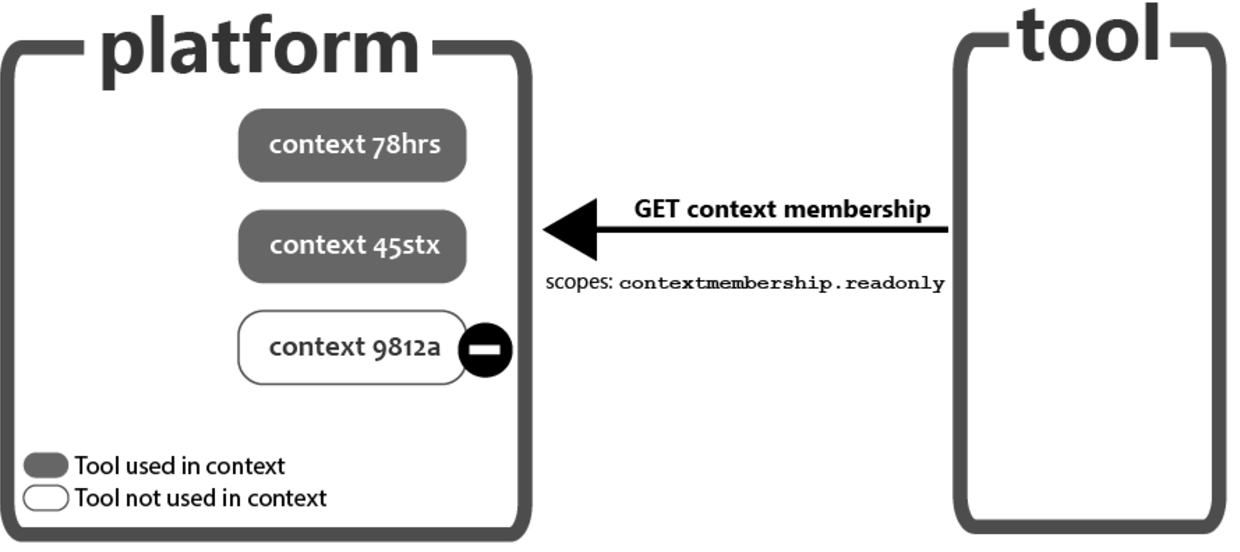
Figure 1 Diagram illustrating how access is controlled by context.
[그림 1] 컨텍스트에 따라 접근이 제어되는 과정을 설명하는 다이어그램.
The client grant does not inherently restrict API calls to given contexts. For example, when a platform grants an access token scoped to access the names and roles provisioning service, there is nothing inherently in the token that restricts its access to a subset of contexts. Indeed the tool may use the same token during its validity period to query the roster of multiple courses.
클라이언트 권한 부여(client grant)는 본질적으로 API 호출을 특정 컨텍스트로 제한하지 않는다. 예를 들어, 플랫폼이 Names and Roles Provisioning Service에 대한 접근 범위를 가진 액세스 토큰을 부여할 때, 해당 토큰에는 특정 컨텍스트 하위 집합으로 접근을 제한하는 요소가 포함되어 있지 않다. 사실, 도구는 해당 토큰의 유효 기간 동안 동일한 토큰을 사용하여 여러 강좌의 목록(roster)을 조회할 수 있다.
Platform implementors should therefore implement logic that applies additional restrictions, so that a tool may not access any context but only contexts where it is actually engaged. The definition of engaged is not specified; a rule of thumb is the instructor of the course ought to have made a direct indication of the intent to use the tool in the course.
따라서 플랫폼 구현자는 도구가 모든 컨텍스트에 접근할 수 없도록, 실제로 참여하고 있는 컨텍스트에만 접근할 수 있도록 추가적인 제한을 적용하는 논리를 구현해야 한다. 여기서 "참여(engaged)"의 정의는 명시되지 않았지만, 일반적인 기준은 강좌의 교사가 해당 강좌에서 도구를 사용할 의도를 직접적으로 나타냈을 때로 간주할 수 있다.
The following guidelines offer some options on how this may be accomplished.
다음 가이드라인은 이러한 제한을 구현하는 몇 가지 방법을 제안한다.
3.2.4.1 Explicit Identification of Authorization Service
3.2.4.1 인증 서비스의 명시적 식별
In this model, during the registration process, the platform should explicitly provide the authorization service's identity, requiring the tool to use this specific identity as the value for the aud claim in the JWT bearer token it will use as a consumer identity assertion when requesting an access token for a service workflow (see 1EdTech Security Framework document section "Using JSON Web Tokens with OAuth 2.0 Client-Credentials).
이 모델에서는 등록 과정 중 플랫폼이 인증 서비스의 식별정보를 명시적으로 제공해야 한다. 이와 같은 과정을 통해 도구는 서비스 워크플로우에서 액세스 토큰을 요청할 때, 소비자(identity assertion)로서 JWT 베어러 토큰의 aud 클레임 값으로 이 식별정보를 사용할 것이 요구된다. (자세한 내용은 1EdTech Security Framework 문서의 "Using JSON Web Tokens with OAuth 2.0 Client-Credentials" 섹션 참조)
플랫폼(LMS)이 Authorization Service(AS)의 정보를 도구(클라이언트)에게 제공해야 한다는 의미이며, 이 식별정보는 보통 AS의 URL이나 식별자로 표현함 (예: https://platform.example.com/auth)
“베어러 토큰“은 "이 토큰을 가진 자는 요청할 자격이 있다"는 의미로, 액세스 권한을 부여받기 위해 사용되며, ”JWT 베어러 토큰“은 클라이언트(도구)가 자신을 인증하기 위해 Authorization Service(AS)에 제출하는 토큰을 말함
JWT 내부에는 여러 클레임(claim)이 포함되는데, 클레임은 JWT가 가진 정보의 구성 요소를 말하며, 각 클레임마다 특별한 목적을 가지고 있음. “aud(audience) 클레임”은 이 토큰이 "누구를 대상으로 발행되었는지"를 나타내는 것이므로, JWT가 인증 요청을 보내는 대상(Authorization Service, AS)을 명확히 지정해야 함
If the platform does not explicitly provide the authorization service's identity, it should permit the tool to use the authorization service's token request endpoint URL as the identity for the authorization service (via the aud claim).
플랫폼이 인증 서비스의 식별정보를 명시적으로 제공하지 않는 경우, 도구는 인증 서비스의 토큰 요청 엔드포인트 URL을 (aud 클레임을 통해) 인증 서비스의 식별정보로 사용할 수 있어야 한다.
3.2.4.2 Explicit Tool Adoption
3.2.4.2 도구의 명시적 채택
In this model, a tool needs to be explicitly added to a context before to be used. There is within the platform's user interface a list of tools used in the course the instructor may add or remove.
이 모델에서는 도구가 사용되기 전에 컨텍스트에 명시적으로 추가되어야 한다. 플랫폼의 사용자 인터페이스에는 교사가 강좌에서 사용할 도구를 추가하거나 제거할 수 있는 도구 목록이 포함되어 있다.
The platform should then check if the tool has been added to the context before allowing the service call to complete. If the tool is not part of the course, the platform should deny the service request with a Forbidden 403 http error code.
플랫폼은 서비스 호출을 완료하기 전에 해당 도구가 컨텍스트에 추가되었는지 확인해야 한다. 만약 도구가 강좌의 일부가 아니라면, 플랫폼은 HTTP 403 Forbidden 오류 코드를 반환하며 서비스 요청을 거부해야 한다.
3.2.4.3 Scoped URLs
3.2.4.3 범위가 지정된 URL
In this model, the URL to access service, present in each and every LTI launch in the service claim, contains additional data preventing the tool to query any context by just changing some parameters.
이 모델에서는 서비스 접근을 위한 URL이 모든 LTI 실행의 서비스 클레임에 포함되어 있으며, 단순히 일부 매개변수를 변경하여 도구가 임의의 컨텍스트를 쿼리하지 못하도록 추가 데이터를 포함한다.
For example, in addition to the typical data needed to fullfil the service request (like the context id), the URL may contain the following information:
예를 들어, 서비스 요청을 완료하는 데 필요한 일반적인 데이터(예: 컨텍스트 ID) 외에도 URL에 다음 정보가 포함될 수 있다
tool identifier
도구 식별자
a signature of the (tool, contextid) i.e. for example a sha256(context_id, client_id, platform_secret)
(tool, context_id)의 서명 (예: sha256(context_id, client_id, platform_secret))
On reception of the service call, the platform gets the tool identifier from the access token, and validates the URL is properly signed and meant for the tool. This means the request is the result of an actual launch to that tool, which means the tool was indeed used in that context, and the service request may be completed. If not, the service call should not go through and a Forbidden 403 http error code should be returned.
서비스 호출을 수신하면, 플랫폼은 액세스 토큰에서 도구 식별자를 가져오고, URL이 올바르게 서명되었으며 해당 도구를 대상으로 하는지 검증한다. 이것은 요청이 실제로 해당 도구로 실행된 결과임을 의미하며, 해당 도구가 해당 컨텍스트에서 실제로 사용되었음을 확인하고 서비스 요청을 완료할 수 있다. 그렇지 않은 경우, 서비스 호출은 완료되지 않아야 하며, HTTP 403 Forbidden 오류 코드를 반환해야 한다.
3.2.4.4 Require Resource Links
3.2.4.4 리소스 링크 요구
In this model, the platform will require at least one resource link to the tool to be present in the context. If there is no link to the tool, the tool is considered not used in the context.
이 모델에서는 플랫폼이 컨텍스트 내에서 도구에 대한 최소 하나의 리소스 링크가 존재하도록 요구한다. 만약 도구에 대한 링크가 없다면, 해당 도구는 해당 컨텍스트에서 사용되지 않은 것으로 간주된다.
3.2.5 Verify the target_link_uri
3.2.5 target_link_uri 검증
The target_link_uri passed in the request to the login initiation endpoint may be used for selecting the redirect_uri to send the id_token to.
로그인 시작 엔드포인트에 대한 요청에서 전달된 target_link_uri는 id_token을 보낼 redirect_uri를 선택하는 데 사용될 수 있다.
However, the target_link_uri is not in itself signed, and the tool implementation should rely on the https://purl.imsglobal.org/spec/lti/claim/target_link_uri claim instead to make the final decision onto which resource should be displayed.
그러나 target_link_uri 자체는 서명되지 않으므로, 도구 구현은 표시할 리소스를 결정할 때 최종적으로 https://purl.imsglobal.org/spec/lti/claim/target_link_uri 클레임을 기반으로 해야 한다.
3.3 Identifying the Tool to Associate to an LTI Link
3.3 LTI 링크와 연결할 도구 식별
While a platform should usually hold an explicit relationship between an LTI resource link and the tool deployment that was used to create it, there are cases where that relationship needs to be determined at runtime; this is usually the case when the resource link is transferred between platforms. For example:
플랫폼은 일반적으로 LTI 리소스 링크와 이를 생성하는 데 사용된 도구 배포(tool deployment) 간의 명시적인 관계를 유지해야 한다. 그러나 런타임에서 이러한 관계를 결정해야 하는 경우가 있다. 이러한 경우는 주로 리소스 링크가 플랫폼 간에 전송될 때 발생한다. 예를 들어,
during a course export/import using common cartridge
공통 카트리지를 사용하여 강좌를 내보내기/가져오기할 때
a deep linking flow return LTI links to be launched to another tool than the one handling the deep linking request
딥 링크 흐름이 요청을 처리하는 도구가 아닌 다른 도구에서 실행될 LTI 링크를 반환할 때
or when importing LTI links from a Learning Object Repository using LTI Resource Search
LTI 리소스 검색을 사용하여 학습 객체 저장소(Learning Object Repository)에서 LTI 링크를 가져올 때
In all those cases, when the resource link is imported on the target platform, it needs to be associated with a local tool deployment in order to be actually launchable;
위와 같은 모든 경우에 리소스 링크가 대상 플랫폼으로 가져와질 때 안정적으로 실행될 수 있으려면 로컬 도구 배포와 연결되어야 한다.
LTI specifications do not presently define a formal tool identifier that could be used to identify the tool needed to launch the resource link. Rather, LTI relies on DNS domain matching as a means to associate a resource link with an actual tool deployment, where a tool is handling one or several DNS domains. This section defines this practice.
LTI 표준은 현재 리소스 링크 실행에 필요한 도구를 식별할 수 있는 공식적인 도구 식별자를 정의하지 않는다. 대신, LTI는 DNS 도메인 일치를 통해 리소스 링크를 실제 도구 배포와 연결하는 방법에 의존하며, 하나 이상의 DNS 도메인을 처리하는 도구를 기반으로 한다. 이 섹션은 이러한 실행방법을 정의한다.
3.3.1 Tool Domain(s)
3.3.1 도구 도메인
A tool supporting LTI Resource Links should be associated with at least one DNS domain. A platform may support associating more than one domain with a given tool. A subdomain is considered as a distinct domain. A platform may support wildcard subdomain.
LTI 리소스 링크를 지원하는 도구는 최소 하나의 DNS 도메인과 연관되어야 한다. 플랫폼은 하나의 도구에 여러 도메인을 연결하는 것을 지원할 수 있다. 하위 도메인(subdomain)은 별도의 도메인으로 간주된다. 플랫폼은 와일드카드 하위 도메인(wildcard subdomain)을 지원할 수 있다.
3.3.2 Domain Matching
3.3.2 도메인 매칭
Domain matching is the logic to associate an LTI Resource Link to an actual tool deployment by matching the Resource Link URL's DNS Domain with the tool's associated DNS domain(s). This is used for example to match resource links contained in a common cartridge to tool deployments.
도메인 매칭(domain matching)은 LTI 리소스 링크의 URL에 포함된 DNS 도메인을 도구의 연관된 DNS 도메인과 비교하여 LTI 리소스 링크를 실제 도구 배포와 연결하는 논리이다. 예를 들어, 이 방식은 공통 카트리지에 포함된 리소스 링크를 도구 배포와 연결하는 데 사용된다.
The matching follows the same rules as used to match a DNS domain with a TLS certificate as defined in [RFC6125] section 6.4:
매칭은 [RFC6125] 섹션 6.4에서 정의된 TLS 인증서와 DNS 도메인을 매칭하는 규칙과 동일한 규칙을 따른다.
TLS 인증서는 ‘Transport Layer Security(TLS)’ 프로토콜에서 사용되는 디지털 인증서를 말하며, TLS는 네트워크 통신을 암호화하여 기밀성(confidentiality), 무결성(integrity), 인증(authentication)을 제공. TLS 인증서는 클라이언트(예: 웹 브라우저)와 서버 간의 통신을 암호화하고, 서버의 신원을 증명하는데 사용됨
DNS domains of the tool URL and the tool's associated domains must be an exact match, using a case-insensitive ASCII comparison. For example, a resource link URL of https://quiz.mytool.example.com/launch/e8982 would match a tool who has quiz.mytool.example.com as associated domain, but not a tool with solely mytool.example.com domain.
도구 URL의 DNS 도메인과 도구의 연관된 도메인은 대소문자를 구분하지 않는 ASCII 비교를 통해 정확히 일치해야 한다. 예를 들어, 리소스 링크 URL이 https://quiz.mytool.example.com/launch/e8982汫h 인 경우, quiz.mytool.example.com을 연관된 도메인으로 가진 도구와는 매칭되지만, 단순히 mytool.example.com 도메인만 가진 도구와는 매칭되지 않는다.
International domains containing non ASCII characters need to use the ASCII-compatible encoding before to run the comparison.
ASCII가 아닌 문자를 포함하는 국제 도메인은 비교 전에 ASCII 호환 인코딩(ACE)을 사용해야 한다.
Wildcards, if supported, only apply to the left-most label. They do not replace multiple labels. For example, a resource link URL of https://quiz.mytool.example.com/launch/e8982 would match a tool who has .mytool.example.com as associated domain, but not a tool with .example.com domain.
와일드카드는 지원되는 경우 왼쪽에서 가장 왼쪽 라벨에만 적용된다. 와일드카드는 여러 라벨을 대체하지 않는다. 예를 들어, 리소스 링크 URL이 https://quiz.mytool.example.com/launch/e8982汫h 인 경우, .mytool.example.com을 연관된 도메인으로 가진 도구와는 매칭되지만, .example.com만을 도메인으로 가진 도구와는 매칭되지 않는다.
The tool deployment governs the rules on how to launch the LTI Resource Link; in particular it defines which version to use (LTI 1.1, LTI 1.3), the parameters to include on the launch, the services to expose and the security contract.
도구 배포는 LTI 리소스 링크를 실행하는 규칙을 결정하며, 특히 사용할 버전 (예: LTI 1.1, LTI 1.3), 실행 시 포함할 매개변수, 노출할 서비스, 보안 계약 등을 정의한다.
3.3.3 Handling Multiple Matches
3.3.3 여러 매칭 처리
This specification does not specify the behavior if more that a single tool deployment may be applied to an LTI Resource link. A platform may decide to prompt the user, or apply a proximity order; for example, if a course deployment conflicts with an institutional deployment, the platform may decide to favor the course deployment.
이 표준은 LTI 리소스 링크에 대해 단일 도구 배포가 아닌 여러 도구 배포가 적용될 수 있는 경우의 동작을 명시하지 않는다. 플랫폼은 사용자에게 선택을 요청하거나 우선순위를 적용할 수 있다. 예를 들어, 강좌 배포가 기관 배포와 충돌하는 경우, 플랫폼은 강좌 배포를 우선시하기로 결정할 수 있다.
3.3.4 Handling No Match
3.3.4 매칭 없음 처리
If the platform cannot match an existing tool deployment, it should let the user decide whether to continue to import the Resource Link (and associate it with a tool deployment later when a matching tool is made available).
플랫폼이 기존 도구 배포와 매칭할 수 없는 경우, 사용자가 리소스 링크를 계속 가져올지 (추후 매칭되는 도구 배포가 제공되면 연결할 수 있도록) 결정하게 해야 한다.
Until the platform has an associated tool deployment for a link, it shouldn't let users use the link (but still may choose to let them be visible).
플랫폼이 링크에 대한 연결된 도구 배포를 가지지 않는 동안에는 사용자가 링크를 사용할 수 없게 해야 한다.
그러나 링크가 여전히 보이도록 허용할 수는 있다
3.3.5 Resource Links Should be Restricted to Tool's Domains
3.3.5 리소스 링크는 도구의 도메인으로 제한되어야 함
If the platform allows users to create an LTI Resource Link manually, it should ensure that the Resource Link URL's domain matches one of the domains associated with the tool deployment that the user chooses as the owner of the manually-created link.
플랫폼이 사용자가 LTI 리소스 링크를 수동으로 생성하도록 허용하는 경우, 리소스 링크 URL의 도메인이 사용자가 수동으로 생성한 링크의 소유자로서 선택한 도구 배포와 관련된 도메인 중 하나와 일치하도록 보장해야 한다.
4. Course Copy and Resource Links
4. 강좌 복제와 리소스 링크
When a course is copied in the platform, the end user expects the copied course to work with the minimum effort. This guidelines will help the tool implementer handle the copy process in a more automatic fashion:
플랫폼에서 강좌가 복제될 때, 최종 사용자는 최소한의 작업으로 복제된 강좌가 제대로 작동하기를 기대한다. 다음 가이드는 도구 구현자가 복제 프로세스를 보다 자동화된 방식으로 처리할 수 있도록 돕는다.
4.1 Do Not Use resource_link id
4.1 resource_link ID를 사용하지 말 것
The https://purl.imsglobal.org/spec/lti/claim/resource_link id is a unique identifier for that resource link across the whole platform; this means that this id will change on copy. Early LTI flows were based on binding a resource to that platform-generated identifier on first launch of a new resource link, de facto resetting links on copy.
https://purl.imsglobal.org/spec/lti/claim/resource_link id는 플랫폼 전체에서 해당 리소스 링크에 대한 고유 식별자이다. 따라서 이 id는 강좌 복제 시 변경된다. 초기 LTI 흐름에서는 새 리소스 링크를 처음 실행할 때 플랫폼이 생성한 식별자에 리소스를 바인딩하는 방식이 사용되었으며, 강좌 복제 시 링크를 사실상 초기화(reset)했다.
It is now preferred for a link to rely on a dedicated URL or even better, on custom parameters to identify the actual resource to launch. Those are preserved on copy and the deep linking flow - the preferred way to add links to a course - allow for the tool to specify either in the ltiResourceLink definition, avoiding cumbersome manual creation of links.
현재는 링크가 전용 URL 또는 실행할 실제 리소스를 식별하기 위한 사용자 지정 매개변수(custom parameters)를 기반으로 하는 방식이 선호된다. 이들 매개변수들은 복제 시 유지되며, 딥 링크(deep linking) 흐름은 도구가 ltiResourceLink 정의 내에서 이 매개변수들을 지정할 수 있게 하여 번거로운 수동 링크 생성을 피할 수 있다.
강좌에 링크를 추가하는 선호되는 방법
If your tool does not support the deep linking flow and must still rely on the 1st launch content binding, you may relay on the substitution parameter ResourceLink.id.history, a comma-separated list of resource link ID values representing the ID of the link from a previous copy of the context, the most recent copy appearing first in the list followed by any earlier IDs in reverse chronological order.
도구가 딥 링크 흐름을 지원하지 않고 여전히 첫 실행 콘텐츠 바인딩(first launch content binding)에 의존해야 한다면, ResourceLink.id.history 치환 매개변수(substitution parameter)를 사용할 수 있다. 이 매개변수는 이전 컨텍스트 복제본의 링크 ID를 나타내는 쉼표로 구분된 리소스 링크 ID 목록으로, 목록의 첫 번째 값이 가장 최근 복제본이며, 이후 값들은 역순으로 정렬된다.
This would be done by registering a tool-wise custom parameter of the tool's choosing, for example:
이와 같은 방식은 도구에서 선택한 사용자 지정 매개변수를 아래 예와 같이 등록하여 수행할 수 있다.
link_history=$ResourceLink.id.historyThe implementer must be aware that some resource links in that chain might actually never have been launched at all.
구현자는 해당 체인의 일부 리소스 링크가 실제로 실행되지 않았을 수도 있음을 인지해야 한다.
Support for ResourceLink.id.history is optional and the tool implementer should have contingency plans when a given platform does not support it.
ResourceLink.id.history에 대한 지원은 선택 사항이며, 도구 구현자는 특정 플랫폼이 이를 지원하지 않는 경우를 대비한 대책을 마련해야 한다.
4.2 Context History
4.2 컨텍스트 히스토리
While the custom parameters (and the url) are copied from context to context, they cannot account for any context customization. To allow the tool to copy a course customization, and in general to be made aware a context is a copy of another context, the LTI Core specification defines the substitution parameter Context.id.history as a comma-separated list of URL-encoded context ID values representing previous copies of the context, the ID of most recent copy appearing first.
사용자 지정 매개변수(custom parameters)와 URL은 컨텍스트에서 컨텍스트로 복제되지만, 특정 컨텍스트 맞춤화(customization)는 반영하지 못할 수 있다. 강좌 맞춤화를 복제하거나, 일반적으로 컨텍스트가 다른 컨텍스트의 복제본임을 도구가 인지할 수 있도록, LTI Core 표준은 Context.id.history 치환 매개변수를 정의한다. 이 매개변수는 이전 컨텍스트 복제본의 URL 인코딩된 컨텍스트 ID 값을 쉼표로 구분한 목록으로, 가장 최근 복제본의 ID가 목록의 첫 번째에 나타난다.
If a tool needs this information, it would specify at registration time a custom parameter to be passed in each and every launch to that tool, for example:
도구가 이 정보를 필요로 하는 경우, 등록 시점에 해당 도구로 실행될 때마다 전달될 사용자 지정 매개변수를 다음 예와 같이 지정할 수 있다.
context_history=$Context.id.historyAs with the ResourceLink.id.history, the implementer must be aware that some of the contexts in that chain might actually never have been launched at all.
ResourceLink.id.history와 마찬가지로, 구현자는 해당 체인의 일부 컨텍스트가 실제로 실행되지 않았을 수도 있음을 인지해야 한다.
Support for Context.id.history is optional and the tool implementer should have contingency plans when a given platform does not support it.
Context.id.history에 대한 지원은 선택 사항이며, 도구 구현자는 특정 플랫폼이 이를 지원하지 않는 경우를 대비한 대책을 마련해야 한다.
5. Reference Implementation
5. 참조 구현
The Reference Implementation is an 1EdTech implementation of LTI 1.3 Advantage which contains both a Platform and a Tool. The reference implementation is written in Ruby-on-Rails. We provide source code and a hosted version of the tool. Our reference implementation has passed Conformance Certification and is complete with 100% automated tests. Developers can run it locally and develop against this tool as a Platform or Tool. We are working to have this available in multiple languages and common functionality eventually available as libraries. From LTI 1.3 on, we will be keeping this implementation up-to-date, to have all versions supported.
참조 구현(Reference Implementation)은 LTI 1.3 Advantage의 1EdTech 구현으로, 플랫폼(Platform)과 도구(Tool) 모두를 포함한다. 참조 구현은 Ruby-on-Rails로 작성되었다. 우리는 소스 코드와 도구의 호스팅된 버전을 제공한다. 참조 구현은 적합성 인증(Conformance Certification)을 통과했으며, 100% 자동화된 테스트를 통해 완벽히 검증되었다. 개발자는 이를 로컬에서 실행하고, 플랫폼 또는 도구로 개발을 진행할 수 있다. 우리는 이 구현을 여러 언어로 제공하기 위해 작업 중이며, 일반적인 기능이 라이브러리로 제공될 수 있도록 준비 중이다. LTI 1.3부터 우리는 이 구현을 최신 상태로 유지하여 모든 버전을 지원할 것이다.
- Source Code is a member-only resource.소스 코드는 회원 전용 리소스이다.
- Hosted version will be available to the public, with services being a member-only resource.호스팅된 버전은 일반에게 공개되며, 서비스는 회원 전용 리소스로 제공될 것이다.
6. Comparing an LTI 1.1 Basic Launch and an LTI 1.3 Resource Link Message
6. LTI 1.1 기본 실행과 LTI 1.3 리소스 링크 메시지 비교
- 1.1 전체 예제 리소스 링크 요청
- 1.3 전체 예제 리소스 링크 요청
- Sample Comparison (Not exhaustive, review links above)샘플 비교(포괄적이지 않음, 위 링크를 검토할 것)
Authentication Data
인증 데이터(Authentication Data)
LTI 1.1
oauth_version = "1.0"
oauth_nonce = "fc5fdc6d-5dd6-47f4-b2c9-5d1216e9b771"
oauth_timestamp = "1510185728"
oauth_consumer_key = "12345"
oauth_signature_method = "HMAC-SHA1"
oauth_callback = "about:blank"
oauth_signature = "TPFPK4u3NwmtLt0nDMP1G1zG30U="
LTI 1.3
{
"iss": "https://platform.example.edu",
"sub": "a6d5c443-1f51-4783-ba1a-7686ffe3b54a",
"aud": ["292832126"],
"exp": 1510185728,
"iat": 1510185228,
"azp": "962fa4d8-bcbf-49a0-94b2-2de05ad274af",
"nonce": "fc5fdc6d-5dd6-47f4-b2c9-5d1216e9b771"
}
User Id
LTI 1.1
user_id = "4676-8317-719e225aacdd"LTI 1.3
{
"sub": "4676-8317-719e225aacdd"
}
Non-Claim Data
LTI 1.1
lis_person_name_full = "Ms Jane Marie Doe"
lis_person_name_given = "Jane"
lis_person_name_family = "Doe"
lis_person_contact_email_primary = "jane@platform.example.edu"
user_image = "https://platform.example.edu/jane.jpg"
launch_presentation_locale = "en-US"
LTI 1.3
{
"name": "Ms Jane Marie Doe",
"given_name": "Jane",
"family_name": "Doe",
"middle_name": "Marie",
"picture": "https://platform.example.edu/jane.jpg",
"email": "jane@platform.example.edu",
"locale": "en-US",
}
Course
LTI 1.1
context_id = "c1d887f0-a1a3-4bca-ae25-c375edcc131a"
context_title = "CPS 435 Learning Analytics"
context_label = "CPS 435"
context_type = "CourseOffering"
LTI 1.3
{
"https://purl.imsglobal.org/spec/lti/claim/context": {
"id": "c1d887f0-a1a3-4bca-ae25-c375edcc131a",
"title":  "CPS 435 Learning Analytics",
"label": "CPS 435",
"type": ["http://purl.imsglobal.org/vocab/lis/v2/course#CourseOffering"]
}
}
Resource Link
LTI 1.1
resource_link_id = "A200d101f2c14"
resource_link_description = "Assignment to introduce who you are"
resource_link_title = "Introduction Assignment"
LTI 1.3
{
"https://purl.imsglobal.org/spec/lti/claim/resource_link": {
"id": "200d101f-2c14-434a-a0f3-57c2a42369fd",
"description": "Assignment to introduce who you are",
"title": "Introduction Assignment"
}
}
Platform
LTI 1.1
tool_consumer_instance_guid = "cen-01/a527c23f-8684-41bb-9292-2b274c229c32"
tool_consumer_instance_contact_email = "support@platform.example.edu"
tool_consumer_instance_description = "The LMS of Example University"
tool_consumer_instance_name = "The LMS of Example University"
tool_consumer_instance_url = "https://platform.example.edu"
tool_consumer_info_version = "1.0"
LTI 1.3
{
"https://purl.imsglobal.org/spec/lti/claim/tool_platform": {
"guid": "cen-01/a527c23f-8684-41bb-9292-2b274c229c32",
"contact_email": "support@platform.example.edu",
"description": "The LMS of Example University",
"name": "The LMS of Example University",
"url": "https://platform.example.edu",
"product_family_code": "ExamplePlatformVendor-Product",
"version": "1.0"
}
}
Launch Presentation
LTI 1.1
launch_presentation_document_target = "iframe"
launch_presentation_width = "320"
launch_presentation_height = "240"
launch_presentation_return_url = "https://platform.example.edu/terms/201601/courses/7/sections/1/resources/2"
LTI 1.3
{
"https://purl.imsglobal.org/spec/lti/claim/launch_presentation": {
"document_target": "iframe",
"height": 320,
"width": 240,
"return_url":  "https://platform.example.edu/terms/201601/courses/7/sections/1/resources/2"
}
}
LIS Information
LTI 1.1
lis_person_sourcedid = "example.edu:71ee7e42-f6d2-414a-80db-b69ac2defd4"LTI 1.3
{
"https://purl.imsglobal.org/spec/lti/claim/lis": {
"person_sourcedid": "example.edu:71ee7e42-f6d2-414a-80db-b69ac2defd4",
"course_offering_sourcedid": "example.edu:SI182-F16",
"course_section_sourcedid": "example.edu:SI182-001-F16"
}
}
LTI Version
LTI 1.1
lti_version = "LTI-1p1"LTI 1.3
{
"https://purl.imsglobal.org/spec/lti/claim/version": "1.3.0"
}
Roles
LTI 1.1
roles = "student"LTI 1.3
{
"https://purl.imsglobal.org/spec/lti/claim/roles": [
"http://purl.imsglobal.org/vocab/lis/v2/institution/person#Student",
"http://purl.imsglobal.org/vocab/lis/v2/membership#Learner",
"http://purl.imsglobal.org/vocab/lis/v2/membership#Mentor"
]
}
Message Type
LTI 1.1
lti_message_type = "basic-lti-launch-request"LTI 1.3
{
"https://purl.imsglobal.org/spec/lti/claim/message_type": "LtiResourceLinkRequest"
}
Custom
LTI 1.1
custom_xstart = "2017-04-21T01:00:00Z"LTI 1.3
{
"https://purl.imsglobal.org/spec/lti/claim/custom": {
"xstart": "2017-04-21T01:00:00Z"
}
}
A. Revision History
A. 수정 이력
This section is non-normative.
이 섹션은 비규범적(non-normative)이다.
A.1 Version History
A.1 버전 이력
| Version No. | Release Date | Comments |
|---|---|---|
| v1.3 Final | 16 April 2019 | The first formal release of the LTI v1.3 Core specification and LTI Advantage Implementation Guide. This document is released for public adoption. LTI v1.3 Core 표준 및 LTI Advantage Implementation Guide의 첫 번째 공식 릴리스. 이 문서는 공개 채택을 위해 출시됨. |
| — | 28 May 2019 | Adds more detail about JWTs to section. 섹션에 JWT에 대한 세부 사항 추가. Removes the Reference Implementation Guide section in favor of including directly with the Reference Implementation. Reference Implementation Guide 섹션을 제거하고, 참조 구현에 직접 포함하도록 변경. |
B. References
B. 참고문헌
B.1 Normative references
B.1 규범적 참조
[LTI-13] 1EdTech Learning Tools Interoperability (LTI)® Core Specification v1.3. C. Vervoort; N. Mills. 1EdTech Consortium. April 2019. 1EdTech Final Release. URL: https://www.imsglobal.org/spec/lti/v1p3/
[LTI-AGS-20] 1EdTech Learning Tools Interoperability (LTI)® Assignment and Grade Services. C. Vervoort; E. Preston; M. McKell; J. Rissler. 1EdTech Consortium. April 2019. 1EdTech Final Release. URL: https://www.imsglobal.org/spec/lti-ags/v2p0/
[LTI-CERT-13] 1EdTech Learning Tools Interoperability (LTI)® Advantage Conformance Certification Guide. D. Haskins; M. McKell. 1EdTech Consortium. April 2019. 1EdTech Final Release. URL: https://www.imsglobal.org/spec/lti/v1p3/cert/
[LTI-DL-20] 1EdTech Learning Tools Interoperability (LTI)® Deep Linking 2.0. C. Vervoort; E. Preston. 1EdTech Consortium. April 2019. 1EdTech Final Release. URL: https://www.imsglobal.org/spec/lti-dl/v2p0/
[LTI-NRPS-20] 1EdTech Learning Tools Interoperability (LTI)® Names and Role Provisioning Services. C. Vervoort; E. Preston; J. Rissler. 1EdTech Consortium. April 2019. 1EdTech Final Release. URL: https://www.imsglobal.org/spec/lti-nrps/v2p0/
[RFC2119] Key words for use in RFCs to Indicate Requirement Levels. S. Bradner. IETF. March 1997. Best Current Practice. URL: https://tools.ietf.org/html/rfc2119
[RFC6125] Representation and Verification of Domain-Based Application Service Identity within Internet Public Key Infrastructure Using X.509 (PKIX) Certificates in the Context of Transport Layer Security (TLS). P. Saint-Andre; J. Hodges. IETF. March 2011. Proposed Standard. URL: https://tools.ietf.org/html/rfc6125
[RFC7519] JSON Web Token (JWT). M. Jones; J. Bradley; N. Sakimura. IETF. May 2015. Proposed Standard. URL: https://tools.ietf.org/html/rfc7519
[RFC7523] JSON Web Token (JWT) Profile for OAuth 2.0 Client Authentication and Authorization Grants. M. Jones; B. Campbell; C. Mortimore. IETF. May 2015. Proposed Standard. URL: https://tools.ietf.org/html/rfc7523
[SEC-10] 1EdTech Security Framework v1.0. C. Smythe; C. Vervoort; M. McKell; N. Mills. 1EdTech Consortium. April 2019. 1EdTech Final Release. URL: https://www.imsglobal.org/spec/security/v1p0/
C. List of Contributors
C. 기여자 목록
The following individuals contributed to the development of this document:
이 문서 개발에 기여한 사람들은 다음과 같다.
| Name | Organization | Role |
|---|---|---|
| Viktor Haag | D2L | |
| Dereck Haskins | IMS Global | |
| Martin Lenord | Turnitin | |
| Karl Lloyd | Instructure | |
| Mark McKell | IMS Global | Editor |
| Nathan Mills | Instructure | |
| Bracken Mosbacker | Lumen Learning | |
| Marc Phillips | Instructure | |
| Eric Preston | Blackboard | |
| James Rissler | IMS Global | Editor |
| James Tse | ||
| Charles Severance | University of Michigan | |
| Colin Smythe | IMS Global | |
| Claude Vervoort | Cengage | Editor |
한국어 번역
| Name | Organization | Role |
|---|---|---|
| 조용상 | 1EdTech Korea 의장 | 한림대 객원교수| 데이터드리븐, 위키드스톰, 에딘트 수석 아키텍처 | 번역 |
| 이정준 | 위키드스톰 | 검토 |
| 고동완 | 데이터드리븐 | 검토 |
| 김기범 | 데이터드리븐 | 검토 |
| 김동근 | 데이터드리븐 | 검토 |
| 원동일 | 에딘트 | 번역 |
| 이지훈 | 에딘트 | 번역 |